


It's critical to be well-informed before deciding on the security versus convenience debate. It's not just about the data on your phone: anyone who has your phone may access all kinds of personal information about you if you lose it or it is stolen. When you realize how much of your digital life relies on your smartphone and the phone number associated with it, the stakes become significantly greater.
If you forget your iPhone 12 passcode and don’t know كيفية فتح قفل iPhone 12 بدون رمز مرور, don't worry, there are still various options for regaining control of your valued iPhone 12. There are several options you can achieve this, however, bear in mind that using these methods may result in the loss of data that was not saved in your cloud storage.
دليل المحتويات Part #1: Using Recovery Mode on Computer [Windows/MAC]Part #2: How to Unlock iPhone 12 without Passcode or Face ID or Computer [Using Find My]Part #3: Unlock iPhone 12 Without Passcode free Via Erase iPhonePart #4: The Most Effective Way to Unlock iPhone 12/12 pro maxالجزء الرابع: الخاتمة
Part #1: Using Recovery Mode on Computer [Windows/MAC]
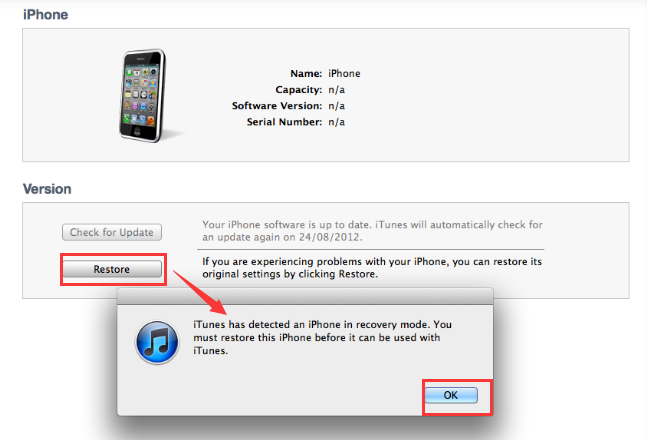
This is how to unlock iPhone 12 without passcode on the Pc. With iTunes or Finder, you may use وضع الانتعاش to restore your smartphone to its original factory settings. This means that all of the information on your iPhone will be gone. After the iPhone has been reset to factory settings without passcode, you may simply restore your backup.
اتبع الخطوات التالية:
- تأكد من توفر جميع المتطلبات. يلزم وجود كابل USB متوافق مع جهاز iPhone، بالإضافة إلى منفذ USB. كما يلزم وجود جهاز iPhone وجهاز كمبيوتر يعمل بنظام Windows أو Mac. تأكد من توفر ما يلي: أحدث اي تيونز الإصدار المثبتة على جهاز الكمبيوتر الخاص بك.
- يمكنك حينها فقط أغلق هاتفك الآيفون. بعد ذلك، طريقة التنفيذ قم بتوصيل جهاز iPhone بجهاز Mac أو جهاز كمبيوتر يعمل بنظام Windows باستخدام كابل USB.
- It's now time to put your iPhone into وضع الاسترداد. اضغط باستمرار على Side (right side) and either of the Volume (left side) buttons حتى خارج السلطة slider shows on the screen. To switch off your iPhone 12, اسحب المنزلق من اليسار الى اليمين. تواصل الضغط buttons until you can see the recovery mode logo (a laptop connected to a USB connection).
- إذا كنت تستخدم جهاز ماك، فانتقل إلى الكمبيوتر وافتح مكتشفستحتاج إلى فتح برنامج iTunes إذا كنت تستخدم نظام Windows. على الجانب الأيسر، انقر على جهاز iPhone الذي قمت بتوصيله بالكمبيوتر للتو.
- On your computer, Finder or iTunes should display a notice stating that your iPhone is having issues وذلك you should upgrade to the newest iOS software or restore to factory settings.
- اختار استعادة. Wait for it to finish and you are now done.
Part #2: How to Unlock iPhone 12 without Passcode or Face ID or Computer [Using Find My]
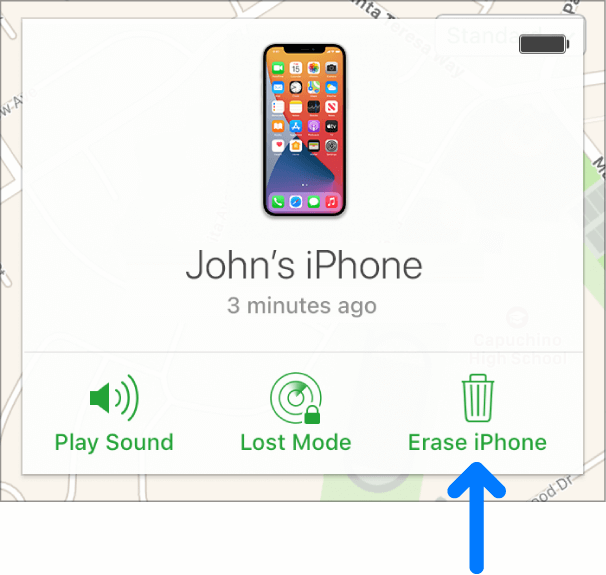
This approach is only available if your iPhone is connected to the Internet. You can also use iCloud's Find My iPhone feature to recover an iPhone 12 if you ننسى رمز مرور iPhone and don’t know how to unlock iPhone 12 without passcode. This is designed to find stolen or lost Apple devices, but it will also work if your iPhone 12 is deactivated.
- تسجيل الدخول to your iPhone's Apple ID account at iCloud.com.
- Select the option for جميع الاجهزة on the iCloud main screen.
- ثم اختر the iPhone from the list of devices that displays.
- أختار محو اي فون من القائمة المنسدلة.
- يمكنك إما أدخل كلمة المرور associated with your Apple ID or answer the browser's اسئلةالأمان.
- Wait for the erasing procedure to finish.
- لديك خيار استعادة نسخة احتياطية from your computer or iCloud or البدء من جديد مع جهاز آيفون جديد.
Part #3: Unlock iPhone 12 Without Passcode free Via Erase iPhone
When you are unable to unlock your iPhone 12 with the above 2 methods, don’t be disappointed, there is still a reliable solution for how to unlock iPhone 12 without passcode: perform the “Erase iPhone” procedure. We'll guide you through the necessary steps to safely and securely unlock your iPhone 12. Before the detailed steps, you should first check whether your iPhone 12 meets the unlocking requirements mentioned below.
- iOS 15.2 or later is required to be installed on the locked iPhone 12.
- Find My function must be activated before the phone locked.
- You must be logged in with your Apple ID and know your password.
- Make sure that the iPhone 12 is connected to Wi-Fi or cellular data.
If your iPhone 12 meets the unlock requirements, then you can keep reading for the steps:
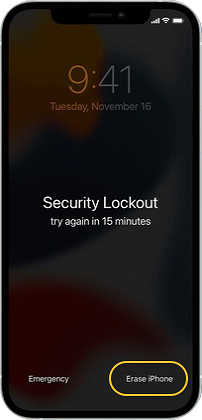
- Enter an incorrect passcode on your iPhone 12 seven times continuously untile you see a pop-up window "Security Lockout try again in 15 minutes".
- Press the "Erase iPhone" button in the lower-right corner of the screen.
- Tap on the "Erase iPhone" button again to confirm.
- Enter your Apple ID password to sign out.
- Wait for a while when the white apple logo appears. After completion, your iPhone 12 will automatically restart.
Part #4: The Most Effective Way to Unlock iPhone 12/12 pro max
Don’t know how to unlock iPhone 12 without passcode? iOS أونلوكر is a tool that allows users to unlock their iPhones by bypassing the passcode. Not only can you disable your device's passcode, but it also provides solutions to problems with your iPhone, such as:
- iOS Device Is Locked & Disabled
If you input the wrong passcode too many times, your device will automatically be locked or worst, disabled. With iOS Unlocker, you can bypass this so no need to wait
- The screen is broken.
If your iOS device has a cracked or broken screen, making it hard to see your iPhone screen, you may use this method to bypass the passcode requirement.
- Face ID and Touch ID are not properly working.
If Face ID or Touch ID isn't working properly, you may use iOS Unlocker to unlock it.
Before you use this software, keep the following in mind:
- Removing the passcode clears your iPhone's data.
- Your iPhone will be immediately upgraded to the أحدث إصدار من نظام التشغيل iOS.
- Finally, make sure the iPhone and computer are connected through USB during the operation.
Simply follow the instructions below to unlock your iPhone without a passcode:
- iOS Unlocker is available for download, installation, and use on both Mac and Windows computers.
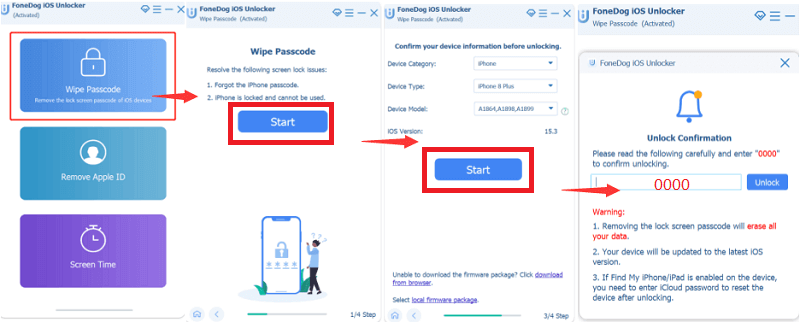
- Wipe Passcode is selected, and the الرئيسية button on the interface is pressed.
- التواصل your iPhone to your computer via a USB cable, and then touch the الثقة زر على اي فون الخاص بك.
- Your device's information will appear. Confirm your choice and press the الرئيسية
- Wait for the required firmware package to finish downloading.
- When the download is finished, tap the فتح button to unlock the phone. Then type the 0000 Wait for it to finish and you are done!
الناس اقرأ أيضاكيفية فتح قفل iPhone 12 بدون Face ID أو رمز المروردليل سريع حول كيفية فتح قفل iPhone 13 بدون رمز المرور
الجزء الرابع: الخاتمة
This post has provided you with multiple ways كيفية فتح قفل iPhone 12 بدون رمز مرور. We looked at four possible approaches to getting around the passcode of the iPhone 12. You can choose to Find My iPhone, Recovery Mode and Erase iPhone to restore your iPhone to factory settings, or a third-party tool especially to solve this problem.
Even though all the methods above allow you to unlock your iPhone 12 by wiping its contents, iOS Unlocker is without a doubt the best out of the three. iOS Unlocker has the advantage since it can also assist you to delete the Apple ID from used devices plus more. It lets you erase passcodes, Apple IDs, and screen time passwords.
Get iOS Unlocker today and unlock all of your iOS device's features! To check out our product right now, go to FoneDog.com/iOS-Unlocker. We provide a free trial to demonstrate how it works.
بقلم روزي
آخر تحديث: 2022-03-22