


Apple has a lot of amazing and great devices that you can use today. And one of the latest mobiles Apple has released is the iPhone XR Verizon. However, even though it’s a really great phone we still can experience issues with it, like getting locked out from your own phone or what. So for those who are facing issues like this one, it’s time for you to learn how to unlock iPhone XR Verizon. Today we are going to show you a very special method that can help you learn how to unlock your iPhone using the best tool. So without anything else, let’s cut the chase and continue learning how to unlock your iPhone XR or any other device at that.
Part #1: Recommended Tool to Use for Unlocking iPhone XR VerizonPart #2: How to Unlock iPhone XR Verizon Using Your Network CarrierParte #3: Para resumirlo todo
Part #1: Recommended Tool to Use for Unlocking iPhone XR Verizon
Are you excited to know which tool you can use so you can learn how to unlock iPhone XR Verizon? Well, we are too! So let us cut the chase and continue learning the best tool you can use to unlock your iPhone XR or any other iOS device.
The best tool I am talking about is no other than the Desbloqueador de iOS. This tool is the best tool you can use if you find yourself being locked out from your own device. Whether you ¿Olvidaste tu contraseña de iPhone?, have been disabled from using your phone, or cracked your screen, the iOS Unlocker can help you with all of these.
Descargar gratis Descargar gratis
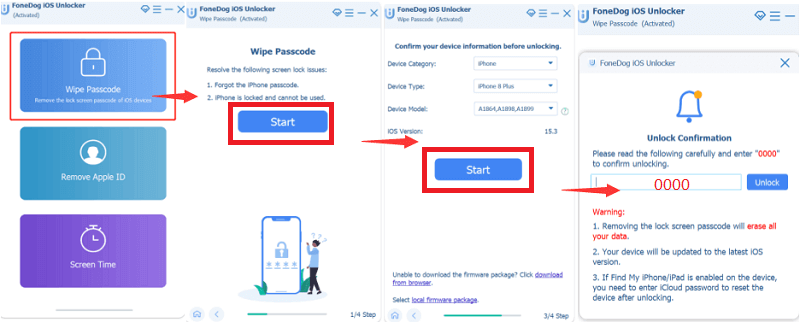
The iOS Unlocker has three main features. First is the Borrar código de acceso feature where you can wipe your phone’s passcode so you will be able to unlock it and use it again as you please. However, using this feature will require you to be ready because all other data from your phone will be wiped away too. This feature will also update your phone to the latest OS version and when using this tool you need to make sure that your device is connected to a computer.
Now, the next feature is called Eliminar ID de Apple. As its name suggests this feature can help those individuals who have forgotten their Apple ID passwords or their iCloud accounts. This feature will allow you to remove such accounts to make you open your phone without it and a new Apple ID.
And the last feature is called <div style="font-size:12px; line-height:1em;">El tiempo<br>DE PANTALLA</div> which basically means it can remove or recover your screen time password but without deleting or losing any of your phone’s data. The iOS Unlocker has everything you need, not only can it unlock the latest version of the iPhone but also can it unlock the iPhone of the old version. So if I were you I would definitely try it out now or just install it just in case you might experience these issues in the future.
If you want to learn how to unlock iPhone XR Verizon, here is a step-by-step guide you can follow to successfully unlock it:
- Descargar and install the iOS Unlocker on your Windows or Mac computer
- Inicie la aplicación y haga clic en el Borrar código de acceso modo
- Haga clic en Tus datos and gently connect your iPhone to your computer via your USB cable
- Haga clic en el botón Confianza button on your device once it shows
- Read and confirm all of your device’s information and select the Tus datos botón una vez más
- Esperar for a few seconds to let the software download the firmware you need to unlock your device
- Now once it’s done click Descubrir and simply enter 0000 to confirm the process
- After a few minutes, your phone will now be unlocked
Part #2: How to Unlock iPhone XR Verizon Using Your Network Carrier
The best way to learn how to unlock iPhone XR Verizon is to directly contact your carrier and have them unlock it for you. But if you really want to know more, you can also check out more details below:
Postpay iPhone Unlock
The Verizon does not lock any 4G LTE or 3G iPhone. You don’t also need any code for this one.
Prepaid iPhone Unlock
There are actually a lot of ways to learn first before you unlock your iPhone XR Verizon. You will have to remember all these requirements first. The code you will use for those who own a 3G iPhone-in-the-box prepaid is 000000 or 123456. For 4G iPhone-in-the-box users, you will have to contact the Verizon carrier using the number (888)294-6804.
Here are the steps to let you unlock your iPhone XR Verizon:
- Contacto your carrier and make sure to meet all the requirements they need so you can unlock your iPhone for free
- Wait for the Verizon carrier to give you an unlocking code via your email or over a call
- Inserte su SI card into your iPhone
- Reanudación your iPhone and a pop-up window asking for your unlock code will appear
- Enter the code given by your carrier to continue unlocking your iPhone
La gente también LeerCómo desbloquear Apple Watch sin contraseña de iCloud fácilmenteFelicitaciones, su iPhone ha sido desbloqueado
Parte #3: Para resumirlo todo
As we reach this part of the post, we hope that you now have learned everything you need to know about how to unlock iPhone XR Verizon as well as how to use the FoneDog iOs Unlocker. Again, if you want to unlock your phone after forgetting your passcode or having your iPhone disabled, or if your screen is a wreck, you can always use the Wipe Passcode feature.
For those who do not remember their own Apple ID or iCloud passwords, you can also use the Remove Apple ID feature of the iOS Unlocker. This will help you open your phone even without entering your Apple ID or iCloud account. And of course, let’s not forget the Screen Time feature we can help you recover or remove your screen time password even without losing any of your data. All in all the FoneDog iPhone Cleaner is truly amazing that you would never regret using and downloading on your computer. So for those who are interested to use it, don’t wait anymore and install it on your computers now.
Escrito por Rosie
Última actualización: 2022-03-17