


Sometimes, getting a used iPhone is more budget-friendly and accessible. However, what makes this a nightmare is when the device you bought is locked with the previous owner’s details. It’s even more challenging to find the iCloud owner info gratuitement en ligne.
With all the suspicious software out there, one cannot easily trust any program on the internet. You must ensure that the software you use will not release any viruses and cause more harm.
So today, we made sure that you can use your device right away by giving you tips to locate the iCloud owner. And of course, other methods to use an iCloud remove tool to bypass this step and make the most of your new iOS device.
Part 1. What Information You Need to Unlock the iPhonePart 2. How to Remotely Erase iPhone (With Previous iCloud Owner Info)Part 3. 3 Software to Find the iCloud Owner Info for FreePart 4. The Best Alternative to Remove iCloud AccountPartie 5. Résumé
Part 1. What Information You Need to Unlock the iPhone
The basic details you need to unlock a used iPhone are, of course, the iCloud account, username, and password. Each iPhone can use one iCloud at a time and this syncs all the features and settings on the given device.
If you don't have these details, you may end up with a useless device unless you get the information straight from the previous owner or use an online finder.
Usually, online iCloud finder tools include reports like the full name of the previous owner, iCloud address, and the ID apple. Other essential details may include the IMEI number, email address, phone number, UDID number, and the security questions.
Contacting the previous owner is still the best option, however, it can be time-consuming to wait and locate. Once you get hold of the iCloud owner info free, you can request to remotely erase the iPhone for you so you can start fresh.
Part 2. How to Remotely Erase iPhone (With Previous iCloud Owner Info)
When you have finally got hold of the iCloud owner, you can ask him or her to clean up the device for you. The best way to terminate the old account is by removing the iPhone as its registered device and unlinking the iCloud account.
Suivez les étapes de synthèse:
- Allez dans iCloud.com utiliser n'importe quel navigateur
- Let the previous owner sign in with the iCloud username and password
- Once logged in, locate the given iOS device, click on it
- Sélectionnez le Effacer l'iphone caractéristique
- Confirmer the request by entering the Apple ID account
- Wait for the erasing to be complete
- Once the iPhone has been erased, don’t forget to click Supprimer du compte
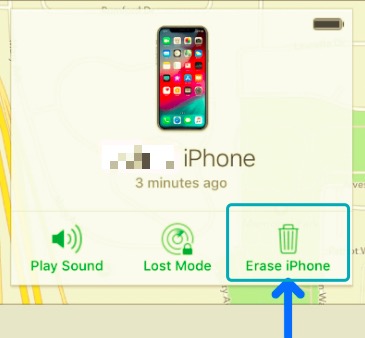
Removing the selected iOS device from the previous owner’s iCloud account is essential so that you can have the freedom to use the iPhone freely and without having to go through all these hassles again.
Part 3. 3 Software to Find the iCloud Owner Info for Free
When looking for software to help you find the iCloud owner info free, search for those with great reviews and feedbacks straight from users. These programs offer a preview for free yet you need to pay for a premium service when you want to use the software.
Here are some of the programs you can use:
- iPhoneUnlock.zone - This tool offers an online service to search and locates the iCloud owner info. It has so far found 92% of iCloud accounts and has unlocked over 60,000 iOS devices. However, you need to pay an unlocking fee in order to get the required details.
- Déblocage de téléphone IMEI - Another service to look for is the IMEI Phone Unlock software which offers an online service to find the iCloud owner info. You simply need to fill up a form, pay a one-time fee, and submit it. However, it may take at least 2 days for the results to arrive.
- Déverrouiller la base - Unlock Base has an 80% success rate when it comes to finding the iCloud account info. This online tool will give out the contact information of the previous owner so you can get in touch and unlock your device. Although this software gives out the results in the next 24 hours, using the program itself takes a while. And of course, you need to make a payment before you can get the iCloud owner info.
Sometimes you are not able to log in because you forget your iCloud account, so it's also time for you to turn to the iCloud account finder for help to get the detailed information of your iCloud.
3.1 How to get the IMEI quickly?
These tools require certain device information before they can start locating the iCloud owner info. One of the most common info they need is the IMEI. But how can you find this number when you cannot even access the device?
Composez simplement * # # 06 on your iPhone and this will display the IMEI number. Note this down and use it when submitting for an iCloud owner info search.
Part 4. The Best Alternative to Remove iCloud Account
Why wait for a few days to get the iCloud owner info free when you can bypass the account right away? Many of us still don’t know that there is a quicker way to unlock a used iPhone. You can remove the Apple ID in just a few seconds by using an unlocker called iOS Unlocker.
Téléchargement gratuit Téléchargement gratuit
iOS Unlocker is a professional tool that aims to unlock any iOS device so that users can make the most of their devices. Usually, you can utilize this software when you forgot the device passcode or when you want to remove the Apple ID. You can also get rid of the Screen Time restrictions password.
It only takes a few minutes to fully unlock your iPhone with iOS Unlocker. Follow this guide below.
- Download iOS Unlocker and run this program on your computer
- Sélectionnez le Supprimer l'identifiant Apple à partir du menu
- Connect the iOS device using a USB cable and click the Commencez bouton (dans la fenêtre de contrôle qui apparaît maintenant)
- If the Find My app is turned off, iOS Unlocker will directly proceed to unlock your device however, if it is turned on, you need to hard reset the device first.
- Entrer 0000 to confirm the unlocking
- Verify the device information and then download the most compatible firmware package
- Attendez que le processus soit terminé
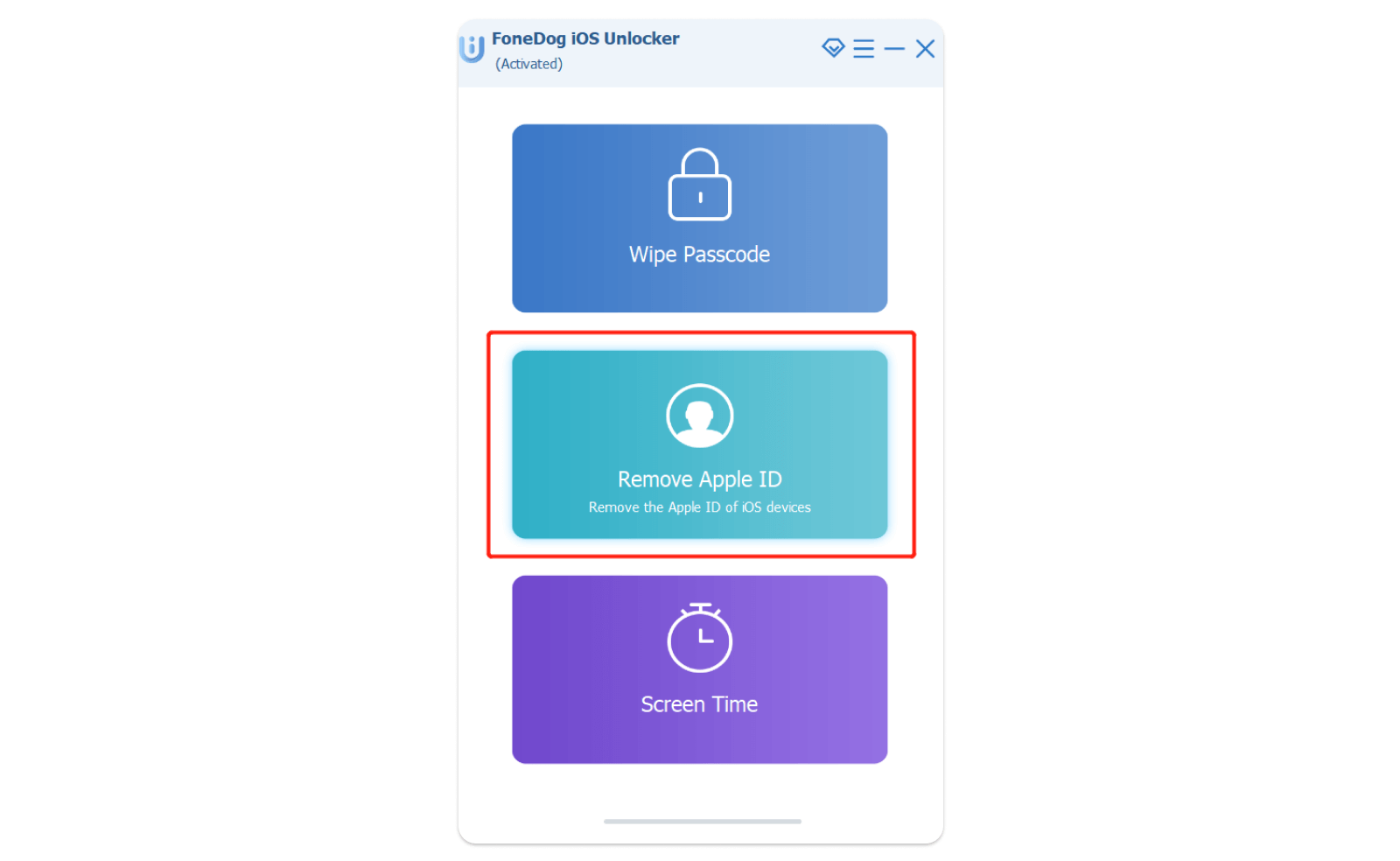
Your iOS device is now fully reset and has been cleaned of the iCloud account that was previously set up. You can now start customizing your device the way you want.
Les gens LIRE AUSSIComment activer son iPhone sans identifiant Apple : un guide pour vousComment supprimer un identifiant Apple de son iPhone sans mot de passe ? [Étapes détaillées 2024]
Partie 5. Résumé
The major dilemma of getting a used iPhone is unlocking it. It can be frustrating to spend a lot of time searching for the iCloud owner info free. There are programs that are gratuitement at first, yet all of them require payment in order to get the details needed.
There are programs that really work but are too costly knowing that they will only give you the contact information of the previous owner, and you still have to contact them to unlock your device.
So, instead of spending much time searching for these tools, why not use Déverrouilleur iOS ? This software has all the unlocking services you need.
Écrit par Rosie
Dernière mise à jour: 2022-01-27