


많은 방법이 있습니다 how to unlock second hand iPhone. If you have bought an iPhone from someone and you do not have contact with the said person, and then suddenly you have locked the device, then this is necessary to learn. Aside from knowing how you can get through the device, we will also talk about some of the tools that you can use to secure all the data that you have stored on your device.
At the end of this article, you will be able to figure out some of the ways how to iPhone을 무료로 잠금 해제하십시오, in case you have already lost hope of being able to use it when the original owner is nowhere to be found anymore. All the things that you will be reading in this article will help you, so let us begin.
파트 1: 어머나! 내 Apple ID가 잠겼어요!Part #2: What Are The Methods on How to Unlock Second Hand iPhones?Part #3: How to Unlock Second Hand iPhone Using A Third-Party Tool?4부: 모든 것을 요약하기
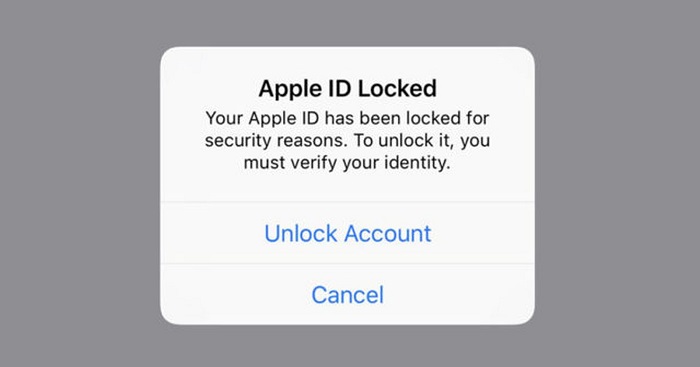
파트 1: 어머나! 내 Apple ID가 잠겼어요!
When you are in a rush or when you have a lot of things on your mind, there can really be a time that you occasionally forget the password on your iPhone, and it would only be difficult to resolve if the situation has been crucial. If you are an Apple user ever since you would know that it is very important to have your Apple ID intact as it is the identification of your Apple device or your Apple account.
When you have forgotten your Apple ID there is no way that you can be able to access Apple services such as iCloud, App Store, FaceTime, and even Apple Support which is considered one of the most necessary. And this situation may happens if you have got a second-hand iPhone, thus it's a need to learn how to unlock second hand iPhone.
Apple ID가 잠긴 경우는 아마도 설정해둔 비밀번호를 여러 번 잘못 입력하여 기억이 나지 않아 잠금이 해제되지 않았기 때문일 것입니다. Apple ID 잠금은 Apple 기기의 보안 기능으로, 승인되지 않은 거래를 방지하고 정당한 소유자만 기기 사용을 허용할 수 있도록 합니다.
- 인터넷 연결에 문제가 발생하여 Apple ID 처리를 진행할 수 없습니다.
- 사용 중인 iOS 기기에 제한 사항이 설정되어 있습니다.
- The Apple services are really down, and there is no way that your 애플 ID can be active again until the servers are up.
- iCloud에서 현재 백업으로부터 애플리케이션을 복원하고 있습니다.
- 사용 중인 Apple 기기(iPad, iPod 또는 iPhone)가 관리되고 있을 가능성이 있습니다.
Part #2: What Are The Methods on How to Unlock Second Hand iPhones?
If you have bought your iPhone from a person, and you have suddenly locked it, and tried to access it to no avail, you must be in a large panic. This can usually happen to people who have purchased second-hand iPhones and has no idea how to unlock second hand iPhone. Now, let us present to you the tools that you can try to use to be able to solve the dilemma.
시리
One of the most common and basic fixes is to trick Siri. This voice assistant of Apple can help you get through your device by bypassing the passcode. On the other hand, this is considered a type of temporary fix only, since you have to do the same tricking every time that you will try to access your device. It should also be noted that the said fix, is only effective if you have iOS 10 up to iOS 10. And it would not guarantee you the removal of the passcode of your device. Here’s how you trick Siri.
Step #1. To activate Siri, you have to press and then hold the “홈 ” button on your device. You have to say “지금 몇 시예요? ”, then a clock icon will appear, and you have to tap the clock icon to be able to start the process of how to unlock second hand iPhone.
Step #2. You have to go through the World Clock, and then click the clock icon so that you can add another clock. You also need to look for a city, you can type in anything, and then click “모두 선택 ".
Step #3. There will be a lot of pop-ups, you have to click “공유 ”. Then there will be a window with a lot of options in it. You have to select “관심 있는 분야를 알려주세요(선택사항) ".
Step #4. Then you have to type in anything that you wanted and choose “반품 ” in the recipient field.
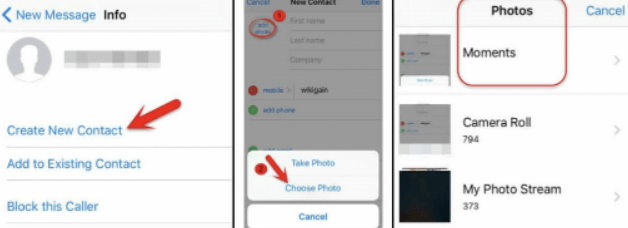
Step #5. Then the said text will be highlighted in green, and then you have to click the “+ ” sign then you will see a new window that will appear. Tap “새 연락처 만들기 ".
6단계. 클릭 "사진 추가 ”, and then hover your mouse and tap “사진을 선택하십시오 ”, doing such will help you access the “사진 " 앱.
Step #7. Exit in the “사진 ” app by tapping “홈 ”, and you can now enjoy your iPhone even without knowing the passcode.
iTunes
One of the most important apps if you are an iPhone user is iTunes. And you can also use it how to unlock second hand iPhone, and by using iTunes to restore the default factory settings on your iPhone. Here’s how you do it through the use of iTunes.
Step #1. You have to connect your device to your Windows computer or Mac computer. And then you have to open iTunes, and then turn off your device.
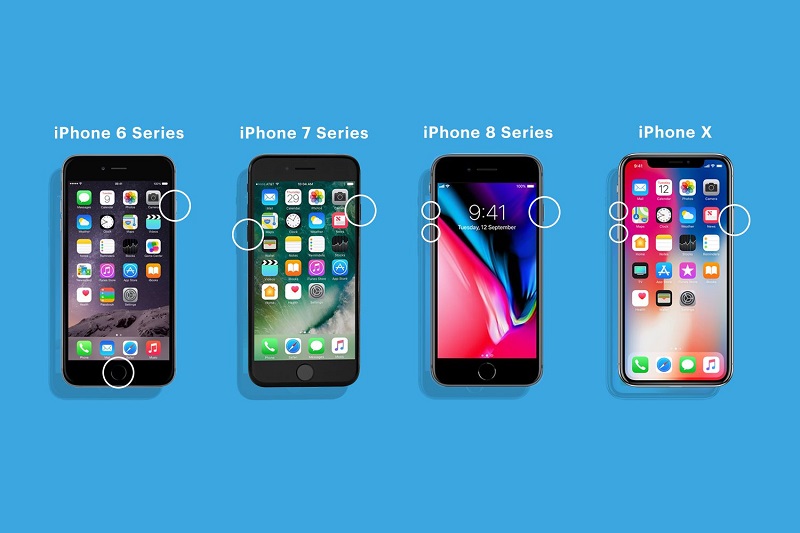
Step #2. Then, you have to put your device in “복구 모드 ”. Here’s how you put your device in “복구 모드 ” depending on the model of your device.
- If you have an iPhone 8 or the latest version of the iPhone, you have to connect your device to a computer, and then press the “볼륨 업 ", 그리고 "아래 볼륨 ” buttons. Then you have to hold the “측면 ” button and wait until you see the screen for “복구 모드 ".
- If you have an iPhone 7 or iPhone 7Plus or an iPod on the 7th generation, you have to press and then hold for some time the top or the side buttons, and then you have to do this at the same time with the “아래 볼륨 ” button, you also have to keep holding them and stop until you see the screen for “복구 모드 ".
- If you have an earlier version of the iPhone, you have to press the “홈 " 그리고 "인기 ” buttons at the same time, and you also have to keep holding them until you are able to see the “복구 모드 "화면.
Part #3: How to Unlock Second Hand iPhone Using A Third-Party Tool?
For the next part of the article, we will be sharing with you a third-party tool called the iOS 언 락커. It is a reliable partner when it comes to the security and welfare of your devices. It can help you with a lot of things such as the removal of Apple ID, wiping the passcode of your devices, and getting rid of the password for “스크린 시간 ".
This tool is easy to use and is compatible with both Mac and Windows computers. If you opted to use the iOS Unlocker, you should have a backup of all the data that are stored on your device to avoid accidental loss of data. You also have to know that once you have proceeded with the process, the operating system of your device will be upgraded to the latest version, and you must connect your device to a computer prior to the initiation of the process.
Here are the steps on how you can use the iOS Unlocker how to unlock second hand iPhone.
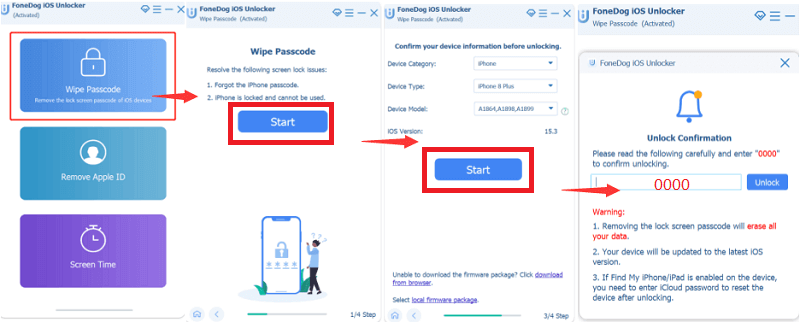
- Firstly, you have to open the iOS Unlocker using your personal computer, and then click the “비밀번호 지우기 ” feature of the iOS Unlocker.
- Then you can now connect your device to the computer via cable. Always remember to tap “믿어 ” to be able to start the process.
- Then, you have to make a confirmation of all the details about your device, and then click “스타트 ".
- Once you tap to start, the downloading of a certain firmware package will commence, and then tap “자물쇠를 열다 ”, and you also have to type “0000 ”, then wait for a few minutes until you can access your device once again.
사람들은 또한 읽습니다iTunes 없이 비활성화된 iPad의 잠금을 해제하는 방법 [2024 가이드]아이폰 5c T-Mobile 잠금 해제하는 방법 (단 몇 단계만으로)
4부: 모든 것을 요약하기
It could really bring you to panic when you are in a situation and you cannot access your device upon accidentally locking it. It is surely a pain in the mind, knowing that it contains most of your important details. We hope that you have learned something that will help you in case you wanted to learn how to unlock second hand iPhone.
Rosie 작성
최종 업데이트 : 2022 년 06 월 09 일