


When you get notifications on an Apple device that reads your Apple ID is invalid or your Apple ID server is connected to an error, it means you aren't able to access the machines unless you run a restore function. You have no option but to know how to unlock Apple ID free.
This protects you against unauthorized access; it's only disadvantageous that you become the unwanted guest. One of the causes for an Apple ID to lock first is logging in to an iCloud account with multiple toolkits within a short period. Secondly is using so many toolkits with questionable security features to log in to your iCloud account.
The million-dollar question here is, what do you do when faced with such a dilemma? This article introduces different approaches based on various available tools to give you several options to unlock Apple ID free. Continue reading and get to know them for your reference.
컨텐츠 가이드 Part #1: How to Unlock Apple ID Using Security CertificationPart #2: Unlock Apple ID Free by Apple Official HelpPart #3: Contact The Previous Owner to Unlock Apple ID FreePart #4: Unlock Apple ID Free Using iOS Unlocker [Without Password]Part #5: How Can You Prevent Locking Apple ID for Free파트 #6: 요약
Part #1: How to Unlock Apple ID Using Security Certification
The essence of the Apple ID is to give you all the permissions and rights to own the account. Do you know that anyone can operate the Apple devices with the Apple ID and log-in details?
Even when you lose the iDevices, you can still locate them if you have the Apple ID. That means an important feature that you have to safeguard, like your ATM PIN and bank credentials. Here are the steps you can follow to unlock Apple ID free:
- Using the browser of choice, open the 애플 ID account site
- 선택 애플 ID를 잊어 버렸습니다 or 비밀번호
- A two-step verification prompt appears to confirm your phone number
- Apple ID를 입력하세요
- 선택 비밀번호 재설정 선택 계속
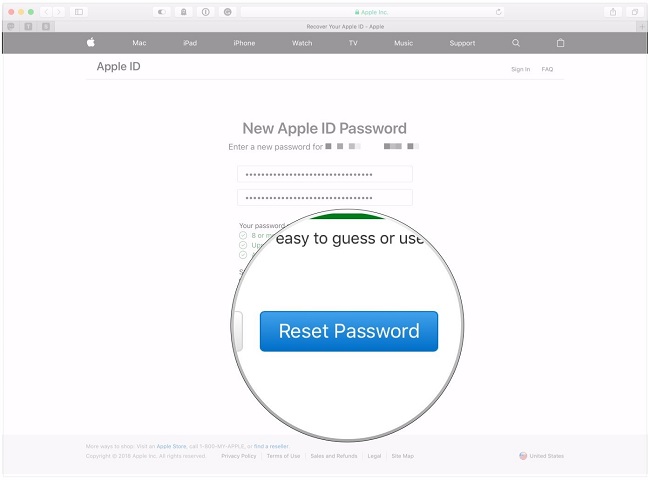
At this point, you have three methods you can follow, which we will all discuss for you to choose what works for you when you want to unlock Apple ID free
- Answer the security questions and follow the on-screen instructions
- "를 선택하십시오.get an Email " to use to reset the password
- Use the two-step authentication to verify and get the Apple ID
This is a straightforward procedure that needs no prior knowledge before running it. You only need to follow the steps and have the Apple ID to get the required information.
Part #2: Unlock Apple ID Free by Apple Official Help
Apple 지원
Apple's customer service support is vibrant and available seven days a week and 24 hours to accommodate the different time zones. Moreover, you can call them using toll-free lines, send an email or use their chat support service. They are also available on various social media platforms. Are you still stuck on how to get them? Specifically, get to the Apple support site for a fast and immediate response on how to unlock Apple ID free. Here are the steps to follow
- 열기 getsupport.apple.com
- 클라임웍스와 함께 하늘과 닿는 여정을 시작하세요 비활성화된 Apple ID
- Three options appear- Reset your password or Talk to Apple Support Now and Schedule a call; go for the 초 or 제삼
- Within two minutes, you get customer support on standby; they will ask several questions and guide you through the process.
iForgot Service
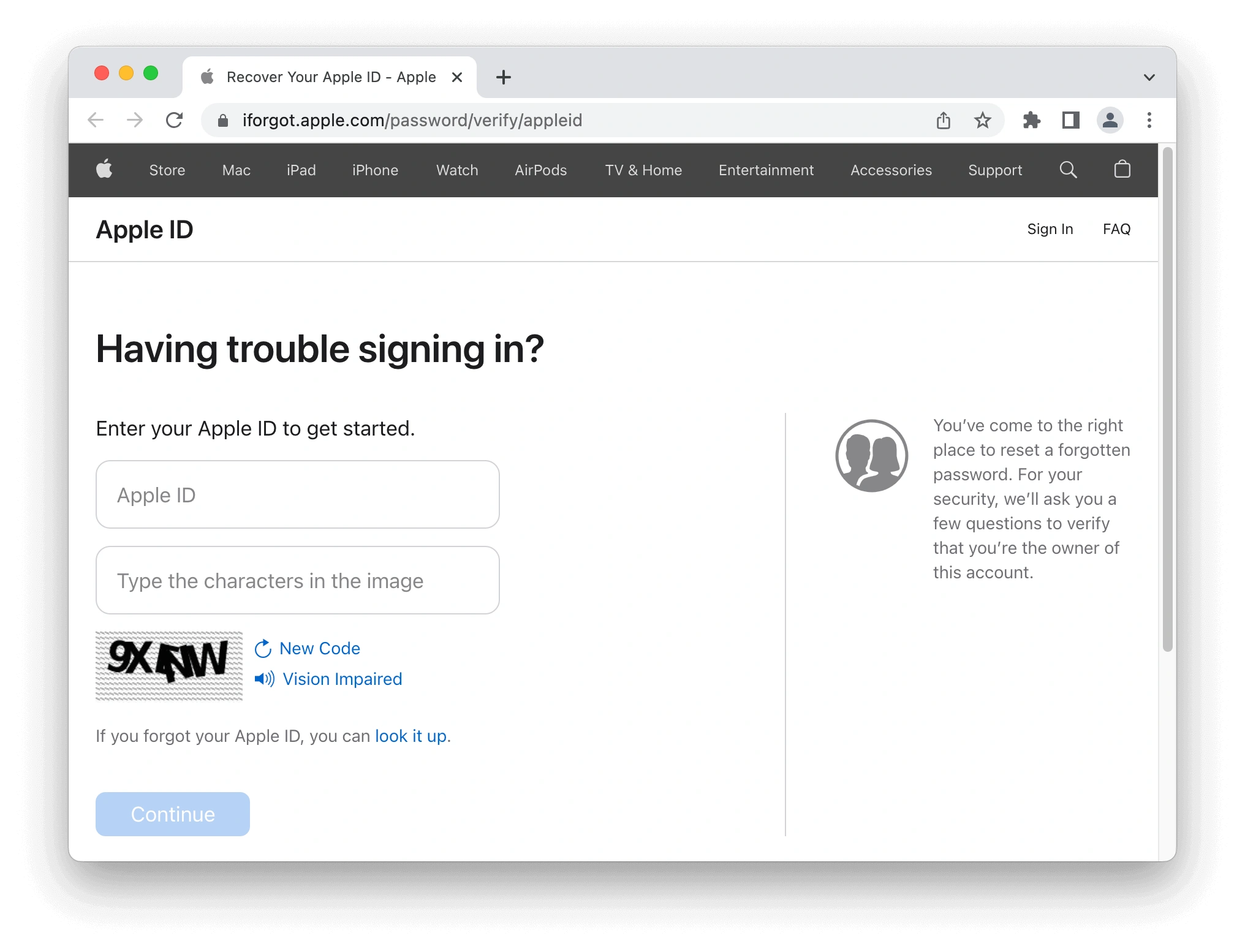
iForgot.apple.com is a website provided by Apple Inc. It allows users to reset their Apple ID passwords or recover their accounts in case they forget their Apple ID login credentials. Before we get into the specific steps, you'll need to verify your identity by answering a few questions and entering your Apple account details, such as email and phone number.
- Go to iforgot.com
- Select "Continue" after entering your Apple ID
- Answer to the security questions
- Follow the instructions displayed on the screen to unlock your Apple ID
Part #3: Contact The Previous Owner to Unlock Apple ID Free
Requesting that the former owner delete the original Apple ID from your iOS device is the simplest approach to unlock Apple ID if you bought a second-hand iPhone and don't know the password. You can ask him to remotely remove the Apple ID by the following steps:
- Visit iCloud.com and log in with his/her original Apple ID and password.
- Click "Find My iPhone" > "All Devices" and select the target iPhone.
- Select “Remove from Account” option. You can also ask him to click "Erase iPhone" after removing the iPhone if you wish to return it to its original configuration.
Do you still double if you can unlock the Apple ID?
Part #4: Unlock Apple ID Free Using iOS Unlocker [Without Password]
What of using a toolkit that does triple functions including unlocking passcode, unlocking Apple ID, and removing screentime? This is what iOS 언 락커 does. The powerful toolkits give you unlimited iOS controls for all your Apple devices.
Moreover, its integrated iCloud settings within the system also come in handy to access the Apple ID features. Its advantage is that once you set the new Apple ID, the old one becomes invalid. One unique feature of the application is its ability t run the iTunes application to run other features that come with this Apple application.
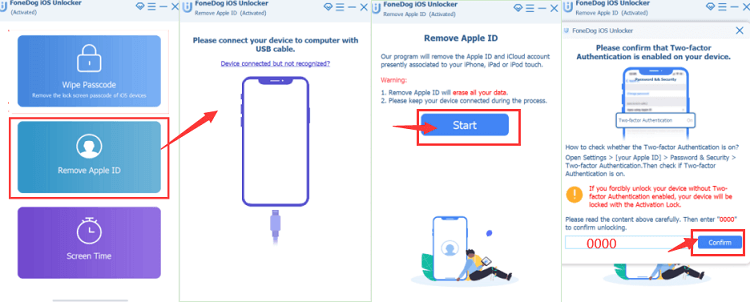
Our area of interest is the Remove Apple ID feature, which helps you retrieve the iDevice's functioning when you have lost the Apple ID. Here are the steps to unlock Apple ID free using iOS Unlocker:
- Download and launch iOS Unlocker
- 클라임웍스와 함께 하늘과 닿는 여정을 시작하세요 Apple ID를 제거하십시오 모드
- Connect the device to the PC using a USB cable and agree to the 믿어 계약
- "스타트 " button to start the Apple ID removal process
- 시작하다 "0000 ” as the confirmation unlock code
- 확인하기 the device information using the two-step authentication and click 스타트 for firmware package download.
- Within minutes, the iCloud account and Apple ID are erased for a new setup
FoneDog iOS is one functionality that is your go-to toolkit when you have iPhone에서 비밀번호를 잊어버렸습니다. or other Apple devices, and you want to get the best out of it.
Part #5: How Can You Prevent Locking Apple ID for Free
Although the digital market has all the available solutions, it's sickening and maddening that you have to look for ways to Unlock Apple ID free. As much as you don't use money, it comes with inconveniences.
Therefore, you need to have information at your fingertips to prevent such eventualities. When hackers get hold of your Apple ID, you will completely lose control of the iDevices. Here are some of the valuable tips to prevent this
- Never share your Apple ID and credentials with unauthorized people
- Always use Apple to sign in Apple ID; it's the only trusted source
- Have an unpredictable passcode that isn't easy to guess
- Have a two-factor verification as another password curtain
Security is of the essence when handling Apple devices; it's something you can't afford to compromise.
사람들은 또한 읽습니다AT&T iPhone 4를 무료로 영구적으로 잠금 해제다양한 방법으로 iPhone 잠금 해제 상태를 확인하는 방법
파트 #6: 요약
It's evident that you have more than one option to unlock Apple ID free. This article hasn't exhausted all of them. Once this happens to you, check on what is available and go for it without blinking an eye because you can lock it when you are in the middle of a crucial online meeting that can cost your job.
The faster the method, the better for you. All in all, it's essential to know that it's possible; the only challenge is what you feel works better and conveniently for you. At this point, you don't have to fear the error messages in the mane of locking an Apple ID, for you have all the solutions at your disposal.
Rosie 작성
최종 업데이트 : 2022 년 02 월 25 일