


If you receive a used iPad there is a huge possibility that it is still locked with a password. It will get disabled and locked out if you attempt several times.
The bright side is that you can always reset the iPad and start afresh, however, you will lose any data that’s left. You can also ask the previous owner for the password.
The worst thing that can happen is when you purchase the iPad online and you have no idea who and where the previous owner is. If you are wondering how to crack hasło do iPada during this kind of situation then read this article to find out!
Part 1. Bypass the iPad Password by Entering the Recovery ModePart 2. The Quickest Way to Crack the iPad Password - Recommended MethodPart 3. How to Crack the iPad Password via iCloudCzęść 4. streszczenie
Part 1. Bypass the iPad Password by Entering the Recovery Mode
Having a device password or passcode is a huge requirement in iOS. This security feature entails a lot of settings and is not something to be taken for granted. You can select either a passcode which is a number combination or a password which has a mix of numbers, letters and special characters.
Remember that a 6-digit password is more secure than a 4-digit. This is because it takes a million more combinations to decode it compared to decoding 4 digits only. To odblokuj iPhone'a or iPad devices, there are several ways.
The conventional method on how to crack iPad password is just to simply factory reset the device and place it in recovery mode. A recovery mode is just to establish a connection between your iOS device and iTunes and restore it.
This is usually advised in troubleshooting but depending on the issue since data loss is at hand. Anyway, if you received a used iPad, there’s no sense in keeping the previous data. In fact, it would be great to clear the device and start anew.
Here is the full guide on how to place your iPad in recovery mode:
- Premiera iTunes. If it is already opened, quit iTunes and reopen it. Make sure it is also updated to the latest version.
- Connect the iPad using a USB cable
- wyłączać iPad
- When the screen is totally black, press and hold the Home button until you see the iTunes screen
- Kliknij Przywracać on the iTunes pop-up window
- Follow the rest of the onscreen instructions to completely restore the iPad
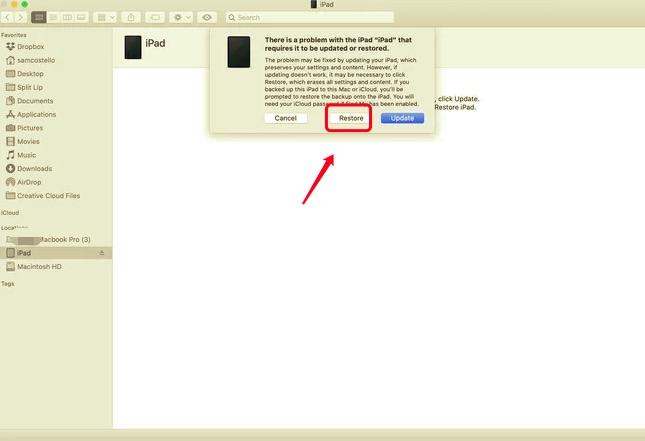
If you are unable to see the iTunes screen or the pop-up, you have to repeat the steps.
Part 2. The Quickest Way to Crack the iPad Password - Recommended Method
If you find the first method too confusing and tricky, you can use this next option to crack the iPad password quickly. There are plenty of programs that you can use to unlock your iPad password. Some are downloadable programs while others are online which only requires you to enter the details.
One of the best programs to use is Odblokowywanie iOS. You don’t need to go through a lot of steps but rather follow the click-through process with iPhone Unlocker.
iOS Unlocker is professional software that provides an easier method to unlock iOS devices such as erasing the passcode, Apple ID/iCloud, and even removing the Screen Time restrictions.
Darmowe pobieranie Darmowe pobieranie
All you need is to get this software running on your computer and connect your iPad. You will then be prompted on what to do in order to completely unlock your device based on the given situation.
To further learn about iOS Unlocker, here is the complete step by step procedure about how to crack iPad password:
- Install iPhone Unlocker
- Wybierz Wyczyść kod dostępu feature from the main menu. Click Rozpocznij aby kontynuować
- Connect your iPad to the computer via USB cable
- Verify your iPad make and model. If needed, use the drop-down arrow to find the correct details
- Kliknij Rozpocznij to download the device firmware package
- Select Unlock and enter 0000 to confirm the unlock request
- Wait for the process to be finished
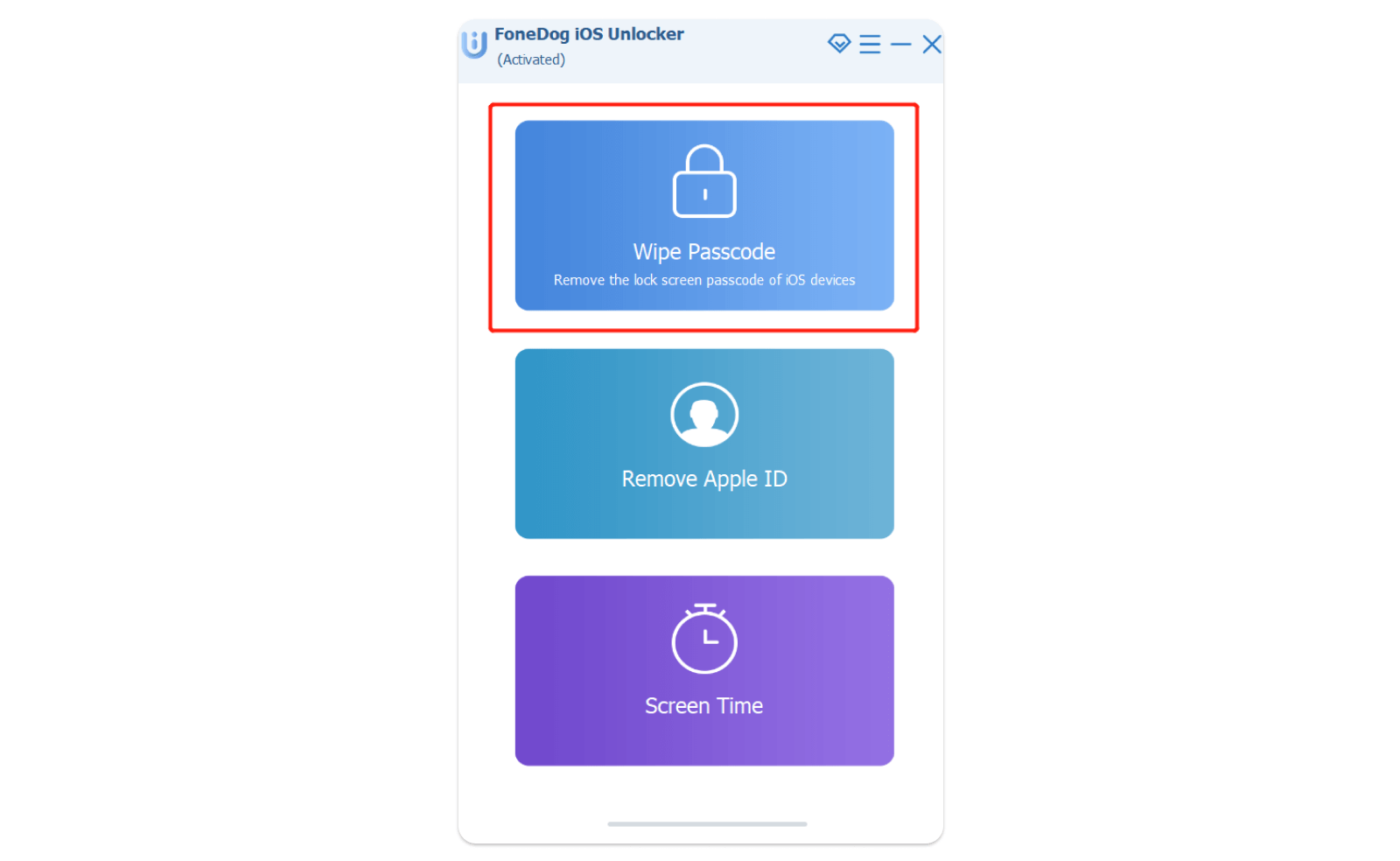
You don’t have to endure a lot of steps just to unlock your iPad. With iPhone Unlocker, you will have more time to customize your device and start to use it right away.
Part 3. How to Crack the iPad Password via iCloud
The last option on how to crack iPad password is to use iCloud remotely to erase the device. iCloud also provided necessary security features in case the iOS device is lost or stolen. It comes with a stand-alone app called Find My, which is a default app on any iOS device. Once this feature is turned on, you can easily track down your device and of course, wipe or delete all the data on the unit.
Using iCloud to erase your iPad is only applicable when you have the Apple ID and password on hand. Or, if you know the previous owner, you can request him/her to remotely erase the iPad via iCloud.
Otherwise, you can choose from the other methods suggested above. However, using iCloud to erase your iPad needs to have the Find My feature enabled first. If this service is already active, then follow these steps:
- W dowolnej przeglądarce otwórz iCloud.com
- Wprowadź identyfikator Apple ID i hasło
- Go to Find My iPhone. Click on Wszystkie urządzenia
- Click on your iPad
- Wybierz Wymaż iPad
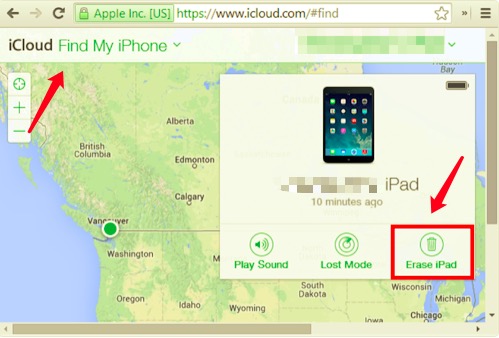
After the iPad has been erased, you can then begin to set up the device just like you wanted. And of course, create a strong password to secure your iPad but make sure to remember it all the time.
For future references, you can enable the Find My feature in case you are caught up in this kind of situation again. We also recommend that you regularly backup your iPad to ensure that your data is safe and of course, if resetting is required, you can quickly restore your backup to minimize data loss.
Also, if you forget detailed information about your iCloud account, you can use a tool to find your iCloud information back so that you can crack the iPad via iCloud easily.
Ludzie również czytająJak naprawić błąd iPada, który wymaga podania kodu dostępu po ponownym uruchomieniuJak naprawić błąd iTunes nie mógł połączyć się z tym iPhonem, ponieważ był zablokowany hasłem
Część 4. streszczenie
In this article guide, you have just learned how to crack iPad password with 3 methods. You can utilize iCloud to remotely erase the data or you can also place the iPad in recovery mode and restore it to start afresh.
The most recommended method so far is to use Odblokowywanie iOS. This program comes with all the prerequisites in unlocking any iOS device. You can choose from its powerful menus like Wipe Passcode or password, Remove the Apple ID/iCloud, and Remove Screen Time password or restrictions.
Whatever method you choose to unlock your iPad, we recommend that you go over these steps given above for guaranteed results.
Napisane przez Rosie
Ostatnia aktualizacja: 2022-01-27