


As long as you enter the wrong password six times, you will have no control over access to the phone. You only have the option of resetowanie iPhone'a. It's frustrating if you don't back up your information. In that case, you'll lose all data. How to unlock disabled iPhone X is simple if and only if you have the correct information and toolkits at your disposal.
Entering a wrong password doesn't mean carelessness, it's natural, you can forget, or the screen can be broken or cracked, which means you can't key in the password. All in all, there is no cause for alarm; the web has several solutions that come in handy during such times. Continue reading to arm yourself with information on how to unlock a disabled iPhone X.
Part #1: How to Unlock Disabled iPhone X with iTunesPart #2: How to Unlock Disabled iPhone X Using iOS UnlockerPart #3: How to Unlock Disabled iPhone X Using iCloudPart #4: How to Unlock Disabled iPhone X without A ComputerCzęść 5: Podsumowanie
Part #1: How to Unlock Disabled iPhone X with iTunes
One of the simple ways you can think of when you have a disabled iPhone X is through iTunes. This simple Apple application comes with several features to support the purpose. All you need to do is download that latest version of the application and use a USB cable device to connect to the iPhone. The recovery model of the toolkit is your next stop to restore the iPhone to factory settings.
Moreover, you can ass well choose to get the recovery mode from the PC directly. How do these two processes work?
Here is the first process when you have synced the device with iTunes before disabling the function
- After syncing the iPhone X with iTunes
- Kliknij przywracać option from the backup setup screen
- Wybierz iPhone X on the iTunes menu and backup data you need to be restored
Secondly, if you haven't synced data with iTunes before, you have challenges connecting to iTunes for whatever reason. Here is the procedure
- Use the USB cable and connect do iTunes.
- restart the iPhone X, press and leave the up oraz ściszona głośność przycisk jednocześnie
- Naciśnij długo power button until you get to the recovery mode screen.
- Kliknij przywracać after a dialogue screen with information about the iPhone X has a problem.
- Kliknij Przywracać option to unlock the device.
- Akceptuj the terms and conditions and download the restore software, iTunes will delete the lock screen, and that's how to unlock disabled iPhone X if you haven't synced data with iTunes.
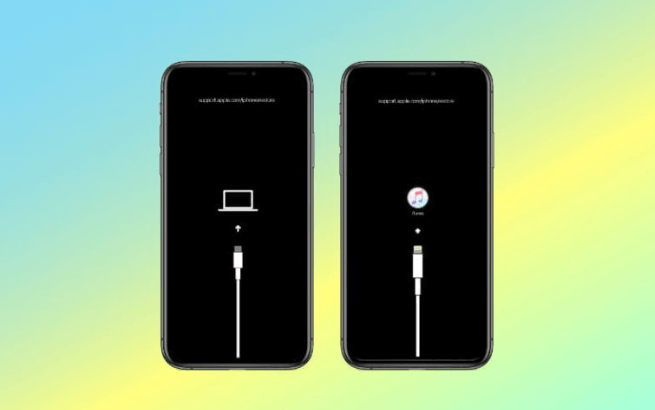
The two methods clearly show that it's important to sync your Apple devices with iTunes; they come in handy during such eventualities. It makes device recovery straightforward.
Part #2: How to Unlock Disabled iPhone X Using iOS Unlocker
The first method only looks at phone recovery when you lose your password.
How about getting an application that also comes with additional functions, including how to unlock a disabled iPhone X? Odblokowywanie iOS is your go-to toolkit when it comes to removing passcode screen time limitations and Apple ID.
Darmowe pobieranie Darmowe pobieranie
You may have an old iPhone or the original owner; hence, you have no access to the original documents. Contacting the owner all the time- whom you may not even know- is an uphill task. This is when you need a comprehensive and powerful toolkit that triples as a recovery and a complete access controller.
iOS Unlocker is the most efficient and user-friendly application to odblokuj iPhone'a. Its user–friendly nature makes it ideal for both novices and experts in equal measure. These simple steps come in handy as one of the options on how to unlock disabled iPhone X
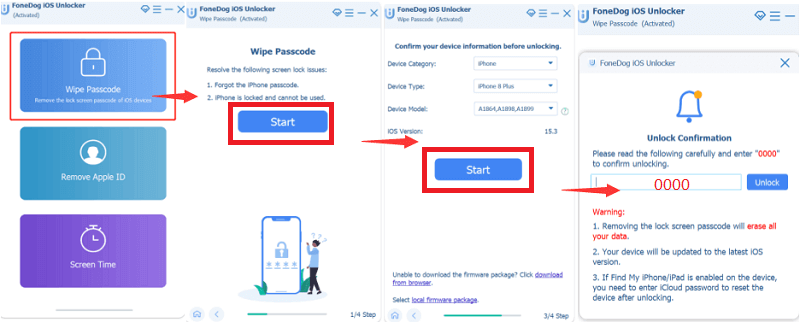
- Pobierz, zainstaluj i uruchom iOS Unlocker
- Wybierz Wyczyść kod dostępu on the main menu and click Start
- Using the USB cable, connect iPhone X to the PC.
- Choose the device-iPhone X model and download the related firmware and click Rozpocznij
- Wpisz 0000 as the unlock code
- Give It a few minutes until you get the on-screen menu of an unlocked iPhone X
iOS Unlocker deletes all data after the recovery process; therefore, it's advisable always to back up your data to avoid disappointments during such eventualities. Its unique advantage is that you can personalize your device using its features, giving it a unique look and added security protection.
Part #3: How to Unlock Disabled iPhone X Using iCloud
If you fear the long and complex processes of how to unlock a disabled iPhone X, then the iCloud should be an option to consider. Although you need to have the Apple ID and password for the iCloud lo in the account, it's a simple process that you should explore.
The only disadvantage of the toolkit is that it deletes all information, so unless you back up your data previously, you; lose all of it.
Moreover, you must have set the Find My function on your iPhone X from the settings menu. Here is the process on how to unlock disabled iPhone X using iCloud
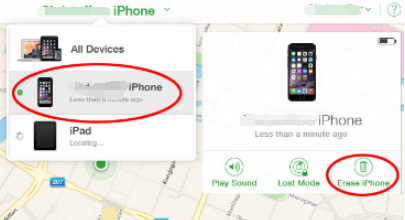
- Otwarte iCloud.com from the computer web browser
- Zaloguj Się by entering the Apple ID and password
- On the iPhone X, select the "Wszystkie urządzenia" option and choose iPhone X
- Wybierz Wymaż iPhone'a
- Answer the security question or choose to ignore is you are using a zaufany przeglądarka internetowa
- You should have an unlocked iPhone X as of now
Part #4: How to Unlock Disabled iPhone X without A Computer
The above-discussed ways mean that you have to have a computer within reach to learn how to unlock disabled iPhone X. That is always not the case. What if the iPhone is disabled when traveling or in a remote area. Does it mean you can't unlock it? This pat is one way to unlock iPhone X without a PC still. The latter iOS version solves this challenge. You only need to know the Apple ID and have the latest Wersja na iOS then this is the best option for you. Here are the steps:
- Once the iPhone is disabled, two menus appear at the bottom of your screen, Otwieranie Awaryjne oraz Wymaż iPhone'a. Wybierać ostatni
- Choose a similar menu to erase all the iPhone X content.
- Wyloguj się by keying in the Apple ID and password
- Czekać and have your iPhone X as new as you bought it.
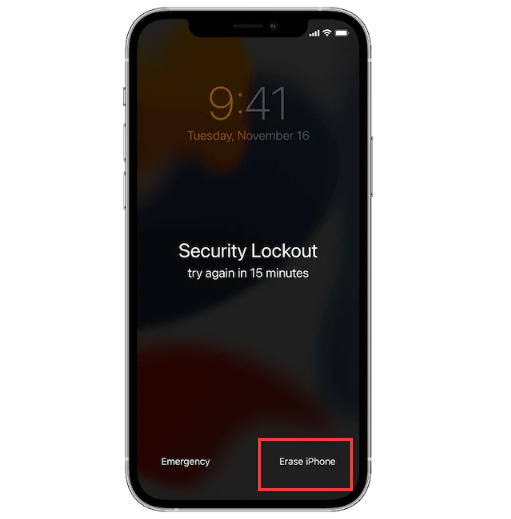
Although this looks simple, it is only ideal if you have backed all your data; if not, you will have your iPhone X back but lose all data.
Ludzie również czytająJak podłączyć iPada do iTunes, gdy jest wyłączony: poradnikJak odblokować wyłączonego iPoda bez iTunes lub komputera
Część 5: Podsumowanie
It's evident there are several ways to unlock disabled iPhone X; in this article, we have only looked at three ways, but there are several others out there. The best solution of choice depends on what you have at hand.
The faster you need the toolkit and access to third-party tools required in the recovery process. Things are easy when you have an internet connection since you have unlimited options, either offline or online.
All in all, despite all the solutions, iOS Unlocker is a software that you need to explore as a method on how to unlock disabled iPhone X. Every option is ideal, but the user has the ultimate solution to the best way of choice.
Napisane przez Rosie
Ostatnia aktualizacja: 2022-02-25