


It's normal to zapomnij hasła do iPada or have an unresponsive screen or have unauthorized access. Whatever the situation, get to know that the iPad permanently locks when you key in the wrong password six times.
That is the moment you have to reset the iDevice to factory settings. That is when you think of things like iPad locked connect to iTunes. There are several solutions to solve this apart from iTunes, as discussed in the following parts of the article.
Moreover, if you also know how to set the iPad to factory settings, you are good to go. All these are found in this article. You will never be shocked by a locked iPad because of a forgotten password by the end of your reading. In your search, you also need to engage software for such a function to give you a wider view of what to expect in the melee.
Part 1: Why Connect Any iPad to iTunesPart 2: How to Unlock an iPad Using iTunesPart 3: The Best Alternatives to iTunes for Unlocking an iPadPodsumowanie
Part 1: Why Connect Any iPad to iTunes
iTunes is an Apple-based application that is not only a media player but also a media library. It also triples up as an unlock toolkit which means you can also use its advanced function to remove the iPad lock key when you have no idea of the unlock codes. That is what iPad locked connect to iTunes means.

The advantage of connecting any iDevice to iTunes before such unlock challenges is to help in backup plans. Moreover, it also comes in handy to aid in simple restore functionality, unlocking the iPad.
Other benefits of iTunes include the ability to add, delete, and organize a media library. Unlimited song play which also includes live music and movie streaming. Search function for all multimedia content- music, videos, podcasts, TV shows, etc. Our area of concern is the iDevice setup.
Part 2: How to Unlock an iPad Using iTunes
When you have synchronized your iPad with iTunes, you'll have no issue when the iPad is locked. You can still use the iTunes application to unlock it.
The unique advantage of this feature is that you're sure that your iPad data is intact. You only need to set up and have the iData back.
Here are the steps you need to follow when iPad locked connect to iTunes appears:
- Pobierz, zainstaluj i uruchom iTunes na komputerze
- Connect the locked iPad via USB cable and sync data
- Click the Device and choose the locked iPad among the Device
- Kliknij Przywróć iPada/iPhone'a
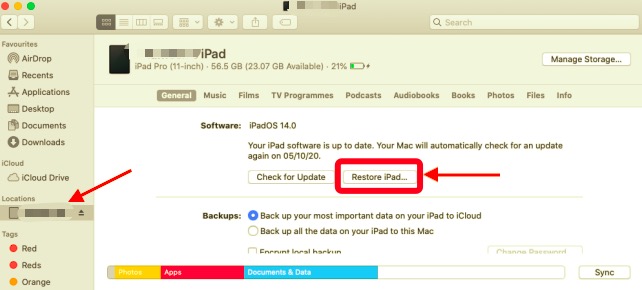
Wait for the process to complete. At this point, you have an iPad without a password. And that's where you can restore iPad locked connect to iTunes.
Part 3: The Best Alternatives to iTunes for Unlocking an iPad
As mentioned earlier, iTunes is not the only approach you can use to solve the iPad locked connect to iTunes. Other alternatives are looked into in detail, and the steps to have the iPad unlock code completely removed.
Tutaj jest kilka z nich:
Odblokowywanie iOS
Odblokowywanie iOS is a simple and intuitive application that removes the passcode, removes the Apple ID, and manages the screen time. The application has no limits on the iDevices. Moreover, it erases the old ID and is compatible with the iCloud devices.
This toolkit gives you full control of the iOS Device with no limits. If you are also looking for a toolkit to access the iCloud and Apple ID settings. Once you use the toolkit, the iCloud settings with the old ID details have no space.
Darmowe pobieranie Darmowe pobieranie
Here are the steps you can use
- Pobierz, zainstaluj i uruchom iOS Unlocker
- Wybierz Wyczyść kod dostępu among the three drops menu
- Wybierz Rozpocznij button, and vis USB, connect the locked iPad to the PC
- Zaakceptuj Zaufaj buttons, confirm the details and click the Rozpocznij line again
- Wait for firmware download and click the Odblokować button, and enter "0000 " as the unlock code
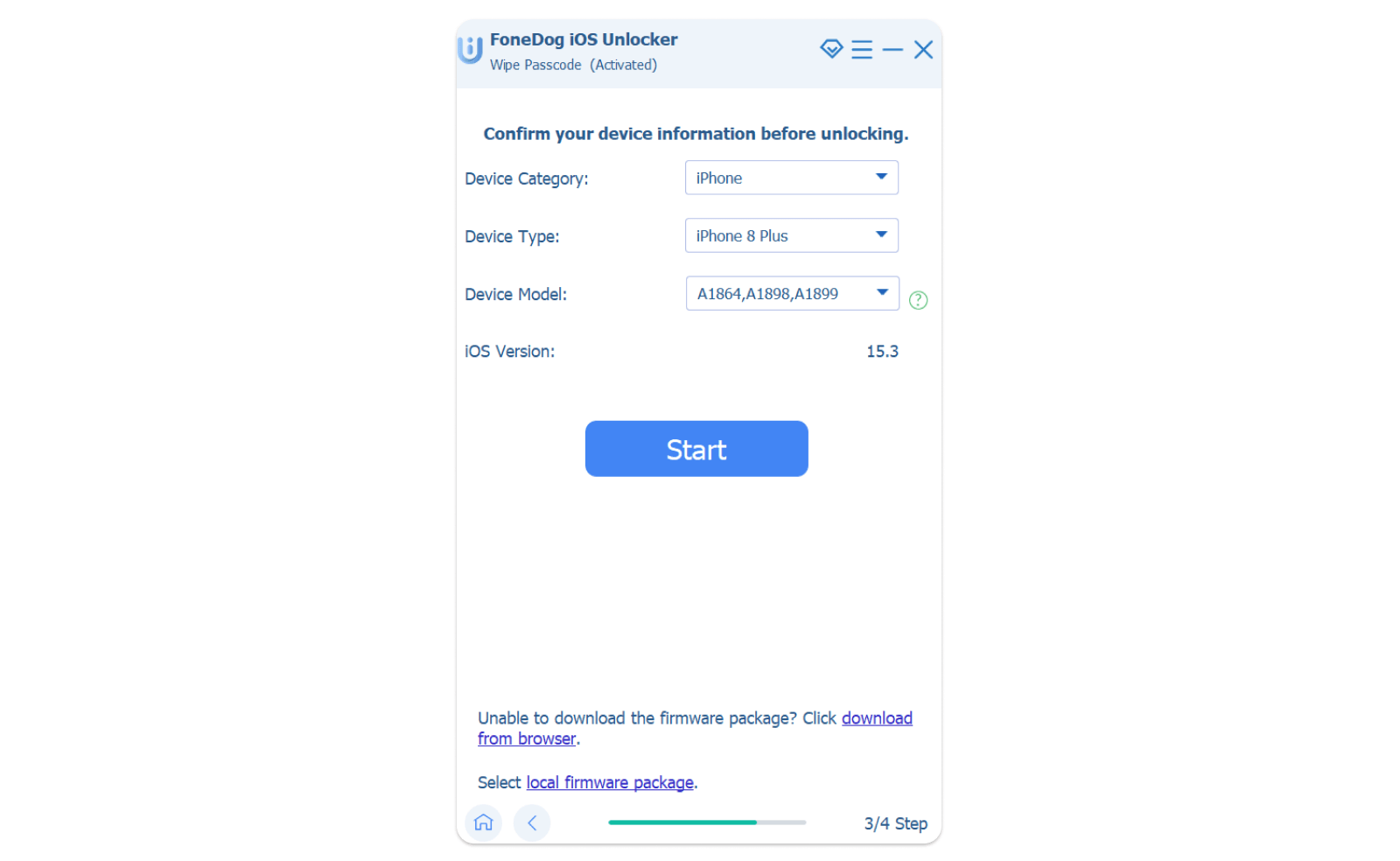
That's how your iPad is password-free without iPad locked connect to iTunes factor. What a pretty simple digital product on the web?
iCloud.com
The only option to have the locked iPad opened is to change it to factory settings. The million-dollar question is, what are the methods you need to implore to change to factory settings? iCloud is a household name among iDevices. Like iPad locked connect to iTunes, this is a toolkit that comes with conditions. You must have registered the iPad to your iCloud account to use it to open the iPad. The process is simple.
- Using another iDevice or PC, open the iCloud.com Zbieranie danych analitycznych o stronach internetowych lub aplikacjach (aby sprawdzić, czy strona działa poprawnie lub które sekcje strony są najbardziej atrakcyjne dla odwiedzających).
- Log in the details that include the Apple ID
- Kliknij Find My iPhone menu, następnie Wszystkie urządzenia menu
- Choose the locked iPad from the list of devices and click the Wymaż iPad
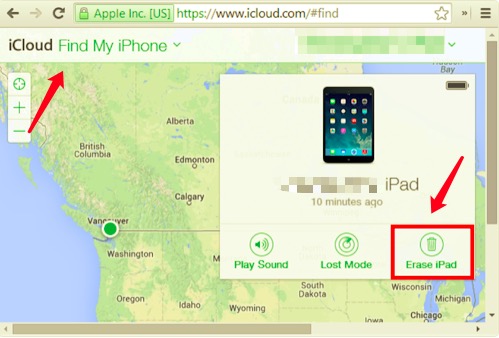
You can now access your iPad without the password and use the chance to set it up, which includes restoring a backup to minimize data loss. Are you looking for another option?
Ludzie również czytająInstrukcja odblokowania kodu dostępu do iPada bez użycia komputeraJak naprawić błąd iPada, który wymaga podania kodu dostępu po ponownym uruchomieniu
Podsumowanie
You have all it takes to demystify the myth around iPad locked connect to iTunes. The toolkit clearly tells you that you have several options to remove the unlock function when you have no access to the password.
Moreover, the software- Odblokowywanie iOS comes with no conditions. You only need an internet connection and download the toolkit, and you have all you need to access the locked iPad. This is your go-to application that supports unlock function of the iDevices.
Are you still in doubt? It's important to note that we have only highlighted one third-party solution. That doesn't mean that it's the only one in existence; there are several in the web market that you need to test and prove their functionality.
Napisane przez Rosie
Ostatnia aktualizacja: 2022-04-07