


Do you have more than one Apple ID? This can really be confusing especially if you only have one Apple device in use, you might want help to organize such things through the Apple ID卸妆. It is important to properly incorporate your Apple ID into your device to have it closer to you, you can be able to do editing, as well as personalization easier. Some of us may have the idea to sell our devices or have them given away, and since you have stored a lot of personal data on them, it must be properly secured. One of the things that you can do is to use an Apple ID eraser to disconnect the said device from your Apple ID.
In this article, we will be learning about some of the most used and most common Apple ID removers that you can try to use in case you wanted to turn your device into something better, or you want to sell it. We will discuss the methods and tools that you can use on how to properly erase your Apple ID without a password, so you better be ready to learn all the needed information.
Part #1: What Are Some Of The Reasons Why You Wanted to Remove Your Apple ID?Part #2: What Is The Best Apple ID Remover?Part #3: How to Remove Your Apple ID Using iCloud?Part #4: How to Remove Apple ID Using Your iPhone?第四部分:总结全文
Part #1: What Are Some Of The Reasons Why You Wanted to Remove Your Apple ID?
Of course, there are valid reasons why you are looking for a reliable Apple ID remover to get rid of your Apple ID on a specific device, here’s a list of the possible reasons.
You Are Selling The Device
One of the most common reasons is you wanted to sell your device to other people. One of the primary precautions that you have to do is to remove your 苹果ID to protect your personal data from unwanted access. It can also help the new user to easily use the device as he or she can finally incorporate his or her data on the device. It is known that when you have the old Apple ID still logged in on the device, the new user cannot get through the “Activation Lock Screen”, which they have to pass when they are setting up the device.
You Are Giving Away Your Device
It is also important to remove your Apple ID when you wanted to give away your device to other people. It is also a way to protect your data from other people and help the new owner of the device like it is their own.
You Wanted To Trade-In
If you wanted to trade in your device so you can upgrade to a higher version, it is also important to use an Apple ID remover to avoid other people from accessing your data and use for their own good.
You Bought A Second-Hand Phone
If you have bought a second-hand device, there can be instances when the old owner was not able to dispose of it properly. It could happen that their old Apple ID is still logged in on the said device. If this is the scenario, you can still try to contact the previous so that they can help to log out their Apple ID. But one of the best solutions in case of worst scenarios, like you cannot get a hold of the previous owner is to use an Apple ID eraser and get rid of the old Apple ID.
Part #2: What Is The Best Apple ID Remover?
One of the most important things, when you have to deal with old Apple IDs, is an efficient Apple ID eraser. Well, if you do some research there could be a lot, however not most of them can meet your expectations and help you solve the dilemma properly. And we are here to share with you one of the most recommended Apple ID removers, the iOS解锁.
It is a reliable partner giving you excellent results when it comes to protecting your sanity and data. It can help you wipe the passcode of your iPad or iPhone in case you have accidentally locked it, it can also help you get rid of the passcode for your “Screen Time”, and of course, it can help you remove Apple ID on your device.
Like other tools, there are some reminders that you have to put into mind prior to using the iOS Unlocker. When you opted to use this tool, all the data that are saved on the device will be deleted, so we suggest that you create a backup to avoid accidentally losing your data. You also have to know that once you have used this tool, the operating system of your device will be upgraded to the latest version, and lastly, you have to connect your device to a computer prior to the removal of Apple ID.
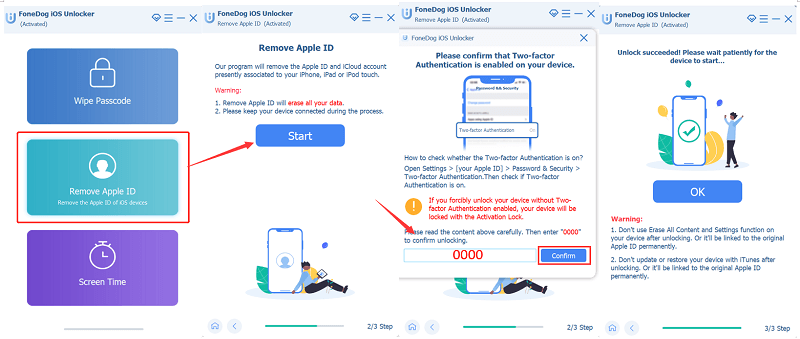
Let us know how to remove Apple ID using the iOS Unlocker.
- Firstly, launch the iOS Unlocker, and then proceed to “删除Apple ID “。
- Use a cable to connect your device to your computer, and do not forget to tap “信托 “ 继续。
- Check everything on your device, and then try to type in “0000 ” to confirm the “双因素验证 “功能。
- Then confirm the information of your device, then click “开始 ” to start the process of downloading the firmware package, and then wait for a few minutes until the download is done.
- Once it is done, the Apple ID and iCloud account installed on the device will be erased. Try to set it up and then make a new one if you want.
Here are some of the reminders that you have to be reminded of before you start removing the Apple ID from your iPhone using Apple ID removers.
- The removal of your Apple ID will be based on your “找到我的 “功能。
- If you have disabled it, the iOS Unlocker will start to directly remove the Apple ID on your device.
- If it is able, to start, reset the settings of your device. Proceed to “个人设置 然后转到“常规 ”, and then to “重设 ”,然后选择“复位所有设置 ”. Type your password for you to continue.
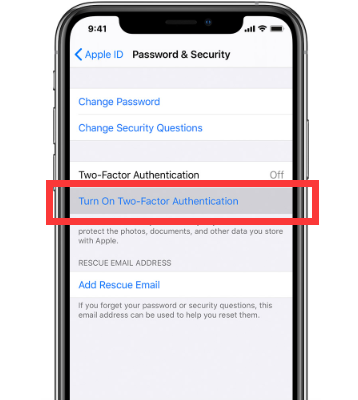
- In case you have the latest version of iOS installed on the device, turn on the “双因素验证 ”, to verify the identity of the user upon logging in. To do this, you have to launch “个人设置 ”, then go to “苹果ID ”, then proceed to “密码和安全性 ”, then toggle the “双因素验证 “ on.
Part #3: How to Remove Your Apple ID Using iCloud?
您还可以使用 iCloud的 as an Apple ID remover, you have to go to the website, and must be aware of the Apple ID and its password to be able to use this option.
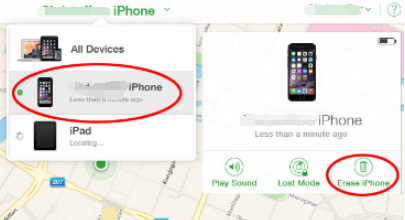
- Open your web browser and go to the official website of iCloud. You have to sign in using your Apple ID and its password, we are talking about the Apple ID of the device that you wanted to remove.
- You have to select “所有设备 ” which you can see in the “查找我的iPhone “ 选项。
- Look for the device that you wanted to remove from the said Apple ID, and then click “从帐户中删除 “。
Part #4: How to Remove Apple ID Using Your iPhone?
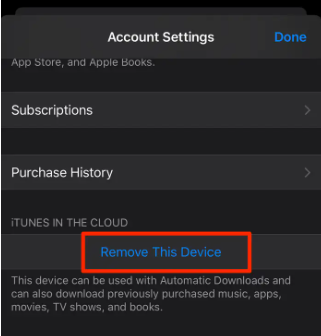
One of the good news is you can also use your iPhone to directly remove an Apple ID. You must also use the Apple ID and password, and utilize the “Settings” of your iPhone. Here’s how you use your iPhone as an Apple ID remover.
- 转到“个人设置 ” application on your device and open it.
- Look for your name on the “Settings”, and choose the header that says “Apple ID,iCloud,iTunes和App Store ”,然后选择“iTunes和App Store “。
- Choose your Apple ID and then choose “查看的Apple ID ”, you will be asked to enter your password and type it in.
- Go down and look for “Remove this Device “。
- Then you will see a pop-up appear, and it will redirect you to the external website of Apple ID where you have to enter your username and password. Then go to “设备 “。
- Choose the device that you wanted to remove from the said Apple ID, and then click “删除 ” to confirm and finalize.
人们也读破解 Apple ID 密码的三种方法修复更新 Apple ID 设置卡住问题的 4 种方法
第四部分:总结全文
It is very vital to know some of the Apple ID removers that can help you in case you have to sell your device or upgrade to a better one. It is a precautionary measure to remove your Apple ID to protect your data from other people who may use it for things that may not be good for you. We hope that we have helped you be informed of some of the methods and tools that you can use as references in the future. After all, we deserved all the sanity and protection from the world of technology and from other people as well.
由罗西撰写
上次更新时间:2022-06-09