


It is common to get the notification- your Apple ID has been locked for security reasons. What do you do? Security questions come in handy for verification purposes in Apple devices when they notice unsuspicious activity while using the devices.
The only option to unlock is correctly answering the security questions as verification protocol. How to unlock Apple ID without Email or Security questions is important. What happens when you don't remember the security question answers?
There is no cause for alarm as long as software developers spend sleepless nights producing different digital solutions. The toolkit some in handy to either wipe the Apple ID even without passcode and allow you to rest it to a new one or maintain the status of the old one-though not advisable.
This article gives you a step-by-step guide on unlocking Apple ID without Email or security questions and getting your device back functional. Read on
内容指南 Part #1: Reasons Why Apple ID Can Be LockedPart #2: Use The Recovery Key to Unlock The Apple IDPart #3: Contact Apple Customer Support to Unlock Apple IDPart #4: How to Reset Your Apple ID With iforgot.appleid.comPart #5: How to Unlock Apple ID without Email or Security Questions or Password?第四部分:结论
Part #1: Reasons Why Apple ID Can Be Locked
Although apple id locked for security reasons is the primary component of why the Apple ID can be locked, you should also be aware of some of the other things that can cause the same. This include
- Too many wrong login attempts
- A suspected IP address associated with fraudsters
- Incorrect answering of the security questions
- A breach and violation of the Apple account
- Failure to pass the verification steps
All these might be reasons, but that's not the case, the method discussed below on how to unlock Apple ID without Email or security questions comes in handy to avoid this. Continue reading and get more information.
Part #2: Use The Recovery Key to Unlock The Apple ID
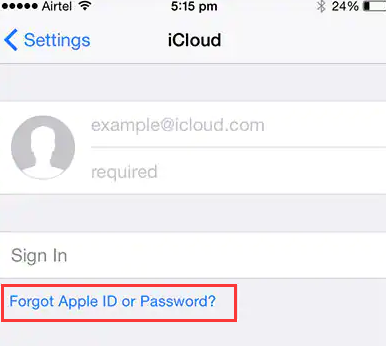
When you have your Apple ID locked, the device will ask for the unlock code, which you must know where and how to get to get out of the hassle of how to unlock Apple ID without Email or security questions. Here is the procedure
- 打开 iCloud. Com using the Web browser of choice to take you to the Apple ID account
- 选择“Forgot Apple ID or Passcode =
- Input the locked Apple ID and choose the reset password option
- 选择“继续 " option and key in the recovery key that appears on the previous window
- After agreeing with the trust agreements, you'll choose the right device to get the verification code
- Use it to set up a new password and choose the rest password again
This is a simple step that only needs an internet connection. However, you can't use the option when you don't have an iCloud account. If that is the case, you have to explore more options.
Part #3: Contact Apple Customer Support to Unlock Apple ID
Apple has a 24-hour and seven-day customer service to manage customer queries irrespective of the time zones. When you are stuck with any Apple functions that include how to unlock Apple ID without Email or security questions, it should be your next thought of action.
Although you need to answer the security questions correctly, they use the recovery account process to bypass the action if you have forgotten. They use other forms of verification as they put your account on hold. If you fail that process, you have no option but to surrender the account and lose everything that comes with it, including the purchases, and you have no option but to create a new account.
Part #4: How to Reset Your Apple ID With iforgot.appleid.com
If you find out how to unlock Apple ID without Email or security questions, you can reset the security questions with iForgot.com by the following steps:
- 可选 iforgot.apple.com.
- Enter your Apple ID, and choose "Continue".
- Select the option for resetting your security questions and then select Continue.
- Enter your Apple ID password, and Continue.
- Answer some questions to verify your identity.
- Select new security questions and answers and then choose Continue.
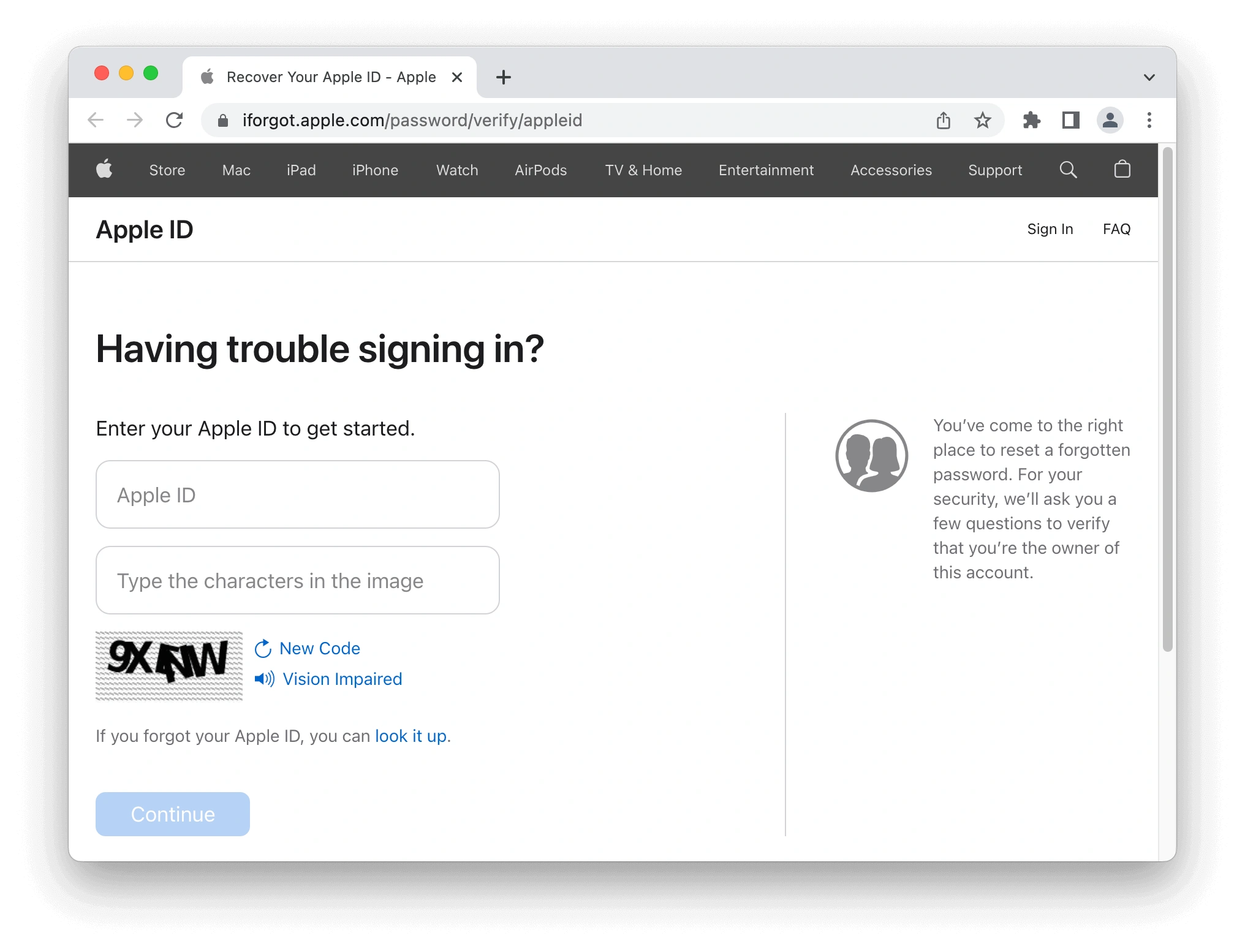
This is how security questions are refreshed for Apple ID. You should be able to modify or reset your security questions with the help of following instructions.
Part #5: How to Unlock Apple ID without Email or Security Questions or Password?
An Apple device user cannot miss having iOS解锁, thanks to the powerful features that come with this digital solution, it will help you deal with how to unlock Apple ID without email or security questions. The application not only removes the Apple ID but also deletes the Passcode and the screen time.
You must use any of the features on your journey to Apple tool usage at any one point. The application is free to download and runs on a payable interface though you have a monthly guarantee and a free trial.
The toolkit comes in handy to help when you have 忘了iPhone密码 and multiple failed attempts, broken iOS devices, and when the face ID isn't responsive, or you want to control a second-hand iOS device completely.
Our area of focus is the Apple ID removal which you can do using the following steps
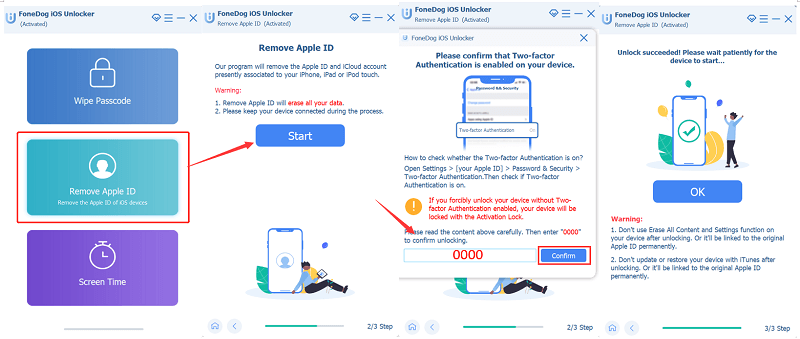
- Download and run the iOS Unlocker
- 点击 信托 button to agreements; and connect the computer to the USB cable
- 点击 ”开始 " button to start the Apple ID removal process. These come with three options
- Using the Find My iPhone feature to directly remove it
- Reset the Find My iPhone when disabled using the settings option
- Use the two-step authentification feature for 11.4 iOS versions and above
- After all verifications and confirmations, input "0000 作为解锁码
- Confirm the device information and click 开始 to download the firmware package
- After completion, it will erase the 苹果ID and allow you to set up another one
This is a straightforward process on how to unlock Apple ID without Email or security questions. Even if you forget the security questions, you still have answers.
人们也读如何关闭 iPhone 的“按 Home 键解锁”功能如何解锁 iPhone 5S:分步说明
第四部分:结论
There is nothing undoable in the Apple industry. The software challenges have software solutions wither directly on the web or through other digital solutions. For example, iOS Unlocker is one that helps you to gain full control of your iDevices as an option on how to unlock Apple ID without Email or security questions.
Moreover, its simplicity in its functioning makes it a well-to-do toolkit. However, the article still doesn't exhaust all the options. You also have a choice to go through the web and have a variety of choices to get the best out of it.
由罗西撰写
上次更新时间:2022-02-25