


Locked iPhone is a common menace among Apple phone users. No one deliberately locks their iPhones. In most cases, they are accidental. iPhone screen cracked can’t unlock is a common statement that iPhone users must say in their journey for Apple device usage.
If that is the case, you don’t need to worry, when Apple has additional functions and third-party tools to come as a savior at such times. Experienced iPhone users understand the menace and always have the toolkits installed on their devices. The million-dollar question here is, what are some of the trusted and simple processes?
Here we go a step further to check what are the available options to get you full control of your iPhone. We discuss four ways to achieve this. Read on.
Part #1: iPhone Screen Cracked Can’t Unlock? Use iOS UnlockerPart #2: Unlock Cracked iPhone Using Find My PhonePart #3: Unlock Your Cracked iPhone Using iTunesPart #4: Unlock Your iPhone Using Siri第四部分:结论
Part #1: iPhone Screen Cracked Can’t Unlock? Use iOS Unlocker
Third-party tools are some of the fast options Apple users think of since very few people get to understand the advanced options of their iPhones. Now how do you get to know the best? iOS解锁 is a toolkit that has a 清除密码 function, which is your g-to function when the iPhone screen cracked can’t unlock. It comes with a few steps, and just as the name suggests, it wipes the passcode making you have your iPhone back to its factory settings.
The straightforward process is simple for both novices and experts in equal measure. Moreover, it also triples as an Apple ID卸妆 和 screen time remover. Its unique advantage is that although it is a paid application there is a month-long free option with a guarantee for money return. Like any other Apple device, it erases all stored data with no option for retrieval. That’s why all Apple users are advised to always back up their iPhone data in their preferred cloud storage device if not using iCloud.
Here are the steps to solve the problem using iOS Unlocker
- Download, run, and set up iOS Unlocker
- 选择“清除密码 ” from the list of the three options
- 选择“开始 ” button as you connect the iPhone to the PC via USB cable
- 接受 Trust Agreements
- After confirmation of the iPhone, device select the “开始 “按钮
- After downloading the firmware package, select the “开锁 ” button and input “0000 ” for confirmation
- After some minutes the device is unlocked
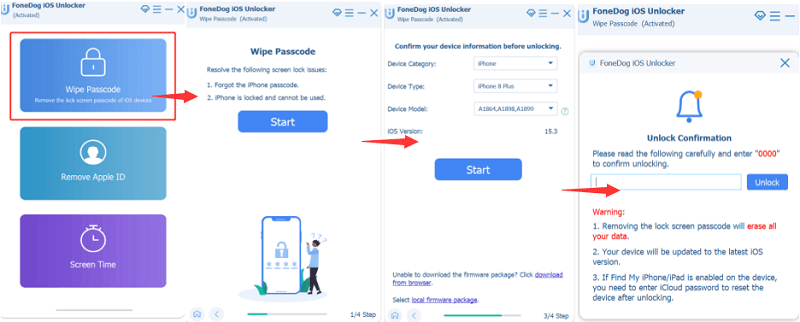
Apart from data loss, the process updates the iPhone to its 最新的 iOS 版本, and also the toolkit can only work when it's 已联繫 to the computer using a USB cable.
Within minutes you have your iPod Passcode restrictions deleted, and the machine set back to factory settings. The unique advantage of this application is that it has no compatibility issues with Apple-supported toolkits. The toolkit works for Apple users including iPads, iPods, and iDevices.
Part #2: Unlock Cracked iPhone Using Find My Phone
Find My Phone is a function that is only supported by iCloud.com. It also can work if and only if you have an account with iCloud.com prior to the locked process. iCloud is a cloud storage toolkit that supports photos, notes, and all files irrespective of the file format, password, and all types of data. The Apple-developed application is a must-have for iPhone users. Here are the steps when iPhone screen cracked can’t unlock.
- 打开 iCloud.com account using the web browser of choice
- 点击 查找iPhone 菜单
- 点击 所有设备 for the top of your screen
- 从我们的数据库中通过 UL Prospector 平台选择 擦除iPhone after choosing the right iPhone
- 确认 using the pop-up message on the screen and that’s how your data is deleted from the system
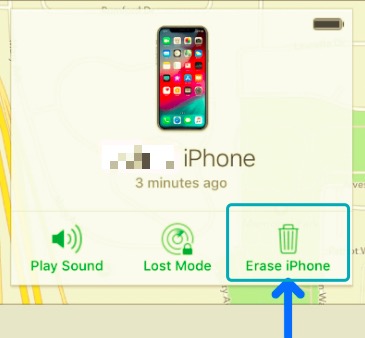
This is a toolkit that is also fast and effective even when looking for a lost iPhone but only functions when you have an account. Also, it unlocks the iPhone and not the iCloud account. Note the difference.
Part #3: Unlock Your Cracked iPhone Using iTunes
If you are a fond user of iTunes, then you must have come across the erase iPhone icon. Just as the above-mentioned method; you can only use the method when you have synched the device to the toolkit before; if not you might need to use the passcode that your iPhone screen cracked can’t unlock.
You should be wondering how to reset your iPad password. There are many ways of doing the same thing in the digital world. Find My is renowned for locating a lost Apple device most of the time. It also doubles up as a tool to unlock the iPod without a password. Continue reading to get the steps.
- 连接 the cracked iPhone to the PC (synched)
- Run and set up iTunes 并选择 结语 at the top of the window
- 选择“最新动态 ” for a drop-down menu on available iOS versions
- 选择“恢复 ” and follow step by step instructions, make sure you 备份 when called requested to avoid data loss
- 选择“Restore from iTunes backup” when also requested
This is a method that also comes with back up which is a plus but now, it can only work when you have also earlier synched the iPhone to iTunes prior to the cracked screen menace.
Part #4: Unlock Your iPhone Using Siri
Since you are still exploring options available when “iPhone screen cracked can’t unlock” state, this is an option you can go for, but it’s important to note that this approach is temporary and may not be ideal as a permanent solution. 这是您可以执行的操作:
- 长 press the “首页 “按钮
- 选择“Turn on Voice Over ” to use its speech prompt for instructions
- 长 按 主页按钮 至 turn off Siri 和 open the unlock screen 再来一次
- 刷卡 either left or right and choose the “滑动来解锁 “和 双击 it
- When a passcode page appears, choose “输入 “和 双击
That is how you can help the “iPhone screen cracked can’t unlock” situation.
人们也读iPhone屏幕死机怎么办?如何通过几个简单的步骤解锁我的 iPhone?
第四部分:结论
iPhone is a toolkit from the renowned Apple brand. All is well until to reach a point where the iPhone screen cracked can’t unlock. That’s the time you have to scratch your head and find ways of unlocking it. The article discusses thy four ways, but ideally, there are several other ways you can do it. Especially when using third-party applications. Each of them has dos and don'ts but there is no harm in explorations.
However, iOS Unlocker is top of the list because of its additional value-added functions. It's a toolkit that you save and store on your PC to manage to unlock functions for iPod or iPod, or iPhone. Its sensitivity and user-friendly nature are something to love and appreciate about the toolkit. Moreover, it has minimal compatibility issues. Never get stuck with a locked iPad when you have solutions to reverse the situation. Although we have only discussed three methods, there are several others out there that you can still explore.
由罗西撰写
上次更新时间:2022-02-25