


When you want to share a Spotify song, you usually copy the link and send it. However, your friends might not click the link to listen sometimes even you added them as friends on Spotify. So, this may not be the greatest solution. That's where the Spotify Code steps in.
In fact, a Spotify code is a hidden feature of Spotify that you can use to share music with anyone. These codes are like secret keys to songs on Spotify. Pretty cool, right? Now, just keep reading this article, and you will learn about the best two Spotify Code Generator and ways to use them.
内容指南 第 1 部分:什么是 Spotify 代码?Part 2. How to Make a Spotify Code via Spotify Code Generator?第 3 部分:如何扫描 Spotify 代码?Part 4. An Alternative Way to Enjoy Spotify Songs Better部分5。 概要
第 1 部分:什么是 Spotify 代码?
Think of a Spotify code like a musical QR code—it's a special code you can see in a picture. They might seem alike to QR codes you've seen before, but the real magic is how they work in a similar way. Both of these codes have a superpower: they help you do things with just a quick scan! The Spotify app on your mobile phone can scan, read, and even play it.
Thus, this is a nifty way to share your favorite music without the hassle of sending links or hoping your friends hit play. With a Spotify code, sharing music becomes a delightful game of 'show and play'—all at once. So, continue, and let's get into the Spotify Code Generator part.
Part 2. How to Make a Spotify Code via Spotify Code Generator?
Spotify codes make sharing music super easy. So, let's figure out how to get them and make the most of this simple way to share tunes. Ready to make music-sharing a piece of cake? We'll show you how to get Spotify codes in this part.
Method 1. Make a Spotify Code via the Spotify App [On Phone]
The first Spotify Code Generator is Spotify itself. The Spotify app on an iPhone, iPad, or Android phone can be used to generate scannable codes.
步骤 1。 在您的移动设备上启动 Spotify 应用程序。
步骤 2。 Find the song you want to make a code to share with your friends.
步骤 3。 Tab the three dots to the right of the song.
步骤 4。 Choose “Show Spotify Code”, and you will see the song’s cover photo with a code.
步骤 5。 Screenshot of this photo to save the code to your phone.
Method 2. Make a Spotify Code via Spotify Codes [On Computer]
With this method, you can make your own Spotify code, which means you can design the code yourself. Isn't it interesting? Here are the steps:
步骤 1。 Open the Spotify web player or Spotify desktop app on your computer.
步骤 2。 Choose the song you want to make a code for and click the three dots.
步骤 3。 Select “Share” from the list and choose “Copy Song Link”.
步骤 4。 Visit the Spotify Codes website.
步骤 5。 Paste the link in the box and click “Get Spotify Codes”.
步骤 6。 A "Create a Spotify Code" window will show up.
步骤 7。 You can design your Spotify code by changing the background color, bar color, size, and image format (SVG的, PNG, or JPEG).
步骤 8。 Click “Download” to save the code once you finish your design.
You can share the downloaded code with your friends, and they can scan the code to listen to the song.
第 3 部分:如何扫描 Spotify 代码?
Now that you've got the hang of using those awesome Spotify Code Generators to create your own codes, let's talk about how to use them! So, imagine a friend sends you a Spotify Code—how do you check out that cool music they're sharing? It's actually pretty straightforward! Here are the steps:
步骤 1。 可选 Spotify 在您的手机上。
步骤 2。 Tab the search logo from the bottom, located in the bottom navigation bar, then tab the search box at the top.
步骤 3。 Tab the camera logo in the search box.
步骤 4。 Choose the “Scan” option. If you have the code, then point the camera at the code. If not, look at the next step.
步骤 5。 Tab “Select from Photos” if you’ve saved a code in your phone’s gallery.
步骤 6。 Select the code’s photo.
步骤 7。 The app will lead you to the song directly.
Part 4. An Alternative Way to Enjoy Spotify Songs Better
Now the you know how to make Spotify codes to share songs with others, we move on to another way for you to share songs with friends. In addition to Spotify code generator, you can get Spotify tracks on your computer, allowing you to enjoy them anytime, anywhere. Spotify songs are protected by DRM encryption, making them playable only through the Spotify app.
Luckily, there is an effective tool called Spotify 音乐解锁器, which is fast at removing DRM from Spotify songs and playlists. This tool is compatible with both Windows and Mac systems.
Imagine this: with the Spotify Music Unlocker, you can stash all your top Spotify tracks on your computer. That means you get to groove to them, even when you're offline! Cool, right? It's like having your very own jukebox, available no matter where life takes you. And here's the kicker: listening to those Spotify songs offline? It's a dream for music lovers. No delays, no buffering—even in spots with sketchy internet. Just pure, uninterrupted beats!
这是使用工具的方法:
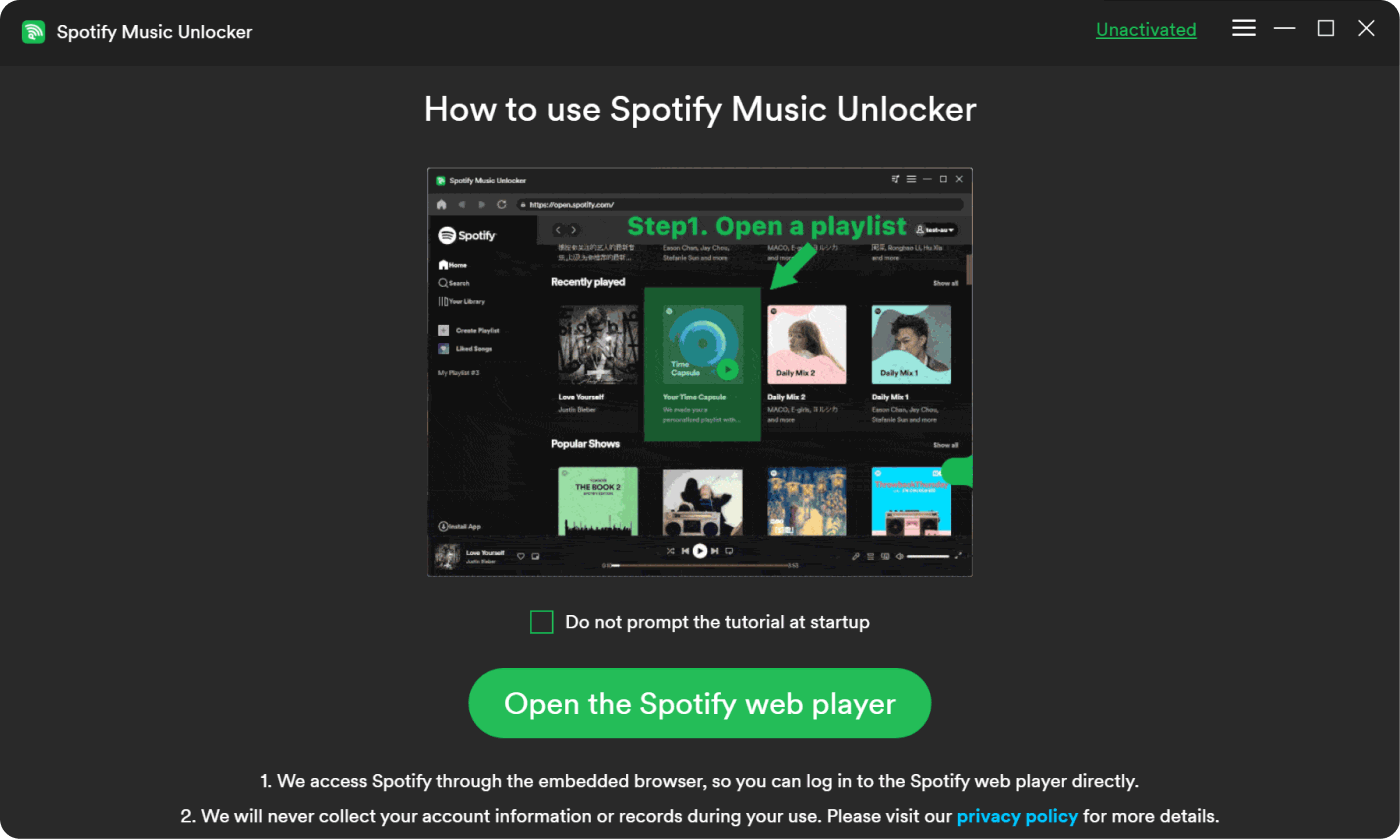
步骤 1。 Open Spotify Music Unlocker and tab on “Open the Spotify web player”.
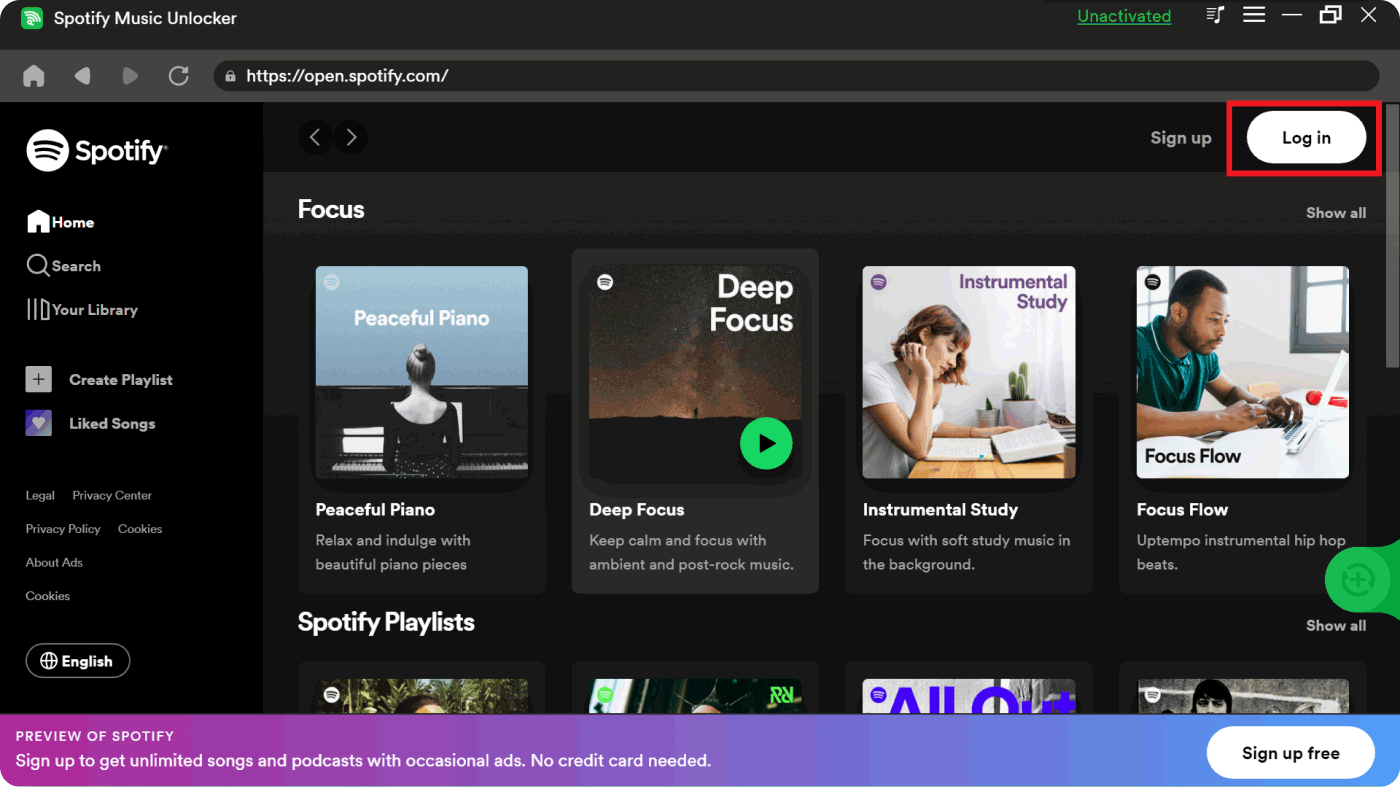
步骤 2。 Click the little man logo in the upper right corner of the window to Sign in to your account. If you don't have an account, click the "Sign up" button to create a new one.
步骤 3。 Choose a playlist or album. If you want to add every song from the album or playlist to the list, click the green "add" button. The album or playlist title can also be dragged onto the green "add" symbol.
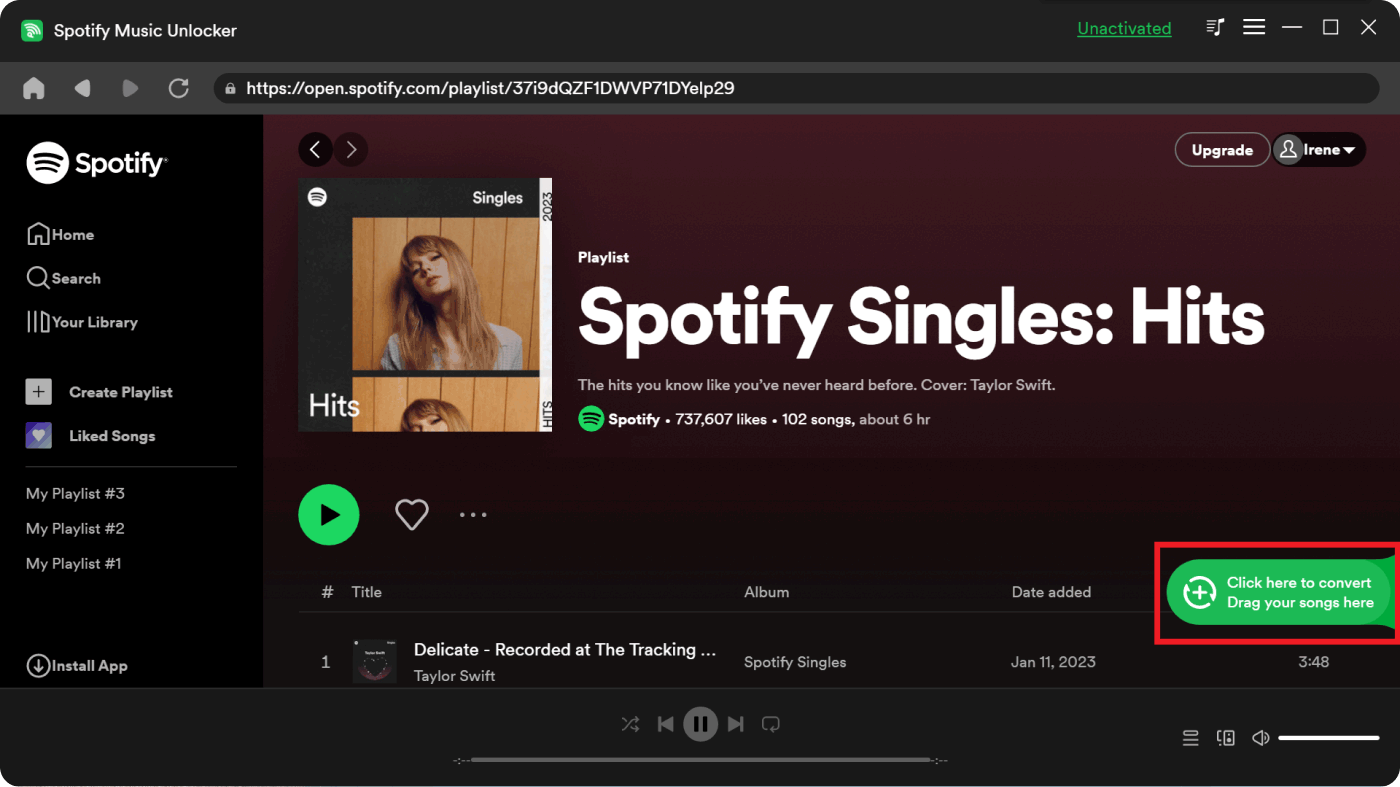
步骤 4。 If you want to convert a single song, then drag its title to the blue icon directly.
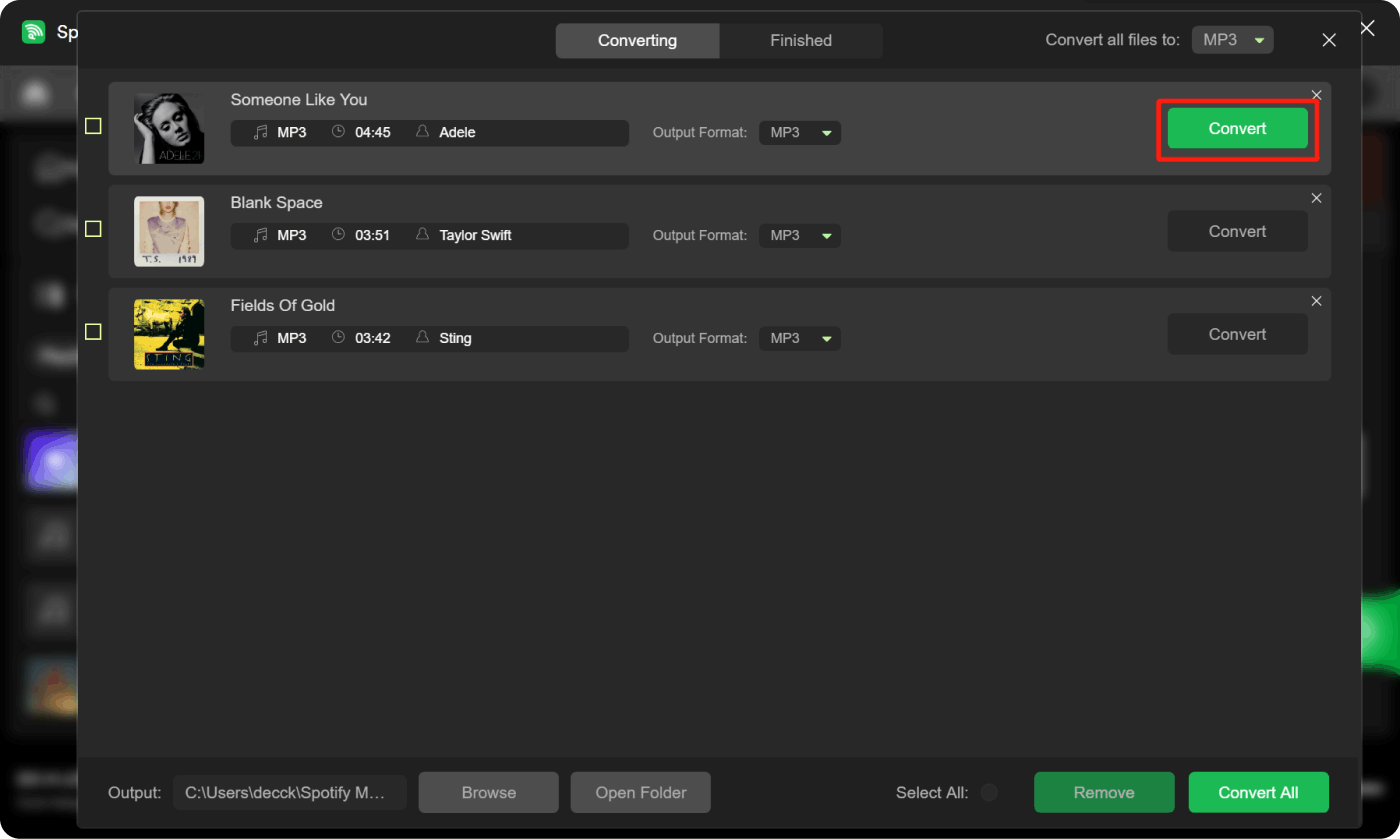
步骤 5。 Choose the desired output format to utilize. You can select FLAC, WAV, M4A, or MP3.
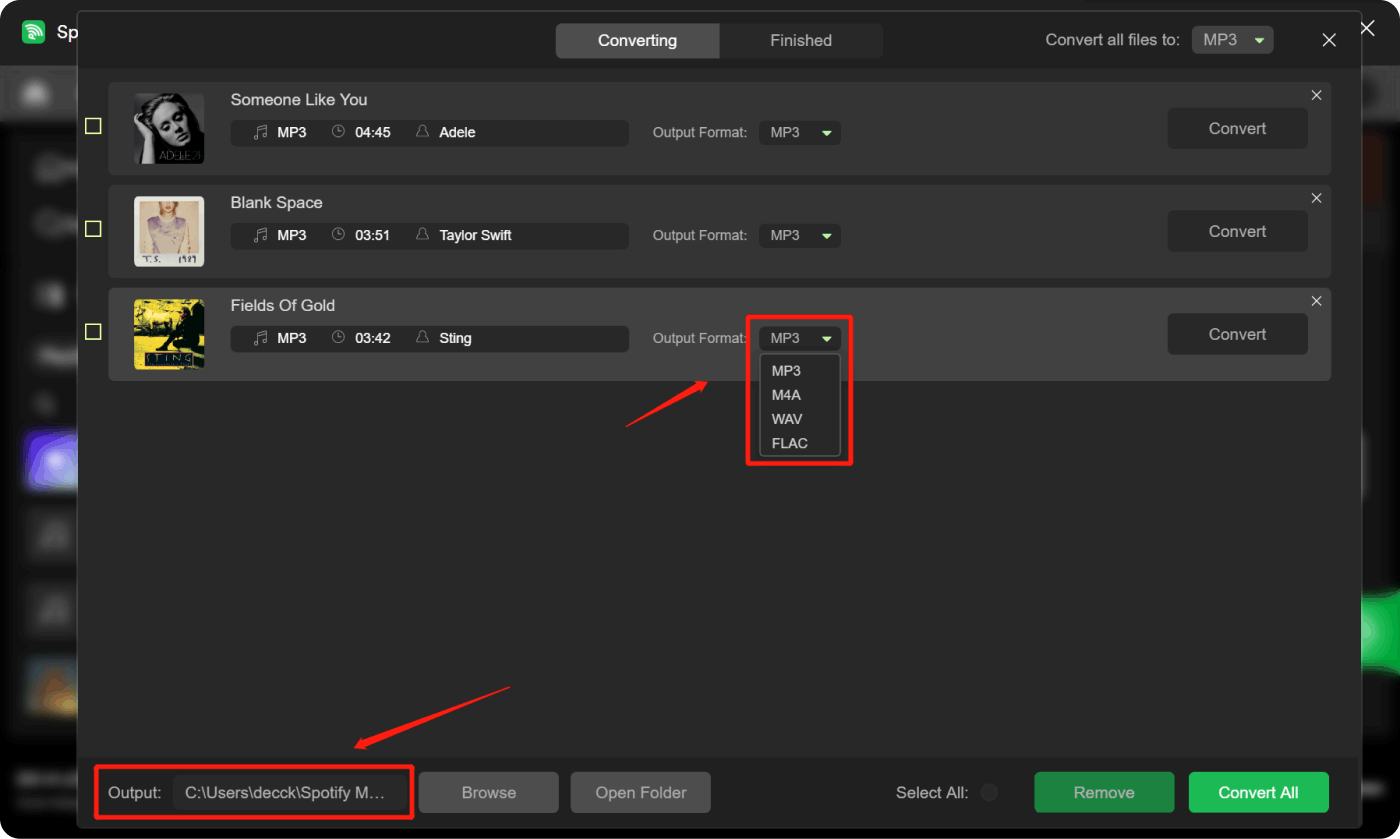
步骤 6。 Click the "Convert" button to start converting the selected songs.
部分5。 概要
Step into a world where sharing music becomes an art form— the best Spotify Code Generator. This post is your ticket to mastering the art of sharing tunes effortlessly. It unveils the magic behind Spotify Codes, those picture-perfect keys to your favorite songs or playlists.
Learn how these codes work—akin to a secret language that bridges music and technology. From creating your own codes to scanning them, it's a journey that turns sharing music into a delightful game.
But wait, there's more! Explore a new route with the Spotify Music Unlocker—a tool that liberates your Spotify tracks, letting you groove offline without missing a beat, even in areas with patchy internet.
In a melody-filled world, these methods ensure your favorite tracks are always close by, whether it's through codes that tell a story or setting your music free for offline bliss.
人们也读 如何用 6 种最佳方法将 Spotify 音乐转换为 MP3 2024 指南:如何在 Spotify 上创建共享播放列表
由罗西撰写
上次更新时间:2024-02-18