


iTunes is definitely one of the most loved apps by many, as it functions not only as a media player but also as a file manager wherein you can keep your media files and access them seamlessly. Syncing playlist from iTunes account to your iPhone or other iOS devices is even easier.
However, it would be a different case if you were an Android user. Directly syncing from iTunes to Android gadgets isn’t permitted. Thus, if you are looking to 将音乐从 iTunes 传输到三星手机 对于各种小工具,你需要寻找有效的方法来实现这一点。
本文将重点介绍几种轻松将 iTunes 音乐传输到三星设备的方法。如果您觉得这很棘手,其实不必担心,我们已经为您准备好了。本文的每个部分都会重点介绍一种将音乐从 iTunes 传输到三星设备的方法。请仔细阅读每种方法,选择最适合您的方法并尝试使用。
内容指南 第一部分:如何通过手动方式将音乐从 iTunes 传输到三星设备第二部分:如何通过 Google Play Music 将 iTunes 中的音乐传输到三星设备第三部分:如何通过 Apple Music 将音乐从 iTunes 传输到三星设备第四部分:如何通过 YouTube Music 将 iTunes 中的音乐传输到三星设备第五部分:如何将受保护的 iTunes 和 Apple Music 文件永久保存到您的三星设备第6部分:摘要
第一部分:如何通过手动方式将音乐从 iTunes 传输到三星设备
As you have already read in the introduction, it is quite a shame to know that direct syncing of content from iTunes to iOS gadgets is easily possible but isn’t on Android devices like Samsung. One of the methods to transfer music from iTunes to Samsung gadgets is to do it manually. In this case, you would need a USB cable. Below are the steps that must be followed.
步骤一:使用 USB 数据线将您的三星设备连接到电脑。然后,找到 iTunes 文件夹所在的位置。
步骤 2. 找到包含要传输的音乐文件的文件夹,然后复制它们。
步骤三:前往三星设备的音乐文件夹,然后粘贴复制的文件。拖放文件也可以。
传输成功后,您现在就可以在三星设备上的其他媒体播放器上收听 iTunes 音乐文件了。
第二部分:如何通过 Google Play Music 将 iTunes 中的音乐传输到三星设备
市面上有很多音乐流媒体平台,它们都以出色的服务而闻名。其中之一就是 Google Play Music。你可能想不到,它还能帮你把 iTunes 里的音乐传输到三星设备上。
Google Play Music 最多可存储 50,000 首音频文件,用户可以在电脑和移动设备(例如手机)上访问这些文件。值得一提的是,它支持 iTunes。如果您想尝试使用 Google Play Music 将音乐从 iTunes 传输到三星设备,以下指南将为您提供便捷的参考。
第一步:在您的三星设备上,从 Google Play 商店安装 Google Play 音乐应用。在您的电脑上也执行相同的操作。
步骤 2. 在电脑上打开 Google Play 音乐应用,然后登录您的 Google 帐户以继续。
步骤 3:要将 iTunes 音乐文件传输到三星设备,必须先将其上传到 Google 音乐管理器。
步骤 4. 上传完成后,iTunes 音乐文件将自动同步到您三星设备上的 Google Play Music 应用。
All you need to do now is launch the Google Play Music app on your Samsung device, sign into your Google account, and then head over to the "My Library" section to finally enjoy listening to the iTunes 音乐文件。
第三部分:如何通过 Apple Music 将音乐从 iTunes 传输到三星设备
Aside from Google Play Music, you may also take advantage of Apple Music to transfer music from iTunes to Samsung gadgets. Though the iTunes app can’t be accessed on Android devices, it is a relief to know that they support the Apple Music app.
使用此方法时,您必须确保电脑上的 iTunes 应用和 Apple Music 应用都使用同一个 Apple ID,以避免同步问题。此外,您必须拥有有效的 Apple Music 订阅。
现在,我们将介绍如何借助 Apple Music 将音乐从 iTunes 传输到三星设备。
步骤一:在电脑上,启动 iTunes 应用。点击“编辑”菜单,然后点击“偏好设置”选项。
步骤二:前往“通用”标签页。找到“iCloud 音乐资料库”选项。请确保此选项已开启。开启后,点击“确定”按钮进行确认并继续。
步骤 3:要手动将音乐文件同步到 iCloud 存储,请按“文件”选项,选择“资料库”,然后选择“更新 iCloud 音乐资料库”菜单。
iTunes音乐库成功同步到iCloud后,您应该可以在三星设备的Apple Music应用“资料库”部分看到这些曲目。现在,您可以随时通过该应用收听这些歌曲。
第四部分:如何通过 YouTube Music 将 iTunes 中的音乐传输到三星设备
You may also try using YouTube Music as an aid to transfer music from iTunes to Samsung gadgets. As with the previous two, YouTube音乐 is supported by Android devices, so using this method should also be effective. The procedure below shows what must be accomplished.
Step #1. Go to YouTube’s website and then log into your account.
步骤二:点击顶部的个人头像。
步骤 3:选择“上传音乐”选项。
步骤 4:查找要上传的 iTunes 音乐文件。
步骤五:浏览并选择要上传到 YouTube Music 的 iTunes 音乐文件。选择后,点击“打开”菜单。
当您在 YouTube Music 音乐库中看到上传的 iTunes 音乐文件后,即可通过三星或其他任何 Android 设备开始欣赏它们!
第五部分:如何将受保护的 iTunes 和 Apple Music 文件永久保存到您的三星设备
Indeed, it is delightful to know that there are numerous ways to transfer music from iTunes to Samsung gadgets. But if you are looking at keeping those iTunes as well as Apple Music files forever accessible and making them flexible enough to be played even on other gadgets, media players, or apps, that would be a separate discussion.
Knowing that some iTunes files as well as Apple Music contents are protected with DRM could be something that would bother most users. Thankfully, tools like 苹果音乐解锁器 are capable enough to 从歌曲中删除 DRM making them playable anywhere. Plus, it has the power to transform the tracks into the most popular formats, like MP3. The conversion process is totally lossless, so worrying about the quality of the output files isn’t needed.
要开始使用 Apple Music Unlocker,请先下载并安装它。之后,必须按照以下步骤操作。
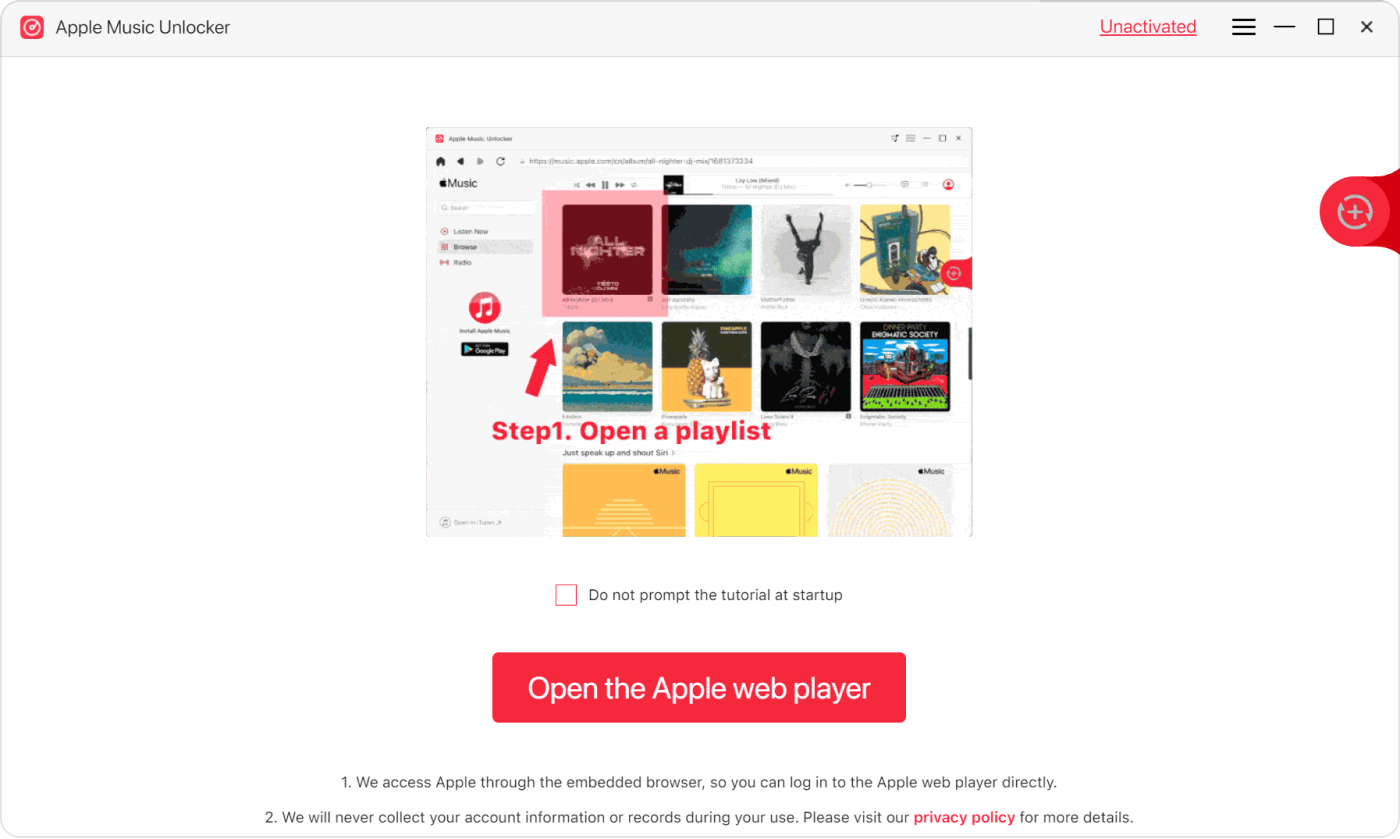
步骤 1. 安装 Apple Music Unlocker 应用后,打开它,然后点击主屏幕上的“打开 Apple 网络播放器”按钮。
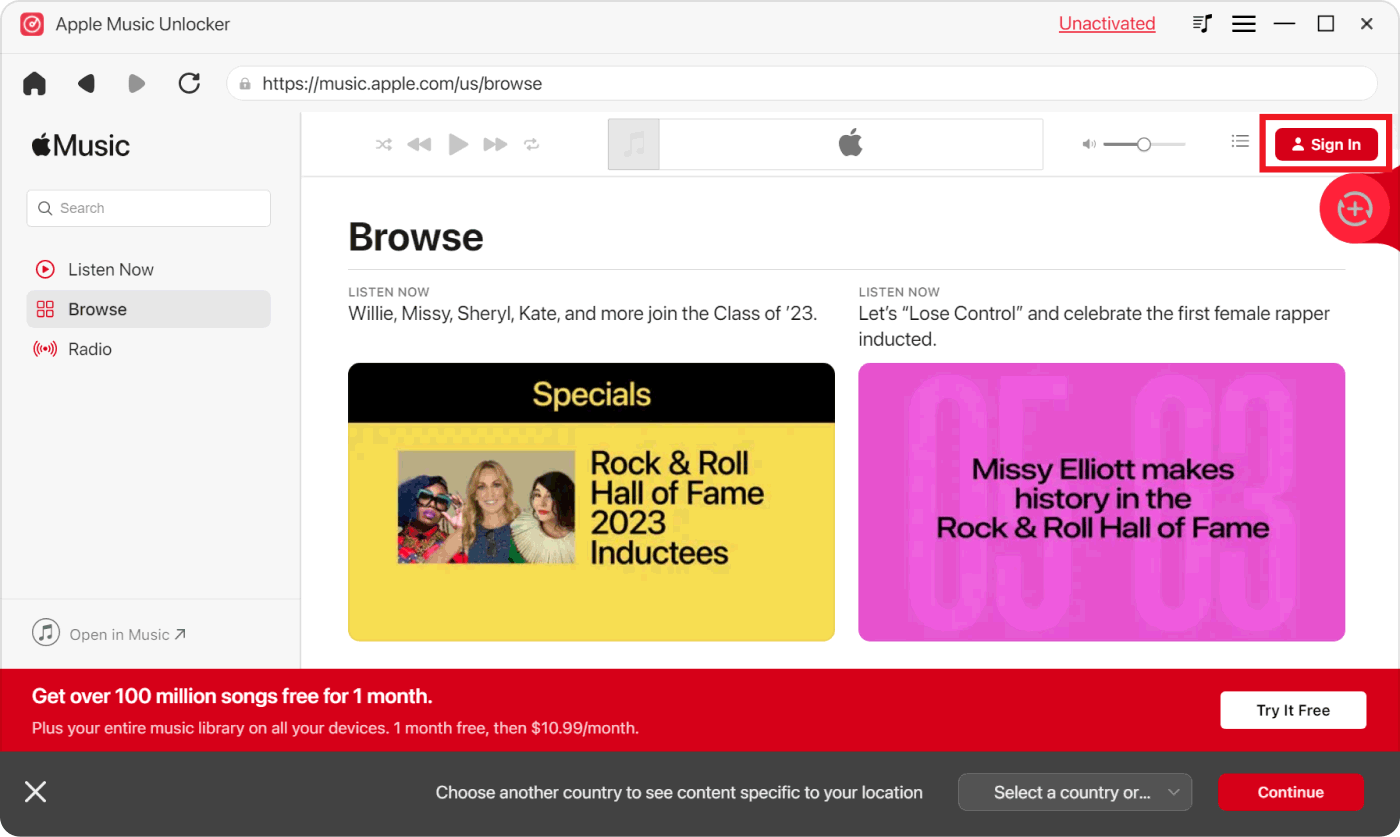
步骤 2. 在新窗口中,按顶部的“登录”按钮登录您的 Apple ID 帐户。
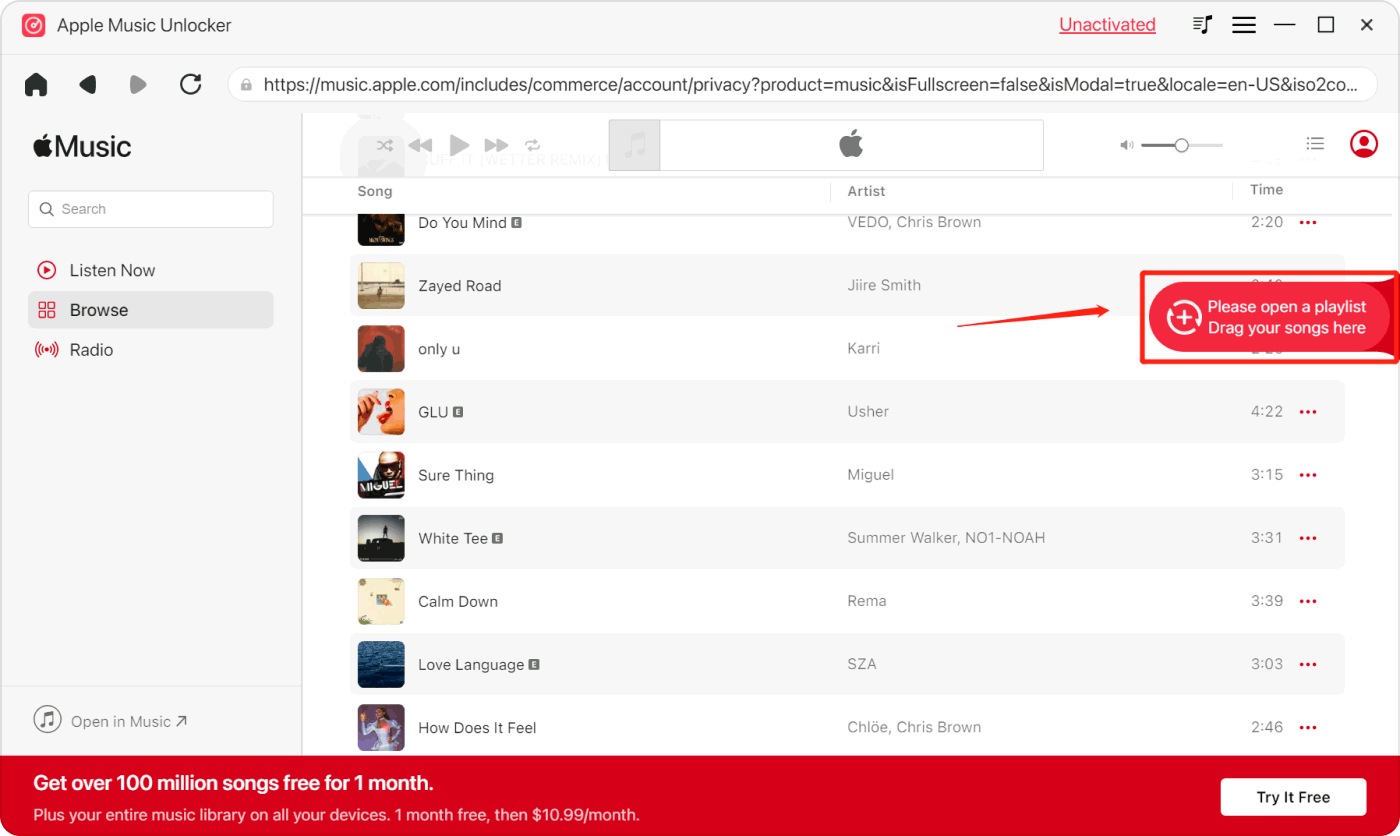
Step #3. Look for the Apple Music content – a song, album, or playlist that you would like to process. Select it and then drag and drop it to the red “add” icon on the side. Clicking on a playlist and tapping the red “add” icon right away will also add the songs in that playlist to the platform.
重复的歌曲不会显示,因为 Apple Music Unlocker 可以检测到它们。
步骤 4:设置输出格式。从可用的输出格式选项中选择您喜欢的格式。如果要在三星设备上播放,建议选择 MP3 格式。此外,您也可以设置要使用的输出文件夹。
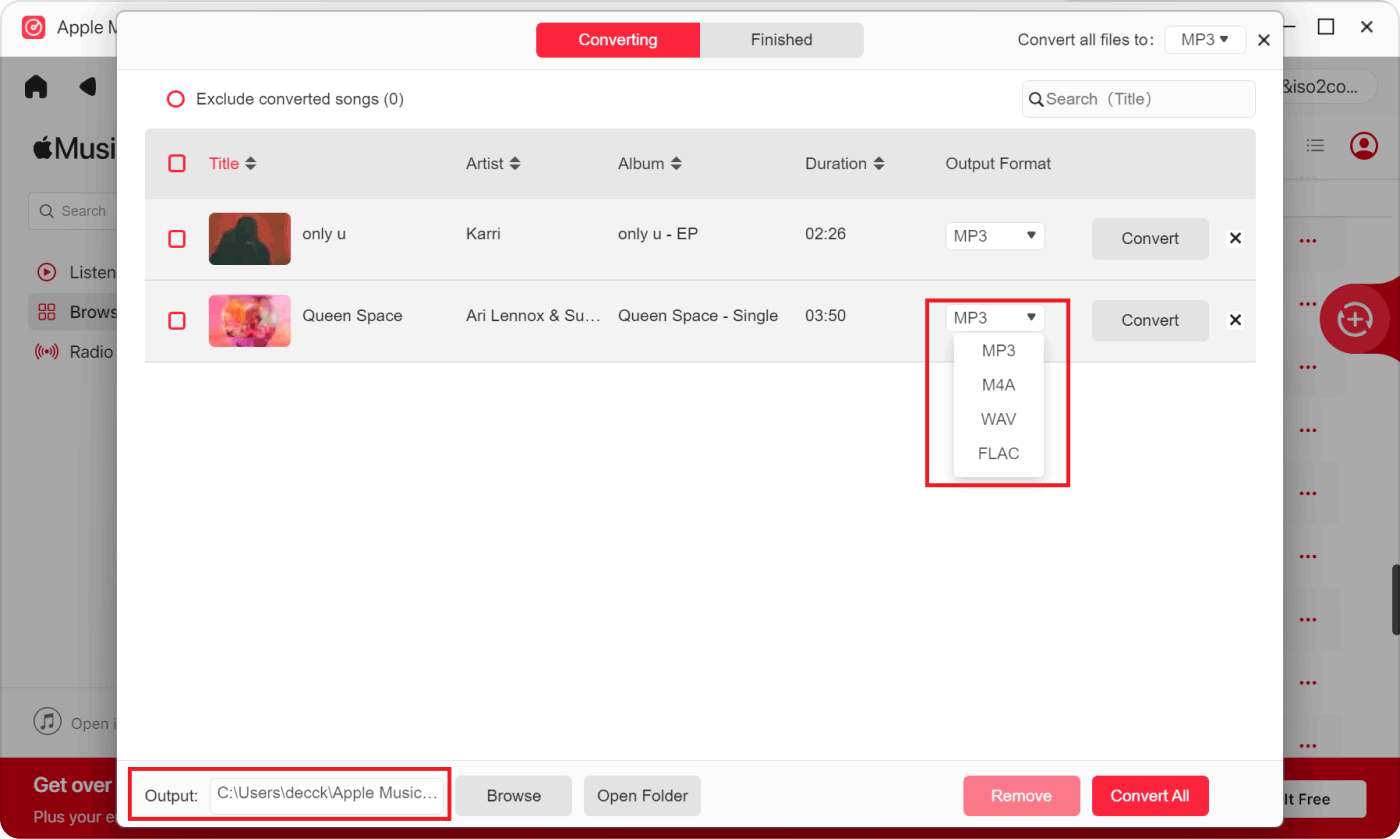
步骤 5. 点击“转换”或“全部转换”按钮后,转换过程将立即开始。
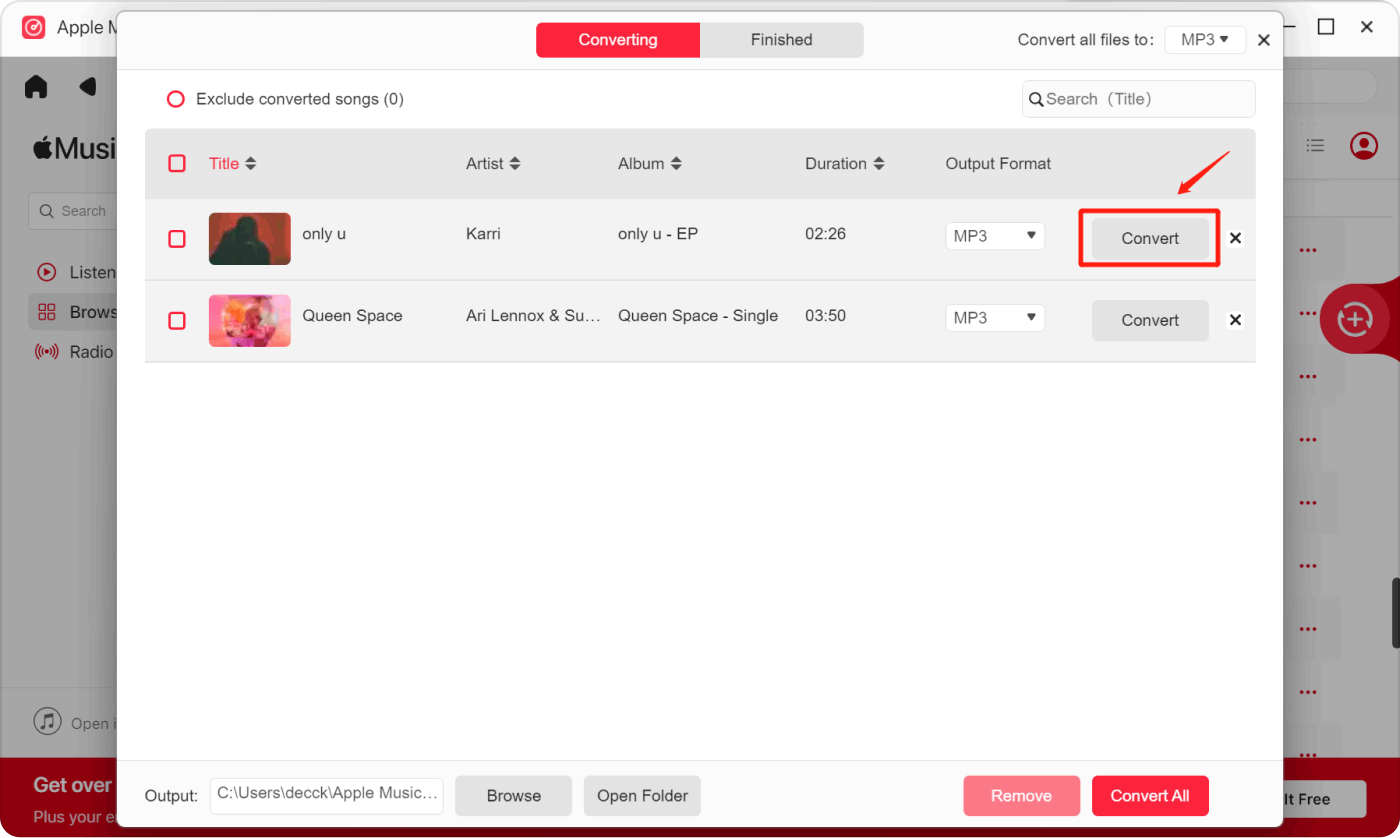
In a few minutes, the unlocked and transformed Apple Music content will now be available and ready to be transferred not only to Samsung devices but also to other gadgets that you’d like to use.
第6部分:摘要
要将 iTunes 中的音乐传输到三星设备,您可以手动操作,也可以使用其他平台,例如 Google Play Music、Apple Music 或 YouTube Music。但是,如果您希望音乐能够永久保存并可在任何设备上访问(而不仅仅是三星设备),建议您使用 Apple Music Unlocker 来下载和转换音乐。
人们也读 最佳指南:将 iTunes 音乐转换为 MP3,随时随地欣赏 2024 年 Apple Music 学生计划综合指南
由罗西撰写
上次更新时间:2023-08-17