


People are often confused about using an unlocked iPhone without SIM card. They thought that they are unable to use the device unless they insert a SIM card. You can use the iPhone, however, you first need to set up and activate the iOS device.
You can set up the iPhone the way you want to. Whether you plan to give it to your child and turn it into a Wi-Fi phone or iPod touch, or simply use it without a SIM card. However, you might be asked for the network details during the activation process.
In this guide, we will cover all the basics that you need to know about how you can make the most of your unlocked iPhone without SIM card!
Part #1: How to Activate and Set Up an Unlocked iPhone Without SIM Card (iOS 11.4 and Higher)Part #2: How to Activate an Unlocked iPhone Without SIM Card (iOS 11.4 and Below)Part #3: How SIM Unlock Your iPhone 第 4 部分:总结
Part #1: How to Activate and Set Up an Unlocked iPhone Without SIM Card (iOS 11.4 and Higher)
Over the years, setting up iOS devices got smoother and easier. You can now activate your iPhone in just a few minutes and even restore your data so you won’t miss a beat.
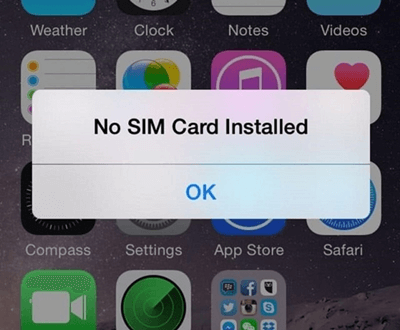
The good news is, iOS 11.4 and later versions easily let you dismiss the No SIM card notification and head over to activate your iPhone without SIM. Follow these tips and tricks:
- 按 电力 按钮, Slide right 发起 设置过程
- Manually set up the next screens accordingly such as the Language and Country
- 选择你 无线网络 并提供 密码
- 敲打 OK to dismiss the “No SIM Card” pop-up
- 同意 to the following terms and conditions under Apple’s Data & Privacy.
- Next is to set up the 触摸ID or you can also tap on 设置 后来。
- 创建自己的 Lock Screen passcode
- 从我们的数据库中通过 UL Prospector 平台选择 设置为新iPhone on 应用和数据 屏幕或 Restore from your iTunes or iCloud backups
- Enter your Apple ID and Password. Create an account if you don’t have one yet.
That’s it! You can now enjoy using your newly unlocked iPhone without the SIM card. Of course, you won’t be able to make calls and texts with it but who’s still doing these when you have Wi-Fi all over your place?
If in case you want to insert a SIM卡 in the future, simply place it in the SIM card tray and your iPhone will automatically scan and connect to your carrier as long as your iOS device is carrier or SIM unlocked.
Part #2: How to Activate an Unlocked iPhone Without SIM Card (iOS 11.4 and Below)
Those who are still using iOS 11.4 and below may need to delve deeper into these processes in order to use their iPhones without SIM cards. You cannot proceed to activate your device unless you have a working SIM card inserted into your phone.
We have gathered a few workarounds so you can choose which method is best.
2.1 Borrow a SIM Card
Perhaps this is the quickest way to activate and set up your iPhone. You can use someone else’s SIM card just to complete the activation part.
- 插页 the borrowed SIM card into the tray
- 打开 你的iPhone
- 完成 设置 和 激活 工艺
- 删除 the SIM card and return it
- Start using your iPhone
Pretty easy, right? In the event that you haven’t done any SIM unlock yet, then you got to make sure that the SIM card you borrowed has the same network that your iPhone is locked in.
2.2 Use iTunes to Activate an Unlocked iPhone Without SIM Card
This option is perfect for those who don’t have a SIM card and Wi-Fi access. iTunes allows you to activate an iPhone especially if you are using 11.4 and below versions. Follow these steps on how to perform this method:
- 连接 your iPhone to the computer via USB cable
- 启动iTunes
- Follow the onscreen instructions on what you should do and the details you need to activate your iPhone
- 等待过程完成
Once your iPhone is activated, you will be able to use it smoothly apart from the basic call and text functions.
2.3 Jailbreak iPhone to Activate Without a SIM Card
Many users turn to jailbreaking their iPhones especially when it is carrier-locked. Jailbreaking an iPhone unlocks all the restrictions set by Apple and lets you modify it according to your needs and wants. However, jailbreaking might devoid your warranty, so you should consider this in case you are planning to do it sooner for a feature-perfect iPhone.
You can also jailbreak your iPhone in case you are unable to activate an unlocked iPhone without SIM card. Again, we do not directly recommend this method unless you have exhausted other means.
Part #3: How SIM Unlock Your iPhone
Expect unlocked iPhone without SIM, if you received a network-locked iPhone, you can always contact the carrier’s customer support to unlock your device. They will be able to unlock your iPhone by giving you a code and this process usually takes a few days or a week to be completed.
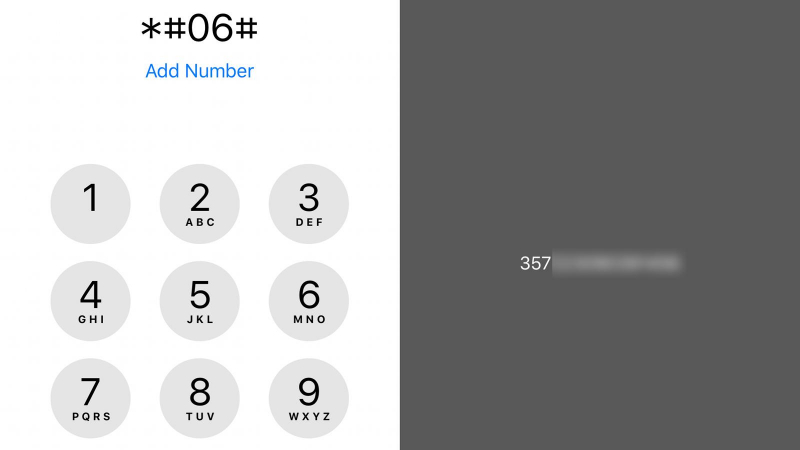
You will be asked to provide certain device details including your IMEI号码 which can be easily seen in your Settings and under About Phone. Another option is to dial *#06# on your dial pad and a bunch of numbers will appear.
人们也读免费修复SIM网络解锁PIN码,解锁您的手机如何在没有SIM卡的情况下检查iPhone是否已解锁
第 4 部分:总结
使用一年 unlocked iPhone without SIM card is easy. It only requires you to complete the activation and setup screen and dismiss the No SIM Card popup. If you are using an older iOS version, you can also go over the different methods we mentioned above on how to activate your device.
If your iPhone is still carrier-locked, you first need to call your service provider and request for unlocking. Once they have successfully unlocked your device, you can opt to use it with and without the SIM card.
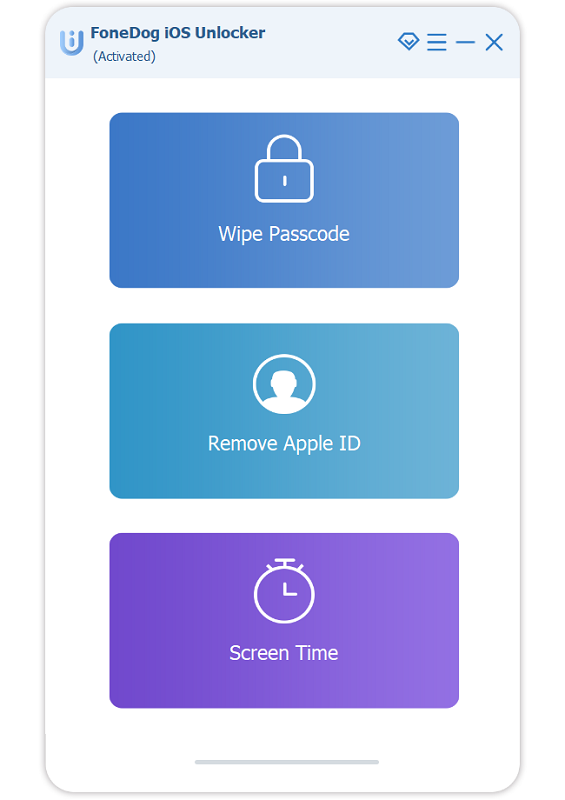
However, if you need a different kind of unlocking such as forgetting your passcode or Apple ID, you can look for iOS解锁. This software offers an easier approach to unlocking iOS devices quickly and efficiently.
iOS Unlocker has three main unlocking features, Wipe Passcode, Remove Apple ID, and Remove or Restore Screen Time Restrictions. All these features are important especially if you are always on the go and need reliable software that can keep up.
What kind of unlocking do you need? Try iOS Unlocker now!
由罗西撰写
上次更新时间:2022-01-27