


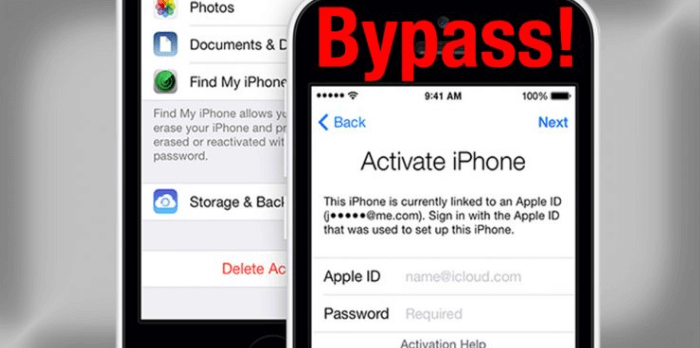
There can be a lot of reasons why someone would resort to knowing the process of how to bypass Apple ID. If you have bought a second-hand phone and the previous owner is not around anymore, and you cannot access the device, it is when you look for ways how to bypass the Apple ID. It could also happen that you have forgotten your passcode on your iPhone and you have tried so many options until the phone was locked, and the only thing that you must do to access it is to bypass the Apple ID.
In this article, there is no room for your feet getting cold, or your hands being shaken up, there are always solutions to these things and we just have to figure out the dilemma well. Here, we will give you a tour of the proper and strategic ways to bypass Apple ID so that you can still be able to access your device and continue with your normal life as it is. Let us begin!
第一部分:糟糕!我的 Apple ID 被鎖定了!Part #2: What Should We Do to Bypass Apple ID?Part #3: How to Bypass Apple ID Using A Third-Party Tool?第四部分:總結全文
第一部分:糟糕!我的 Apple ID 被鎖定了!
Before learning about the methods to bypass Apple ID, it's necessary to figure out the reasons why your Apple ID got locked. When you are in a rush or when you have a lot of things on your mind, there can be a time that you occasionally forget some passwords, and it would only be difficult to resolve if the situation has been crucial.
If you are an Apple user ever since you would know that it is very important to have your 蘋果ID intact as it is the identification of your Apple device or your Apple account. When you have forgotten your Apple ID there is no way that you can be able to access Apple services such as iCloud, App Store, FaceTime, and even Apple Support which is considered one of the most important.
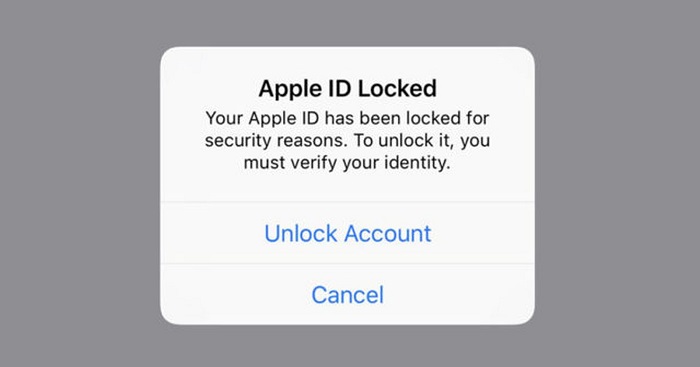
如果您的 Apple ID 被鎖定,很可能是因為您多次嘗試輸入您認為合適的密碼。然而,由於您記不住正確的密碼,Apple ID 被鎖定了。這是 Apple 裝置的安全功能,旨在鎖定您的 Apple ID,以防止未經授權的交易,確保只有合法所有者才能存取其 Apple 裝置上的各項功能。
- 您的網路連線出現問題,Apple ID 處理無法繼續。
- 您使用的 iOS 裝置中啟用了一些限制。
- The Apple services are really down, and there is no way that your Apple ID can be active again until the servers are up.
- 您的 iCloud 正在從備份中還原應用程式。
- 您正在使用的蘋果設備(iPad、iPod 或 iPhone)有可能受到監控。
Part #2: What Should We Do to Bypass Apple ID?
And if your Apple ID got locked and you cannot access it anymore you have to bypass the Apple ID so that you can use your device. There are some tools that we can use in case we have to bypass the Apple ID to use our iDevices. We will have the list of the tools and methods that we can try, and see if they can be possible solutions in case our devices get locked.
iCloud的
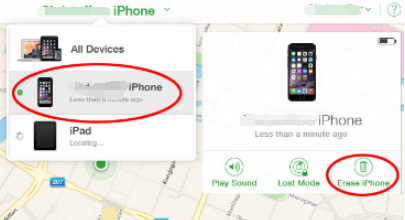
One of the tools that we can use which is commonly installed on iPhone or Apple devices is the iCloud. You can use it to bypass the Apple ID, however, you must contact the previous owner of the device as there are details needed to be able to proceed. The previous owner can provide the username and the password that you can use to bypass Apple ID. Here’s what you have to do:
- Launch the web browser on your device and go to icloud.com. You have to sign in using your Apple ID username as well as the password. And then go tap “查找iPhone “。
- Once you have opened the iCloud, you have to tap “所有設備 “。
- Then you have to choose the model as well as the name of the device that you wanted to bypass. You have to tap “擦除iPhone ” or iPad if you are using an iPad and then click “從帳戶中刪除 “。
Once you are done with the said steps, the device that you have chosen will be deleted from your Apple ID, and then bypass Apple ID.
DNS
You can also use DNS to bypass Apple ID, let us take a look at the steps that you have to do if you opted to use DNS.
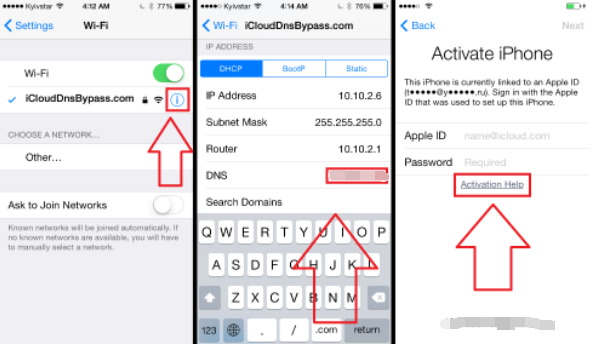
- The initial step that you have to do is to restart your iDevice, and then select the country and also the language, and then you have to enter the DNS server that you will use, it must be a new one, samples of these servers are:
- 歐洲:104.155.28.90
- USA/ North America: 104.154.51.7
- 亞洲:104.155.220.58
- DNS of the rest of the world: 78.109.17.60
- 然後點擊“返回 ”, and you have to connect your device to the Wi-fi network, and then tap “唐 e”, and then click “激活幫助 ”. Once you have successfully connected the device, you will receive a message that it is successfully connected to the server.
- 然後你必須點擊“選項 ”, and then have a preview of the apps that are available and then you have to choose a thing or option that you can verify from the previous owner of the device.
Permanently Bypass Your Apple ID
For the third method, we will teach you how to bypass Apple ID permanently. If you have opted to use DNS you should know that it is just a temporary solution, here’s how you do it permanently.
- 點擊“選項 ”, then go to “應用 ”,然後點擊“Crash ”, if you have followed it right, your device will restart.
- Then you have to choose the language, and also the country, and then click the “首頁 ” button then select “更多Wi-Fi設定 ”, and then click the “I ” symbol which you will see beside the Wi-Fi network. You then have to go down and tap the “選項 “。
- You have to clear the address bar and then tap “地球 ”, and then you have to type random numbers from 15-30 that you will see in the “Port Zone ”, and then you have to click “返回 ”, and select the “Next Option ”. Then you will see the language option and also the unlock screen, it will appear repeatedly. You just have to unlock the device, and then click the options for language and you just have to stop until you are able to see the “首頁 “ 屏幕。
Part #3: How to Bypass Apple ID Using A Third-Party Tool?
Now that we already have an idea of some methods and tools on how to bypass Apple ID, we will now discuss a third-party tool that we can use in case all the previous methods and tools failed. This time, if we use the iOS解鎖, we are definite that the result will be good and useful.
It is a powerful tool that can help you unlock your iPad or iPhone through the process of erasing your passcode. Aside from the deleting passcode, you can also use it to erase the Apple ID without using a password on your device and also get rid of your password with regards to “Screen Time”. This tool is compatible with both Mac and Windows computers, and it has a very easy-to-understand user interface.
Once you have decided to use the iOS Unlocker, there are things that you have to put into mind first.
- Once you proceed with the process, all the data that are present on your device will be deleted, so you must have backup data.
- When you proceed with the process, the operating system of your device will be updated to the latest version.
- You have to make sure that your device is connected to a computer before you bypass the Apple ID.
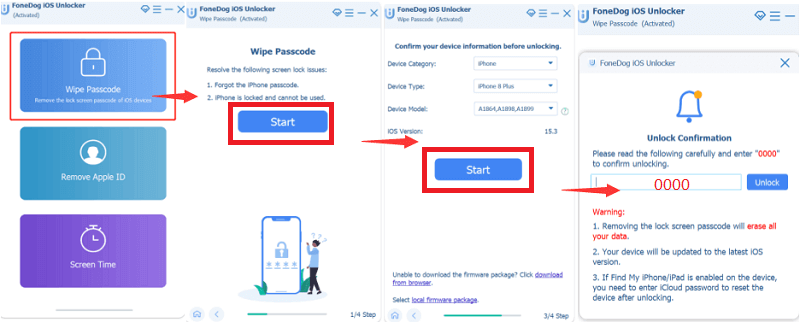
Let us see the steps on how to bypass Apple ID using the iOS Unlocker.
- Launch the iOS Unlocker on your personal computer, and tap “清除密碼 “。
- 點擊“開始 ” then connect your device to the computer via cable.
- Confirm all the details that you will see, and then tap “開始 “。
- The downloading of the firmware package will commence, and then you have to tap “開鎖 ”, and type “0000 ”. After some minutes, you can now be able to access your device.
人們也讀如何在沒有 iTunes 的情況下解鎖已禁用的 iPad(2023 年指南)解鎖舊款 iPhone 的最佳方法
第四部分:總結全文
We hope that you have learned the proper things to do prior to the process of bypassing your Apple ID. We also have shared important notes that you should take into mind so that you can still protect the data that are present in your device before you bypass Apple ID.
羅西(Rosie)撰寫
上次更新時間:2022-06-02