


Apple FairPlay, developed by Apple company, is a family of DRM technology to protect the videos, iBooks, music and apps from being copied. Generally, DRM-protected files cannot be played on unapproved Apple programs or devices. However, there are some ways to solve this issue by Apple Music에서 DRM 제거. In our article, we provide some tips for Apple FairPlay DRM removal 당신이 시도해보십시오.
컨텐츠 가이드 1 부. Apple FairPlay DRM이란 무엇입니까?Part 2. The Best Apple FairPlay DRM Removal3 부. 개요
1 부. Apple FairPlay DRM이란 무엇입니까?
Apple's FairPlay DRM is like a digital bouncer made by Apple Inc. It's there to make sure digital stuff you get or rent from Apple's iTunes Store or App Store is used the right way. It's like having a guardian for your online goodies!
FairPlay DRM is a bit like a special lock for digital stuff, and only Apple devices, like iPhones, iPads, iPods, and Apple TVs, with the right keys, can open and play the content. It's like having a secret code to keep people from copying or sharing things without permission. This way, the folks who made the content are protected.
FairPlay DRM is like a guardian for content, but it has rules that might feel a bit limiting. It says you can only watch stuff on certain devices and platforms, like Apple gadgets or using Apple's special software.
It's worth noting that as technology evolves, DRM systems may undergo updates or changes. Therefore, for the most current information on Apple FairPlay DRM, it's recommended to check Apple's official documentation or announcements. Before talking about Apple FairPlay DRM Removal, let’s understand some of its features first.
Key Features of FairPlay:
- 애플 에어플레이 지원
- DRM-supported hardware
- Supports download and playback offline
Pros of Apple FairPlay DRM:
- Content protection. FairPlay DRM protects intellectual property rights of the content creators.
- Encourages Content Creation. Creators may be more willing to create high-quality content if they believe their work is protected.
- Revenue Protection. For content creators, Apple Music FairPlay DRM can protect their revenue by decreasing piracy.
Cons of Apple FairPlay DRM:
- Can’t use everywhere. You may not be able to use it on some of your gadgets, if you purchase things with Apple FairPlay.
- Can’t avoid piracy. Although Apple Music FairPlay are protected by DRM, Apple FairPlay DRM doesn't guarantee absolute security. determined hackers may still find alternative methods to obtain copies of the protected media files.
- Only Works with Apple Friends. FairPlay mostly hangs out with Apple devices. If you want to use your stuff on other gadgets, it's like trying to get your cat to play fetch—it might not work so well.
- Not Always Easy. Sometimes, FairPlay makes it tricky for regular people. It's like having a puzzle to solve just to listen to your favorite song.
So, even though FairPlay tries to be a strong guard for your media, there's always a chance that really smart people might find a way to outsmart it. It's like a race between those who build the locks and those who try to pick them.
Part 2. The Best Apple FairPlay DRM Removal
For the removal of FairPlay DRM from Apple Music, a reliable choice is 애플 뮤직 언락커. This software provides the means to eliminate FairPlay DRM and convert the tracks into unprotected MP3, FLAC, M4A, and WAV formats. Its compatibility with the official Apple Music web player ensures a smooth process of DRM removal, all without the requirement of iTunes installation.
Here are some features of Apple Music Unlocker:
- Enjoy Your Music Anywhere: Turn all your songs into easy-to-play formats like MP3, M4A, FLAC, and others. Play them on any device, forever, even if your subscription runs out.
- Unlock Your Apple Music: No more stuck tracks! Free your Apple Music, iTunes buys, audiobooks, and even Audible files from their digital chains.
- Keep Quality Intact: Maintain your music's clear sound with all the details. Adjust settings like bitrate for the best listening experience.
- One Player, Many Devices: Forget about family plan restrictions. Share your unlocked music on multiple devices – iPhones, Apple Watches, iPods, MP3 players, even Kindle Fires – all without needing an internet connection.
다음 단계는 다음과 같습니다
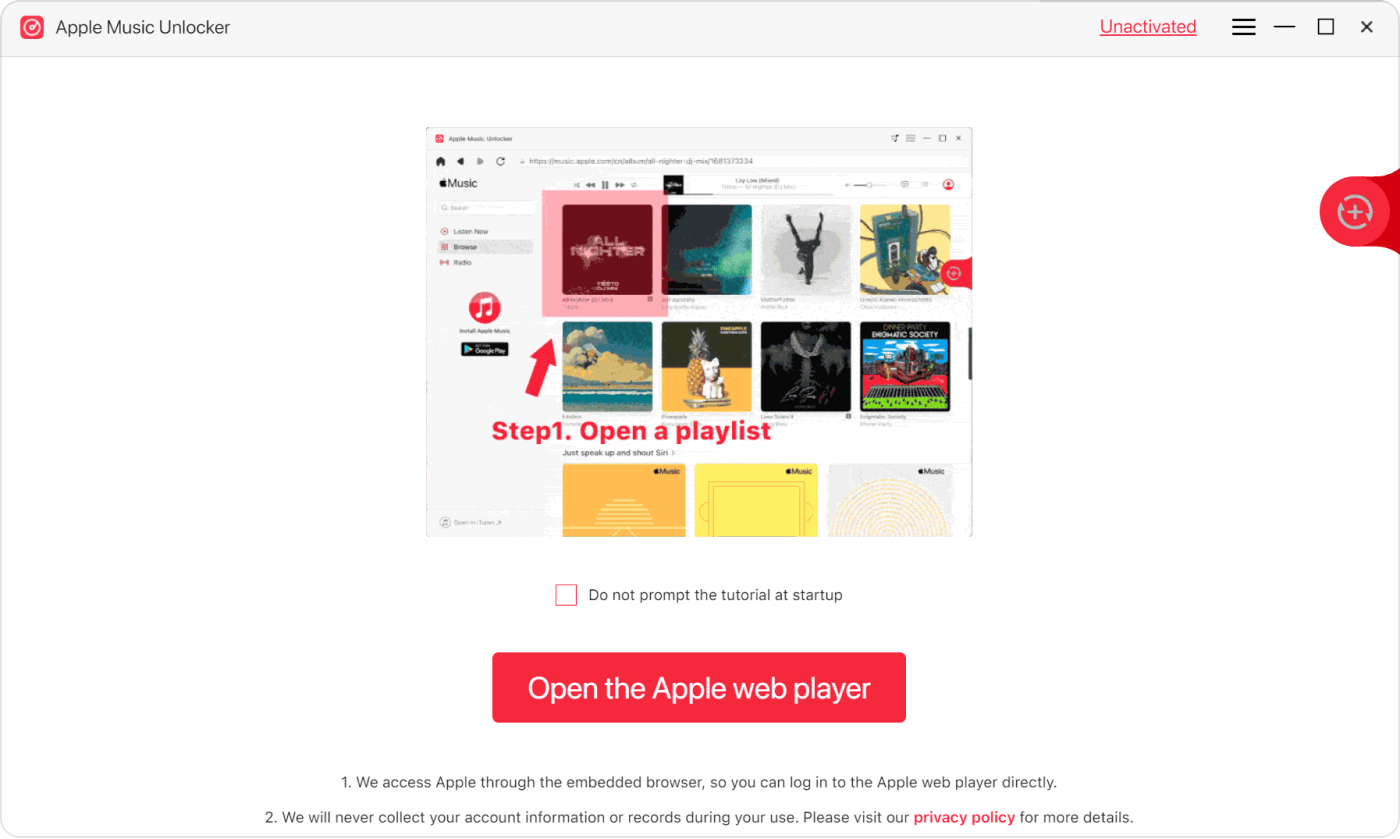
1. Download and install Apple Music Unlocker, and once the installation is complete, launch the application. Click on the inviting option to “Open the Apple web player.”
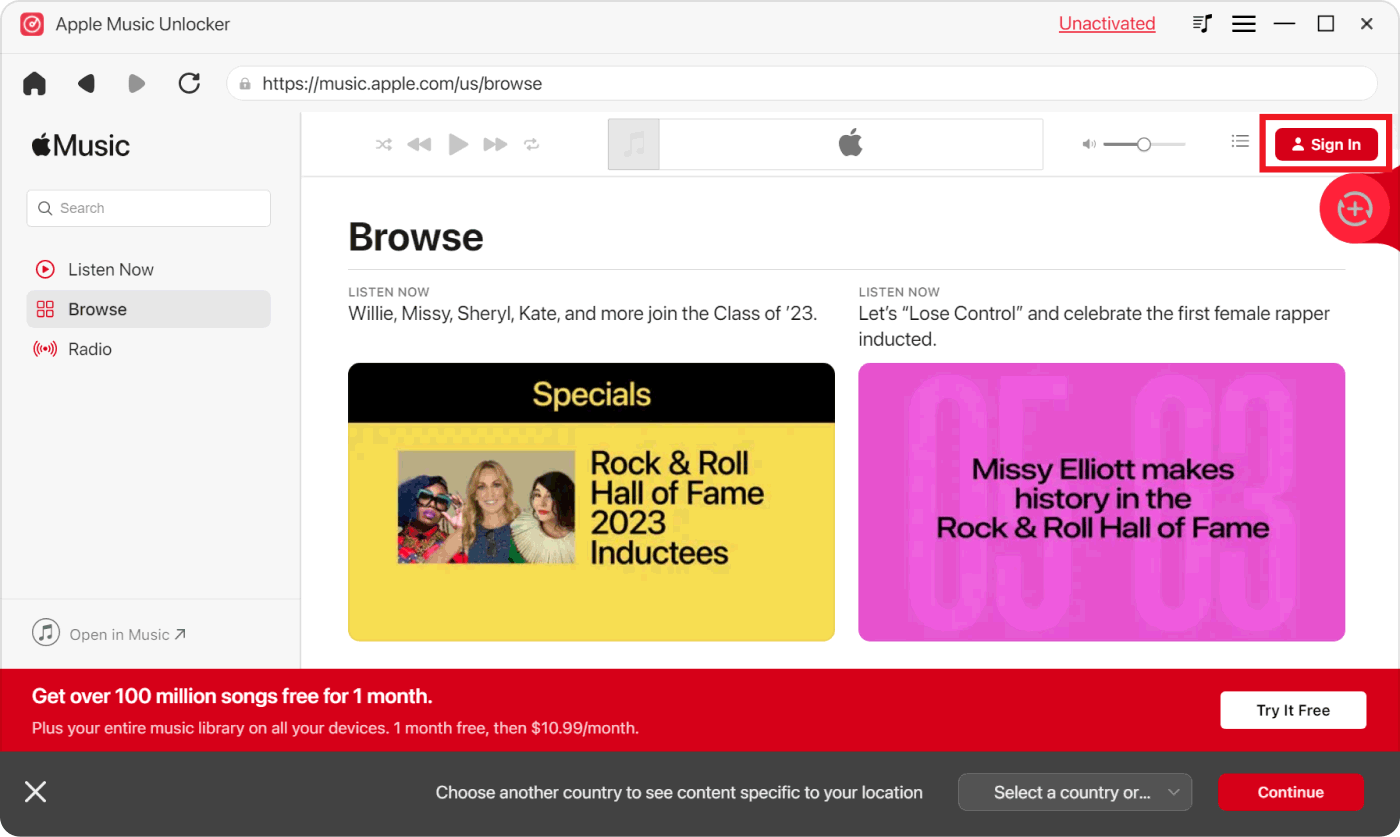
2. Navigate to the upper right corner and locate the "Sign in" option. Click on it, and enter your Apple ID information securely. Rest assured, your privacy is a top priority, and no personal details are stored.
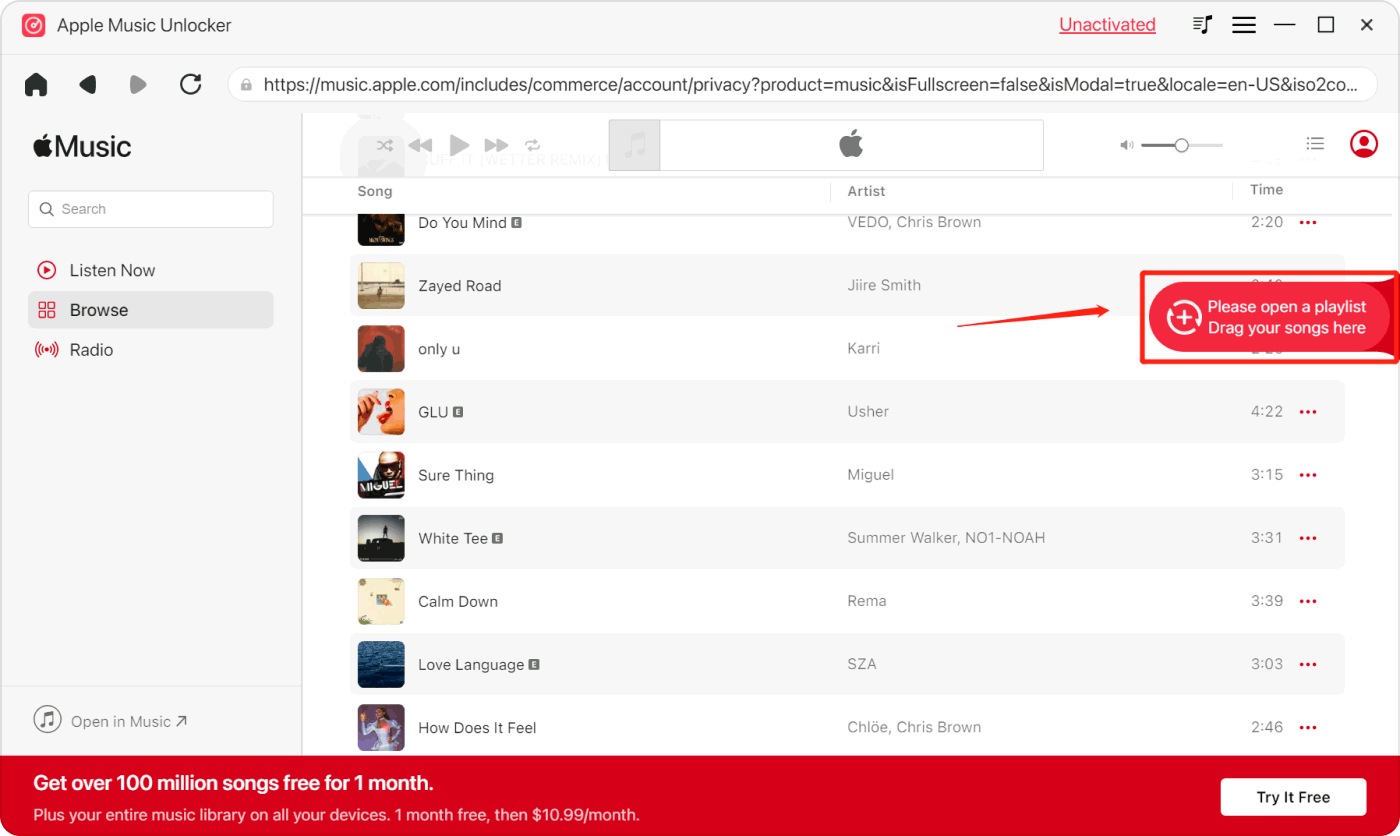
3. Open your music library and select your favorite songs. Drag them over to the red add icon, making the process of adding tracks both simple and enjoyable.
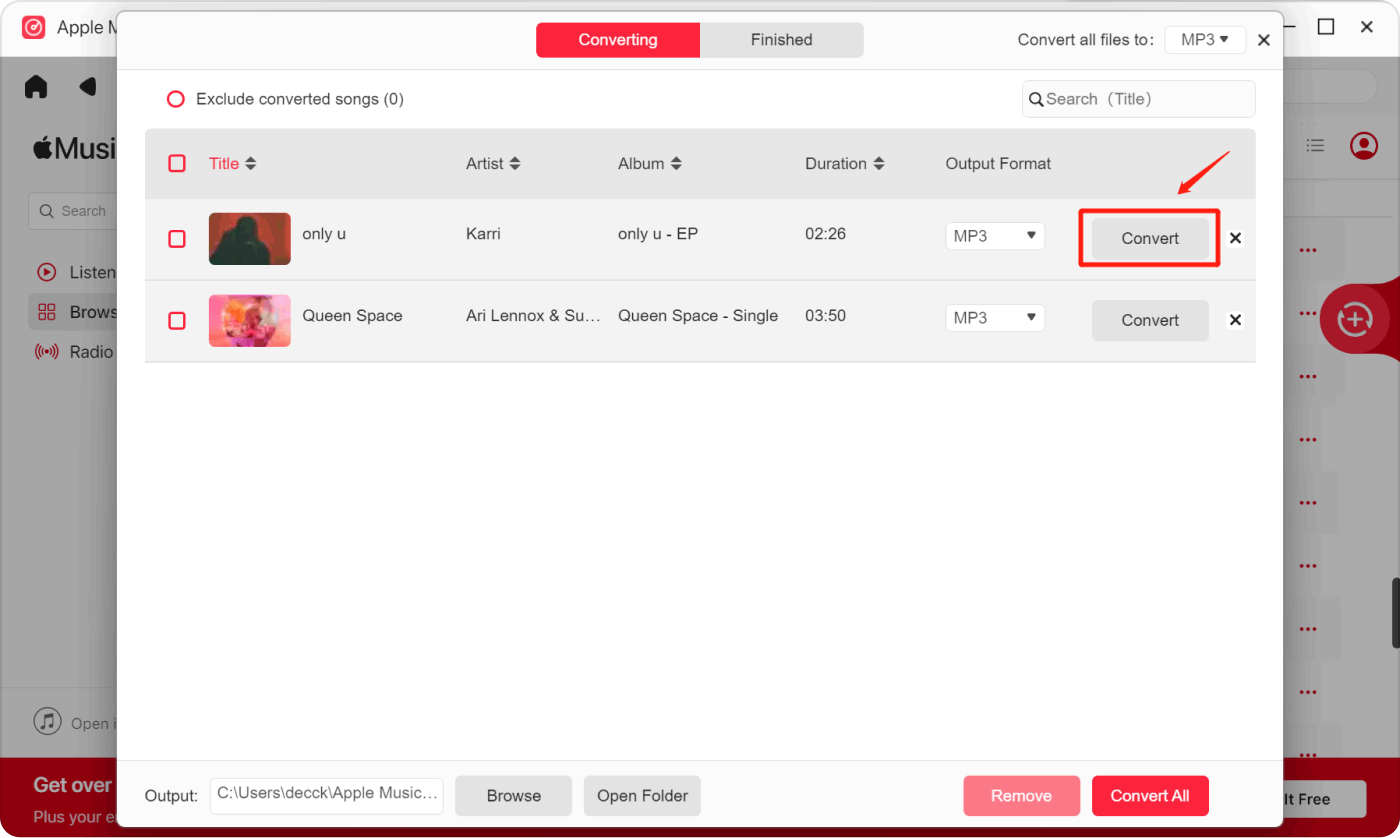
4. Select the output formats such as MP3, M4A, WAV, or FLAC. Whether it's the classic MP3, high-quality M4A, versatile WAV, or lossless FLAC, the choice is yours.
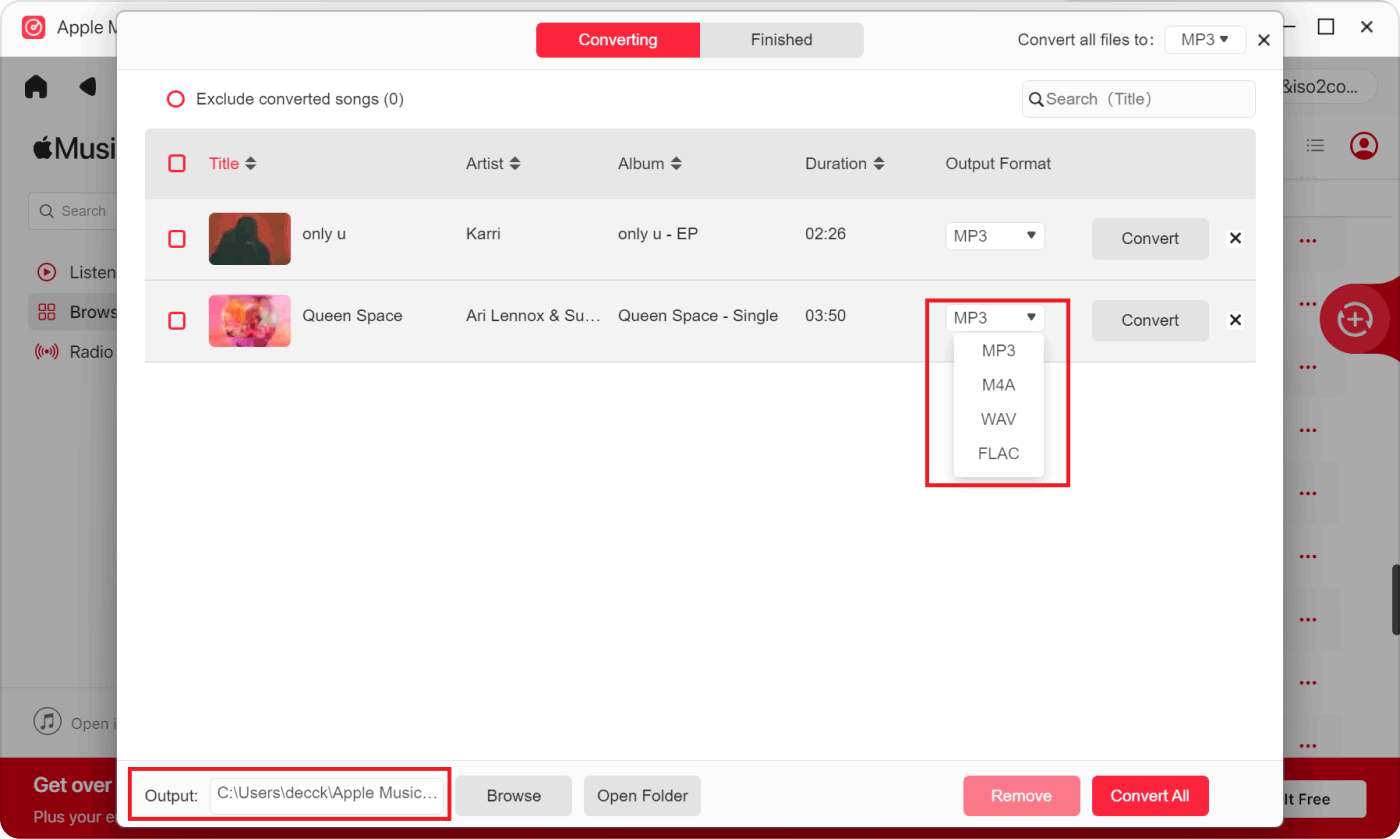
5. Convert the tracks by clicking “Convert” for individual songs or “Convert All” for all chosen songs.
3 부. 개요
Let's dive into the world of digital content protection, where Apple FairPlay DRM acts as a trusty guard, keeping videos, iBooks, music, and apps safe from being copied without permission. Picture FairPlay DRM as your digital bouncer, making sure creators' hard work stays protected, though it does have a few rules that might cramp your style.
In this ever-changing tech world, it's crucial to stay in the loop about updates in DRM systems. As we take a closer look at FairPlay, we see it playing a dual role – protecting content while also setting some boundaries for users. Despite its best efforts, crafty hackers sometimes manage to outsmart FairPlay, turning it into a constant race between those building locks and those trying to pick them.
Now, getting practical, let's talk about Apple Music Unlocker. Think of it as your friendly neighborhood superhero for Apple FairPlay DRM removal. This tool lets you break free from the digital chains on your Apple Music, iTunes buys, and audiobooks, turning them into easy-to-use formats. It's like giving your music a passport to travel seamlessly across different devices.
Apple Music Unlocker is all about compatibility, quality preservation, and simplicity, making the journey from locked to liberated music a breeze for everyone. Follow the step-by-step guide, and you'll be enjoying your music on various devices without missing a beat.
사람들은 또한 읽습니다 iTunes 파일을 MP3로 변환하는 방법? 2024년 기준 단계별 가이드 2024년 유튜브에서 애플 뮤직으로 노래를 옮기는 방법
Rosie 작성
최종 업데이트 : 2024 년 03 월 12 일