


당신이해야 할 몇 가지 이유가 있습니다 change iTunes store Email. At times, you may not be able to access the Email yet; that is what is registered in the iTunes account. Moreover, as your business grows, you want to differentiate your account from your business account.
To organize your online content, changing your Email to accommodate this new move is essential. Besides, there is no harm in running multiple accounts on the same device, as long as you know how to maneuver, you are at liberty to do so if that will make you more organized and professional. So be it. What options are available for this assignment?
Part #1: What Is iTunes Store Email?Part #2: The Best Option to Change iTunes Store Email - iOS UnlockerPart #3: Other Options You Can Consider4부: 결론
Part #1: What Is iTunes Store Email?
Among all the digital device manufacturers, Apple takes the lead as the best developer who takes care of the user's security. Their devices have excellent security features that even allow you to track and operate your device from a remote location. They do this using the Apple ID function. This authentication and verification feature identifies the user for it has all personal information. It uses an Email and a password.
On the other hand, iTunes is also an Apple-based application renowned as a music player, but it's also a security protocol. When you want to change iTunes store Email, you have more than enough options you can explore. Could you have a look at some of them?
Part #2: The Best Option to Change iTunes Store Email - iOS Unlocker
The iOS 언 락커 is a third-party application renowned as a savior in unlock functions, just as the name suggests. The simple toolkit runs on a user-friendly interface without prior knowledge to manage and run it. Moreover, it has no limit to access to iCloud settings - an advanced feature in the Apple device family.
The application supports all iOS versions with no restrictions. Moreover, all the Apple ID functions are available on the toolkits; our area of focus in this article - change your iTunes store Email. Once you use the function of Apple ID 제거 , the old Apple ID registered on the iDevice is wholly removed from the system. That means no one can remotely access the device from a remote location.
This is the toolkit to trust for data loss since it's integrated with iTunes to back up data even if you run the erase functions of the Apple gadgets. Here is the procedure that supports you to change iTunes store Email:
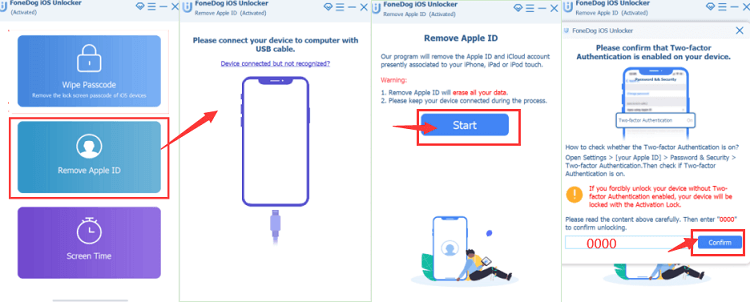
- iOS Unlocker를 PC에 다운로드, 설치 및 실행하세요.
- 클릭 Apple ID를 제거하십시오 메뉴에서
- Connect the iDevice to the computer using a USB cable
- 스타트 to begin the Apple ID removal process.
- Confirm the iDevice details displayed and run all the verifications as required
- 들어가다 "0000 " unlock code and confirm using the authentication procedure set on the device
- Once again, approve the device information and wait for the complete firmware suite for some minutes.
- Within minutes, the Apple ID is wholly removed from the iDevice, and you now have the chance to change iTunes store Email using the set-up information displayed. Is that not a pretty simple procedure?
Other third-party solutions are available in the market to help you get this function working efficiently. The million-dollar question is, how effective is the function? The choice of the toolkit depends on flexibility, performance, and value-added features within the digital solution.
iOS Unlocker takes the lead since it has three modes which all define the security detail one needs when managing Apple devices. That is Wipe Passcode, Remove Apple ID, and Screen Time management, among which, The Wipe Passcode Mode provides a service of unlocking your iPhone without password.
Part #3: Other Options You Can Consider
Going to Apple Support For Help
When you aren't comfortable with the Email registered on the Apple device, it's time to rethink changing to a different Email. This helps you have the correct Email associated with the Apple ID.
The only fear people have when they want to change iTunes store Email is that they may lose contacts, music, web content and other personal data. No, you can retrieve them to the new Email if you wish.
이를 달성하기 위한 절차는 다음과 같습니다.
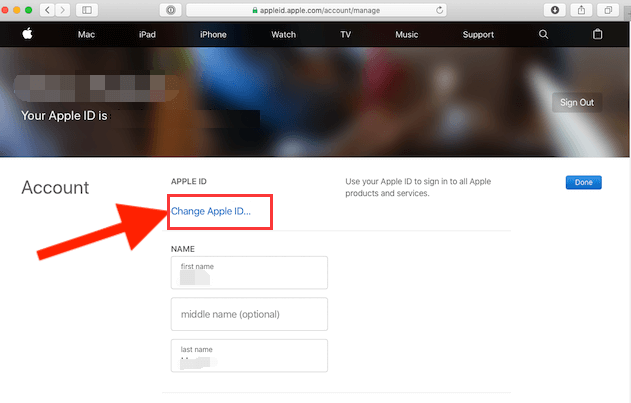
- 브라우저에서 다음으로 이동합니다. Applied. Apple.com and sign in with the Email address and log in with the password associated with the Email address.
- 클라임웍스와 함께 하늘과 닿는 여정을 시작하세요 애플 ID 메뉴에서
- Enter the desired Email address
- 클라임웍스와 함께 하늘과 닿는 여정을 시작하세요 Change Apple ID, a verification code will be sent to the Email; open it and ley in the verification code sent
- If it is correct, sign in to other Apple services that you wish to associate with the new Email address.
That is how you can change iTunes store Email, using Email support with minimal effort. When you don't have an Email address, you can also choose to use your phone number as long as it's within your access such that you can always access the verification code and key it in. Moreover, you need not confuse; you can have several Apple IDs with the same Email address but not vice versa.
사람들은 또한 읽습니다오래된 iPhone의 잠금을 해제하는 가장 좋은 방법비활성화된 경우 iPad를 iTunes에 연결하는 방법: 가이드
4부: 결론
Are you still in doubt you can change iTunes store Email? Software developers are always looking for solutions to make users comfortable and maintain customer loyalty amid still competition in the digital market when there is a technological error. iOS Unlocker is your go-to application as an Apple user. The value-added services and simplicity of the functionality make it among the best toolkits of all time. When you want to change your iTunes store Email, then you have unlimited options on what to go for. The choice is yours, for you have all the freedom to make the right choice.
Rosie 작성
최종 업데이트 : 2022 년 06 월 16 일