


Apple has made sure to give us not just a second chance but a total of six chances in order for us to re-enter our passcodes, in case we typed in the wrong one or forgot the iPhone password. Now to answer your question about 尝试解锁 iPhone 的次数, you can find out more about it by reading this article. What’s more, is that we also prepared a way you can follow in case you have exceeded the maximum limit of attempts Apple has allowed you. So without anything else, let’s get to the main part and learn some attempts to unlock iPhone.
Part #1: How Many Attempts to Unlock iPhone?Part #2: The Best Tool to Use to Unlock iPhonePart #3: Other Ways to Unlock iPhonePart #4: To Summarize
Part #1: How Many Attempts to Unlock iPhone?
If you are a person who tends to forget his or her password almost every time, then you probably wonder the attempts to unlock iPhone. Or you can also be a parent who has an iOS device and wants to learn more about this issue because you keep on being locked out from your phone because your children keep on entering the wrong passcode.
So to help answer your question, any iOS device will only give you six tries to re-enter your passcode. If you get it wrong on the sixth try, you will find yourself reading the words “iPhone is disabled” . This is because Apple has developed a built-in system where it will automatically disable your passcode after six wrong tries of entering your passcode. This is to help sure no one aside from you is using your device without your permission.
But what if you get permanently locked out? How can you retrieve this? It’s simple. All you need is one single tool that can help you retrieve your iPhone device even while it is disabled or you are locked out.
Part #2: The Best Tool to Use to Unlock iPhone
Finally, learned 尝试解锁 iPhone 的次数? Now it’s time for you to learn more.
For the people who are locked out of their devices and couldn’t retrieve their iPhones after being disabled, you will need the help of the right and perfect tool. And what is actually better than iOS Unlocker?
iOS解锁 will let you choose from its three different main features. The first feature is the 清除密码 feature where you will be able to wipe your password and unlock your phone without entering your passcode. We will introduce the steps to you about this tone later.
Now, iOS Unlocker’s second feature is the 删除Apple ID which will help you remove all your Apple ID passwords and even your iCloud account. This feature can also help you disable the Find My iPhone feature of your device. And last but not least is the 屏幕时间 feature where you will be able to recover, retrieve, or even remove your screen time password without actually losing any data at all.
So without further ado and to those who are very curious to learn the Wipe Passcode feature from the app, all you have to do is follow all these steps we have provided:
- Install iOS Unlocker on your device
- Now make sure that everything is settled right on your device. This process will also erase all data from your phone so make sure you have backed them up before.
- Launch the app after the installation has finished and tap on the 清除密码 菜单
- 点击 开始 button and connect your device to your computer
- 点击 信托 and confirm all information about your device
- Once finished, tap the 开始 button once more and wait for a few seconds
- After the firmware has been downloaded make sure to click the 开锁 按钮并进入 0000 确认动作
- After a minute or two, your device will now be unlocked and you can now set up a new password for your iPhone
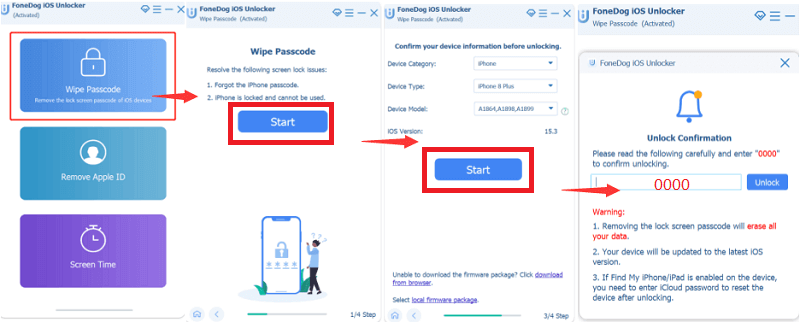
And in case you get locked out once more, you can always choose to use iOS Unlocker. This tool is simply the best and works well, especially in helping users fix their security and safety issues. And if you are suffering from the same issues with your device, then try using iOS Unlocker like everyone else.
Part #3: Other Ways to Unlock iPhone
Now that we have answered your question about how many attempts to unlock iPhone and provide a special tool that you can use to unlock your device, we have also come to introduce to you other alternative ways you can follow in order to unlock your device without a third-party tool.
All you need to do is either use your Siri feature or ask it about the time. Then you will have to add a new clock feature once Siri provides you with a world clock. Share the time and select something to add to the field of your device. Now ask Siri to make a new contact for you. Click the 添加照片 feature to add a profile for your new contact. It will then lead you to the Photos. Once you are in the Photos, tap on the Home button and you will find yourself being able to open your iPhone without your passcode.
Or you can also use the Find My app on a second device. iTunes can also help you recover your lost passcode. But all of these methods are nothing compared to using iOS Unlocker as it is easier and quicker to use.

人们也读如何在没有面容 ID 或密码的情况下解锁 iPhone 12如何在没有密码的情况下解锁 iPhone 13 的快速指南
Part #4: To Summarize
And now that you have finally learned the answer to your question such as 尝试解锁 iPhone 的次数, you can now choose which of the following methods to unlock iPhone you can follow. Any of these are effective but there is no better and quicker way to unlock iPhone than to use iOS Unlocker. So download it now!
由罗西撰写
上次更新时间:2022-03-10