


Getting locked functions is a norm unless you purchase a brand new Apple device. The several solutions in the digital market come in handy to protect and secure gadgets from unauthorized access. It's vital to run 3uTools MDM bypass toolkits to remove any protective features or remote management activations on the gadget.
Some of the devices support remote management, while others are protective features. Some users forget to factory reset their iPad or iPhone. However, for the new users, the best thing to do is to rest the machine in factory settings. Do you know even the normal factory reset settings cannot erase the remote management functions on the devices?
That's the point you need third-party solutions to come in handy to help you access it with minimal effort. The 3uToools are your go-to solutions at this point. Continue reading and get more information and insights to help bypass the remote management operations installed on the Apple device.
컨텐츠 가이드 Part #1: How 3UTools MDM Bypass Operate For FreePart #2: Frequently Asked Questions About 3uToolsPart #3: The Alternative to Bypass MDM on iPhone And iPad4부: 결론
Part #1: How 3UTools MDM Bypass Operate For Free
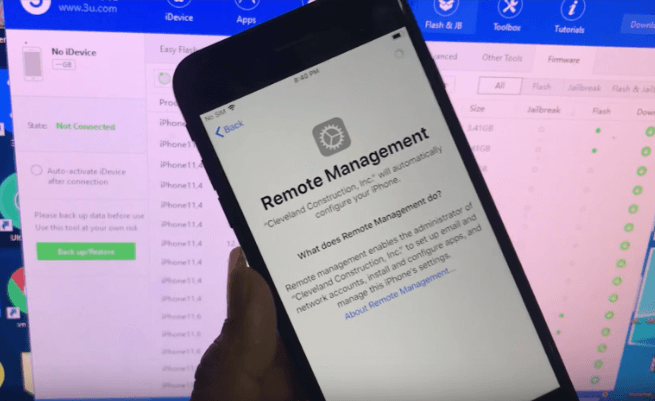
Mobile Device Management is a feature that helps you locate and lock your device from your remote location. That means any new owner, whether legal or illegal, can't access the device until they ask to log in the activation details. It's a feature that the factory settings can't also erase.
One of the solutions is to get a toolkit like 3uTools designed for the iOS devices to bypass the activation and allow you unlimited access to the iDevices. It's renowned for effective data management, iDevice flashing functions, and jailbreaking operations. This is your assistant tool for all manner of activation bypasses and the removal of MDM locks.
It operates on a simple principle that only requires a computer and a USB cable, as discussed in the procedure below. This is your go-to toolkits when you want to run 3uTools MDM bypass operations.
- Connect to a reliable data network
- Download, install and run 3uTols on your PC
- Open the application and connect the MDM-locked device to the PC using a USB cable.
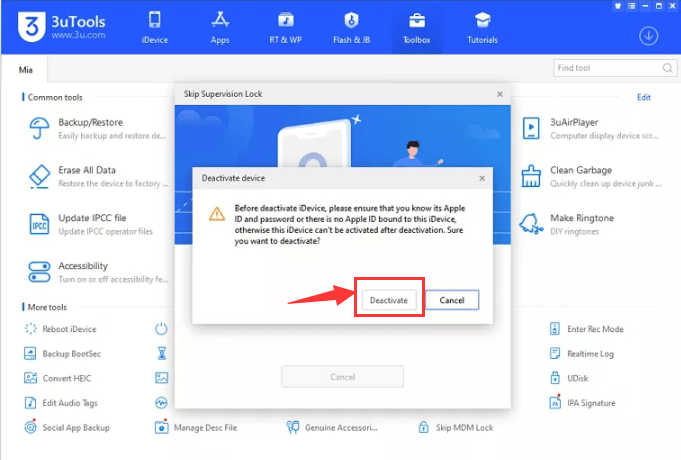
- Open the Remote management window; once the app recognizes the device, confirm the device information
- 도구 상자 클릭 MDM 잠금 건너뛰기
- Wait for the confirmation box and click the Skip Now 메뉴
- 비활성화 from the popup window
That's how you get your iOS device from the mobile device management chain. What a simple application.
Part #2: Frequently Asked Questions About 3uTools
Can you use 3uTools on Mac?
Unfortunately, you cannot use the application on a Mac device but with all iOS-supported tools. However, several other options are available in the market that runs similar operations, specifically for Mac devices. We will contact the developer to think of this for Mac.
Is 3uTools a freeware?
The good news is that 3uTools is free software that you can download and install with unlimited access, which means that you can run 3uTools MDM bypass solutions for free. The functions include jailbreak and mobile management unlocking toolkits without paying a penny.
Is 3uTools compatible with all iOS devices?
The solution is compatible with all 4-17 iOS versions. The advantage is that when you install and start to run the toolkit on the machine, it will give you a notification before you make many steps when it's not able to run on your device.
What is the next step when you fail to run the 3uTools MDM bypass?
When the application fails, there is no shortcut to make it work since it works with inbuilt drivers on your device. If they lack, then the only option you have is to look for alternatives that can similarly remove the MDM 자물쇠.
Part #3: The Alternative to Bypass MDM on iPhone And iPad
Apple ID is a lock feature for Apple devices to support remote operations. Some users fail to remove it when they dispose of their machines. Some gadgets also permanently have the feature even if you run the factory settings on the device. Therefore, you need an alternative that can run 3uTools MDM bypass features.
iOS 언 락커 is one of the toolkits you can explore as an alternative option. The application removes Apple ID and Wipe passcode and supports screen time management practices. Sometimes the activation code you need may not necessarily be the MDM option but the iCloud activation, which is also a remote lock function. Simply click the button below to download and start a free trial to unlock your iPhone and iPad.
Here are the complete steps to remove the Apple ID:
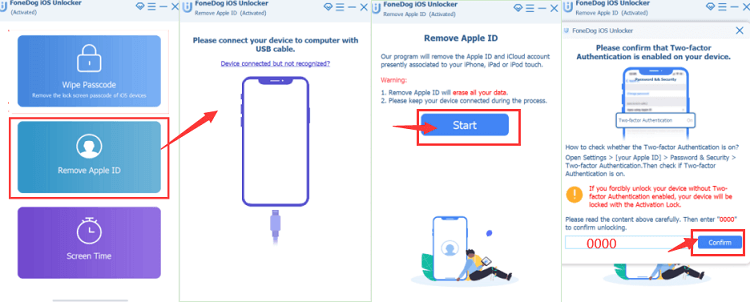
- Download, install and open the iOS Unlocker on your PC
- Apple ID를 제거하십시오
- Connect the iOS device to the PC using a USB cable and accept the 믿어
- 스타트 시작하다 Apple ID removal process.
- After authentication confirmations, enter "0000 " as the unlock code and confirm the device information displayed.
- 스타트 again to download the firmware suite and wait for some minutes
Wait for some minutes for the process to complete. As simple as that, you have removed the iCloud에 account from the system, and you are now free to set up yours to help you remotely manage the device. Is that not a better option like you run 3uTools MDM bypass too?
사람들은 또한 읽습니다오래된 iPhone의 잠금을 해제하는 가장 좋은 방법해결됨: 암호 없이 iPhone 12의 잠금을 해제하는 방법
4부: 결론
The choice of getting a used iOS device is smooth despite the several lock features accompanying the gadgets. This is only possible when you run 3uTools MDM bypass and other alternatives. Although we have only discussed one alternative, the digital market has several other bypass solutions that you need to explore and have wide knowledge on what to do when faced with a similar challenge again.
The choice of the toolkit, whether free or paid, is not at your discretion as long as you have a free iDevice with no limitation at the end of it. iOS Unlocker is among the options that you can also explore.
Rosie 작성
최종 업데이트 : 2022 년 06 월 13 일