


Are you tired of being limited by the proprietary format of iTunes audiobooks? Do you wish to listen to your favorite audiobooks on any device without restrictions? The solution lies in the process of using an Audible Unlocker to konwertuj audiobooki iTunes do formatu MP3 format
In this guide, we'll delve into the process of converting iTunes audiobooks to MP3, exploring different methods, tools, and considerations along the way. Get ready to unlock the true potential of your audiobook collection and enjoy the freedom to listen wherever and whenever you want.
Przewodnik po zawartości Part #1: Convert iTunes Audiobooks to MP3 Using iTunesPart #2: How to Convert iTunes Audiobooks to MP3 Using VLC Media PlayerPart #3: BEST WAY: Using iOS-Unlocker’s Audible UnlockerPodsumowanie
Part #1: Convert iTunes Audiobooks to MP3 Using iTunes
In this section, we will discuss three different methods to convert iTunes audiobooks to MP3. In this way, you’ll have different options to explore.
Converting iTunes audiobooks to MP3 within the iTunes software itself requires the following steps:
- Launch iTunes on your computer and ensure you have the latest version installed.
- Idź do swojego Biblioteka iTunes and select the audiobook you want to convert.
- Right-click on the selected audiobook and choose “Konwertuj na MP3 ” or a similar option from the context menu. If this option is not available, proceed to Step 4.
- If the “Convert to MP3” option is not present, go to the iTunes menu and select “Preferencje ”(Lub„Ustawienia ” on Windows). Then, navigate to the “Ustawienia importu "Lub"Ogólne "Tab.
- In the import settings, choose the MP3 format as the output format. Adjust any other desired settings like bitrate or quality.
- Kliknij "OK ”, aby zapisać zmiany.
- Go back to your audiobook, right-click on it, and select “Utwórz wersję MP3 ” or a similar option. iTunes will start converting the audiobook to MP3 format.
- Once the conversion is complete, you can locate the converted MP3 audiobook file within your iTunes library or in the designated folder on your computer.
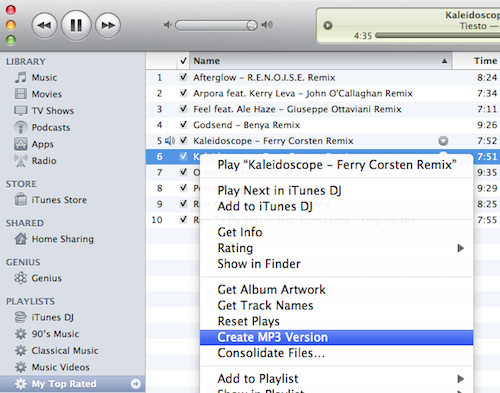
While converting audiobooks using iTunes is a straightforward method, there are a few potential challenges you may encounter:
- DRM Protection: If your audiobook is protected with DRM, iTunes may not allow you to directly convert it to MP3. In such cases, you’ll need to remove the DRM protection using third-party software or utilize alternative methods, as DRM removal is beyond the scope of iTunes.
- Incompatibility with Older iTunes Versions: Some older versions of iTunes may not support the direct conversion of audiobooks to MP3. If you encounter this issue, consider updating your iTunes to the latest version or explore alternative methods for conversion.
- File Organization: iTunes may split audiobooks into separate files for each chapter, making it cumbersome to convert and manage. You can overcome this challenge by using third-party software or tools specifically designed to merge or organize audiobook files before conversion.
Part #2: How to Convert iTunes Audiobooks to MP3 Using VLC Media Player
Here are the steps on how to convert iTunes audiobooks to MP3 using VLC Media Player:
- Pobierz i zainstaluj VLC Media Player.
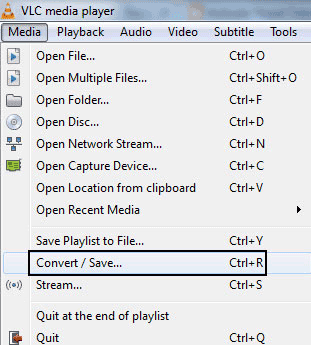
- Open VLC Media Player and click on Multimedia > Konwertuj/Zapisz.
- In the Open Media dialog box, click on Dodaj and browse for your iTunes audiobook file. Then click on Otwarte.
- Kliknij na Konwersja / Save , aby przejść do następnego kroku.
- W Sekcja profilu, Wybierz Audio - MP3 jako format wyjściowy.
- W Zapisz jako sekcję, enter a name for your converted file and select a location to save it.
- Kliknij na Rozpocznij przycisk, aby rozpocząć proces konwersji.
- Once the conversion is complete, your converted MP3 file will be saved in the location you specified.
Part #3: BEST WAY: Using iOS-Unlocker’s Audible Unlocker
Najlepszym sposobem konwertuj audiobooki iTunes do formatu MP3 is to use a tool that will allow you to grab audiobooks at your disposal. Odblokowanie dźwiękowe is a product or tool that claims to remove DRM (Digital Rights Management) protection from Audible audiobooks. DRM is a technology used to control the usage and distribution of digital content, including audiobooks, and restricts them to specific platforms or devices.
Darmowe pobieranie Darmowe pobieranie
Removing DRM from Audible audiobooks is kind of the same as removing DRM from Spotify Music, both result in allowing you to convert files to different formats, such as MP3, and play them on various devices or media players that are not officially supported by the platform. In this way, you can listen to your favorite audiobooks on the go, anywhere, and anytime.
Oto cechy narzędzia:
- Audible Unlocker is a tool that allows you to download and convert Audible audio to MP3 or other popular formats. This means that you can listen to your Audible audio on any device, even if it does not support the Słyszalny app.
- Audible audios are typically locked to the Audible app and can only be played on devices that are authorized by Audible. This can be inconvenient if you want to listen to your Audible audio on a device that is not authorized, such as an iPod or an MP3 player.
- Audible Unlocker removes this restriction by decrypting the Audible audio and converting them to a format that can be played on any device. This makes it easy to listen to your Audible audio on any device, even if it is not authorized by Audible.
- In addition to convenience, Audible Unlocker also focuses on sound quality. It provides users with an option to enjoy lossless audio quality, which means that the iTunes audiobooks can be transferred to your iPhone without any loss of quality. This is perfect for users who have high standards for sound quality.
- Audible Unlocker is a powerful tool that allows you to listen to your Audible audio on any device, with or without the Audible app. It is a great option for users who want convenience and sound quality.
Here’s how to use the tool to grab the audiobooks you love and convert them to MP3:
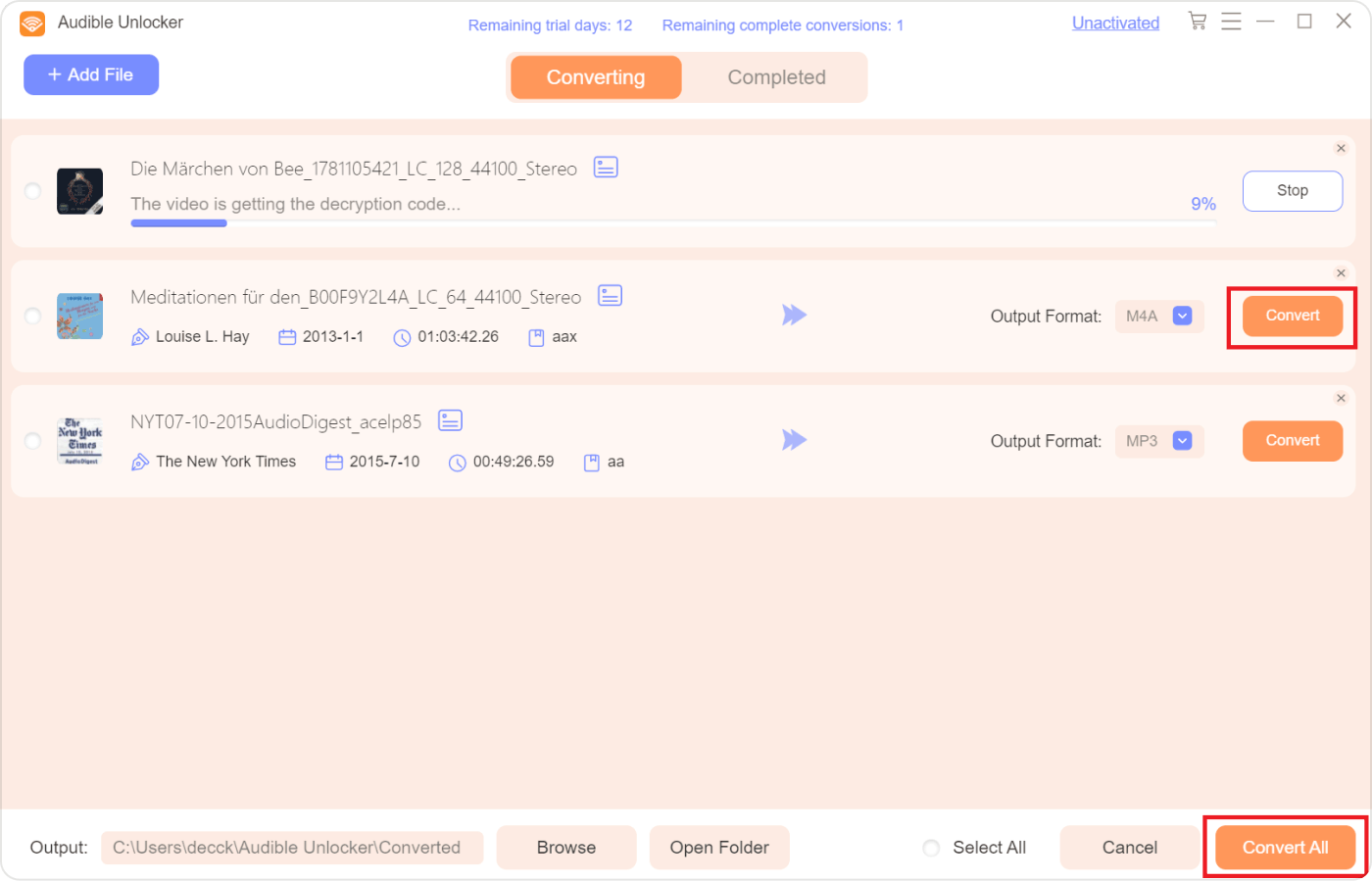
- On the main interface of Audible Unlocker, drag and drop the Audible audio files you want to convert into the software.
- Choose the output format, such as MP3, WAV, M4A, or FLAC. You can also select an output folder if you want.
- To customize the output settings, click the hamburger icon in the upper right corner and select "Podziel na rozdziały ". Then, press "Zapisz ".
- Kliknij "konwertować "Lub"Skonwertuj wszystko " button to start converting the Audible audio files.
- When the conversion process is completed, click the "Otwórz plik " button to view the converted audio files under "Zakończony ".
Ludzie również czytają Najlepszy przewodnik: Importowanie biblioteki iTunes z zewnętrznego dysku twardego Odblokowanie elastyczności: konwersja Amazon Prime Music do formatu MP3
Podsumowanie
Podsumowując, proces konwertuj audiobooki iTunes do formatu MP3 format opens up a world of possibilities for enjoying your audiobook collection across different devices and media players. By converting iTunes audiobooks to MP3, you overcome the limitations imposed by DRM protection and gain the freedom to listen to your audiobooks without being tied to Apple's ecosystem.
Using iOS-Unlocker’s Audible Unlocker to convert Audible audiobooks to MP3 format empowers you to enjoy your audiobook collection on a wider range of devices and media players. Consider the methods discussed in this article. Try out the tool today!
Napisane przez Rosie
Ostatnia aktualizacja: 2023-05-18